Mobile / Smartphones
User Manual for ZTE Blade V2020 Smart
Quick start guide for the ZTE Blade V2020 Smart. Learn how to set up your SIM card, charge the device, power it on, and understand safety and regulatory information.
Table of contents
Manual images
Click an image to enlargeQuick Start Guide
This document provides essential instructions for setting up and using your ZTE Blade V2020 Smart. It covers initial hardware setup, charging, and basic operation, along with important safety and regulatory information.
Getting to Know Your Phone
The device features a front-facing camera, earpiece, proximity/light sensor, and indicator light at the top. The touch screen occupies the front. On the sides, you will find the volume key and the power key (which also functions as a fingerprint sensor). The card tray for nano-SIM and microSDXC cards is located on the side. The bottom houses the charging/USB Type-C jack, headset jack, and speaker. The back includes the camera array and flash.
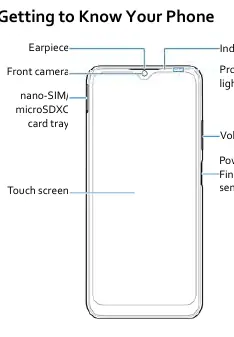
Setting Up Your Phone
The phone supports nano-SIM cards and microSDXC cards. Follow these steps to install them:
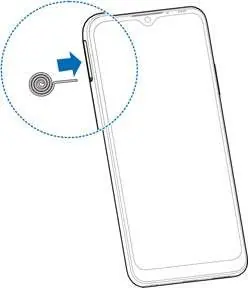
- Insert the tip of the tray eject tool into the hole on the card tray.
- Pull out the card tray.
- Place a nano-SIM card on the right slot.
- Place a second nano-SIM card or a microSDXC card (optional) on the left slot.
- Carefully slide the tray back into place.
Warning: Use only the included tray eject tool. Do not use sharp objects to eject the tray, as this may damage the phone. Do not use non-standard cut SIM cards.
Charging the Phone
Your phone's battery should be fully charged as soon as possible. Use only ZTE-approved chargers and USB Type-C cables to avoid damage or battery explosion. Connect the adapter to the charging jack and plug it into a standard AC power outlet. Disconnect the charger when the battery is fully charged.
Note: If the battery is extremely low, the phone may not power on immediately when plugged in. Charge for at least 20 minutes before attempting to power it on again.
Powering On and Waking Up
- Power On: Press and hold the Power key.
- Power Off: Press and hold the Power key to open the options menu, then select the power off option.
- Waking Up: Press the Power key to turn on the screen, then swipe up. If you have set a security method (PIN, pattern, password, fingerprint, or face verification), you will need to unlock the screen.
- Restart: If the screen freezes, press and hold the Power key for over 10 seconds.
Safety and Regulatory Information
The device is designed to comply with international radio frequency exposure guidelines. The Specific Absorption Rate (SAR) limit is 1.6 W/kg (FCC) or 2 W/kg (EU). Always keep the phone at least 10 mm away from your body during use. Do not disassemble the phone, avoid extreme temperatures, and keep the device dry. Dispose of the device according to local regulations for electronic waste.
Manufacturer information
ZTE Corporation
Practical help
Common problems
Screen freezes or is unresponsive
Press and hold the Power key for over 10 seconds to force a restart.
Phone will not power on even when charging
The battery may be extremely low. Charge the phone for at least 20 minutes before trying to power it on again.
Before use
- Use the included tray eject tool to open the SIM tray.
- Ensure you are using a standard nano-SIM card.
- Use only ZTE-approved chargers and USB Type-C cables.
- Charge the battery fully before first use.
Specs in practice
- FDD LTE Band 7
- Supported network frequency for 4G connectivity.
- Bluetooth 4.2
- Wireless connectivity standard for accessories and data transfer.
- SAR (Specific Absorption Rate)
- A measure of the rate at which energy is absorbed by the human body when exposed to a radio frequency electromagnetic field.
Images and diagrams
- The card tray supports two slots: one for a nano-SIM and one for either a second nano-SIM or a microSDXC card.
- The Power key also functions as a fingerprint sensor.
- The device uses a USB Type-C port for charging.
Model compatibility
- The card slots support 4G/3G/2G networks.
- Do not use non-standard SIM cards cut from larger cards.

Manual page author
David Miller
Documentation analyst
Organizes user manual content into clear summaries, with attention to model details, product context, and everyday usability.