Mobile / Smartphones
Installation Guide for ZTE ZXV10 B866V2 RichMedia Box
Quick installation guide and troubleshooting for the ZTE ZXV10 B866V2 RichMedia Box. Learn how to connect your device, resolve common audio/video issues, and maintain your media player.
Table of contents
Quick Installation Guide
Follow these steps to set up your device:
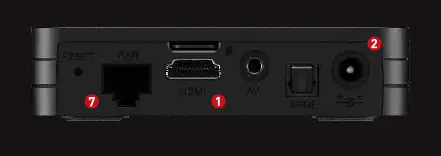
- Connect the HDMI cable (included) from the Player to the corresponding input on your TV.
- Connect the power adapter to the mains and plug it into the device.
- Turn on the TV.
- Turn on the Player.
- Select the correct input source on your TV using the TV remote control (e.g., HDMI 1, HDMI 2).
- Follow the on-screen instructions to access the service.
- Establish the network connection to the modem, either via WiFi or Ethernet cable.
Installation and Safety
To ensure proper operation and safety, observe the following:
- Ventilation: Install the player in a well-ventilated area, leaving at least 10 cm of space around the device.
- Environment: Keep the device away from direct sunlight and heat sources such as radiators, fireplaces, or candles. Avoid humid environments.
- Precautions: Do not cover the device's vents with objects like tablecloths or curtains. Do not place heavy objects on top of the player.
- Liquids: Keep the device away from liquids and aerosols to prevent damage and voiding the warranty.
Troubleshooting
If you encounter issues, check the following solutions:
- Front panel display is off: Ensure the power adapter is securely plugged into a working electrical outlet.
- No sound or picture: Verify that the HDMI cable is connected correctly and that the TV is set to the correct input source.
- No sound: Check the HDMI cable connection and adjust the television volume.
- Program cannot be played: Ensure the device is properly connected to the network.
Maintenance
- Always unplug the player from the electrical outlet before changing connections or cleaning.
- Do not insert or remove audio/video cables while the player is powered on.
- In the event of an electrical storm, unplug the power adapter to prevent damage from lightning strikes.
- If the unit is not used for a long time, unplug the power adapter.
- Clean the device with a dry cloth; do not use sprays, solvents, or abrasive cleaners.
Technical Specifications
- Model: ZXV10 B866V2
- Video Decoding: Supports 1080p, 1080i, 720p, 480i, 480p.
- Connectivity: WiFi IEEE 802.11 b/g/n/ac 2x2 MU-MIMO.
- Power Adapter: Input 100-240V ~ 50/60Hz; Output 12V 1A.
- Physical: 100mm x 100mm x 23.3mm; Weight 200g.
Manufacturer information
ZTE Corporation
Practical help
Common problems
Front panel display is off
Ensure the power adapter is plugged into a suitable power outlet.
No sound or picture
Check HDMI cable connection and ensure the TV is set to the correct input (HDMI 1, HDMI 2, etc.).
Program cannot be played
Ensure the device is connected to the network with a proper connection.
Before use
- Ensure at least 10 cm of space around the device for ventilation.
- Keep away from heat sources like radiators or fireplaces.
- Verify internet speed: 5MB for Full HD, 25MB for UltraHD (4K).
- Ensure you have a valid subscription for the service.
Specs in practice
- Video Decoding
- Supports resolutions up to 1080p and 4K.
- Power Adapter
- Requires 100-240V input; outputs 12V at 1A.
Images and diagrams
- Port 1: HDMI output for connecting to the TV.
- Port 2: Power input for the adapter.
- Port 7: Ethernet port for wired internet connection.
Model compatibility
- Requires TV with HDMI input.
- Requires active internet connection for service access.

Manual page author
David Miller
Documentation analyst
Organizes user manual content into clear summaries, with attention to model details, product context, and everyday usability.