Computers / Laptops
Acer Nitro 16S AI User Manual
Comprehensive user manual for the Acer Nitro 16S AI laptop, covering setup, usage, maintenance, security, and troubleshooting.
Table of contents
Getting Started
Welcome to your new Acer Nitro 16S AI laptop. This guide provides essential information to help you get started, including hardware overview, Windows 11 interface navigation, and basic maintenance tips to ensure your device performs at its best.
Device Overview
The laptop features a variety of ports and connectors for enhanced productivity:
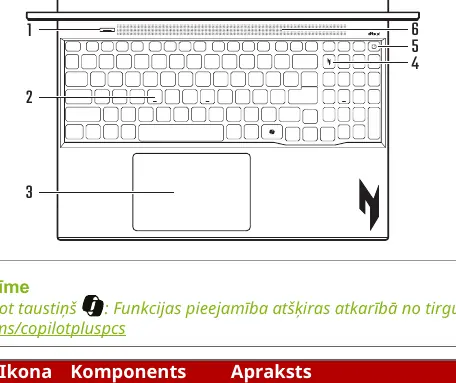
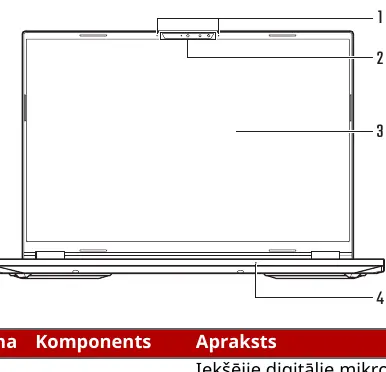
- Display: High-definition screen with integrated infrared camera for Windows Hello.
- Connectivity: Includes Ethernet (RJ-45), USB 4, USB 3.2 Gen 2, and HDMI 2.1 ports.
- Audio: Integrated microphones with AI noise reduction and stereo speakers.
- Input: Precision touchpad and a full-sized keyboard with customizable backlighting.
Battery and Power Management
To maintain battery health, follow these guidelines:
- Use only the provided or Acer-approved power adapter.
- Avoid charging in extreme temperatures (below 0°C or above 35°C).
- Enable Optimized Battery Charging in NitroSense to limit charge to 80% and extend battery lifespan.
- If storing the device for long periods, keep it at room temperature and check the charge level every six months.
NitroSense Software
NitroSense allows you to monitor system performance, control fan speeds, and customize your gaming experience. Use the Scenario Manager to create custom profiles for different tasks, and the Checkup tab to monitor the health of your battery, storage, and RAM.
Security and Maintenance
Protect your data and hardware:
- Security: Utilize BIOS passwords (Supervisor and User) to prevent unauthorized access.
- Cleaning: Always power off and unplug the device before cleaning with a soft, damp cloth. Avoid aerosol cleaners.
- Troubleshooting: If you encounter issues, check the FAQ section for common solutions, such as power-on failures or display issues.
Internet and Online Safety
Stay safe online by keeping your software updated and using robust security software. Be cautious of phishing attempts and avoid accessing sensitive accounts over unsecured public Wi-Fi networks. Always use a VPN when connecting to public networks to encrypt your data.
Related manuals
Related manuals from the same brand or category.
Home Appliances / Washing Machines
Acer Nitro V 16S User Manual
ACERComputers / Laptops
Acer Nitro V 16S User's Manual
ACERGeneral / Other Manuals
Acer NITRO 16S AI User Manual
ACER
Manual page author
David Miller
Documentation analyst
Organizes user manual content into clear summaries, with attention to model details, product context, and everyday usability.