Lighting / Stage Lighting
User Manual for ACME COOLIE 14FC LED Fixture
Quick guide for the ACME COOLIE 14FC LED fixture. Learn about installation, DMX control, menu settings, troubleshooting, and maintenance.
Table of contents
Manual images
Click an image to enlargeQuick guide from the manual
The ACME COOLIE 14FC is a professional LED lighting fixture. Before operation, ensure the unit is installed by a qualified operator in a location with at least 50cm of ventilation clearance. Always use a safety cable capable of holding 12 times the fixture's weight. The unit is IP66 rated, making it suitable for wet locations, but it must not be immersed in water.
Safety Instructions
- Do not connect the device to any dimmer pack.
- Ensure the power cord is not damaged; replace immediately if necessary.
- Ground the yellow/green conductor to earth to prevent electric shock.
- Keep flammable materials away from the fixture during operation.
- Do not operate in dirty or dusty environments.
- Disconnect from power before servicing.
Technical Specifications
- Power Voltage: 100-240V~ 50/60Hz
- Power Consumption: 165W
- Light Source: 14x15W RGBW LED
- Beam Angle: 13.5°
- Protection Rating: IP66
- Control: DMX512, RDM, Primary/Secondary
- DMX Channels: 4, 5, or 7 channels
Control Panel and Operation
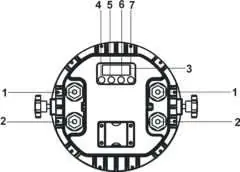
The control panel features an LED display and four buttons: MENU, DOWN, UP, and ENTER. Use the MENU button to access programming functions, UP/DOWN to navigate, and ENTER to confirm selections. The unit includes a keyboard lock feature; if the display shows 'Loc', press ENTER to enable the menu, then use UP/DOWN to enter the unlock code.
DMX Control
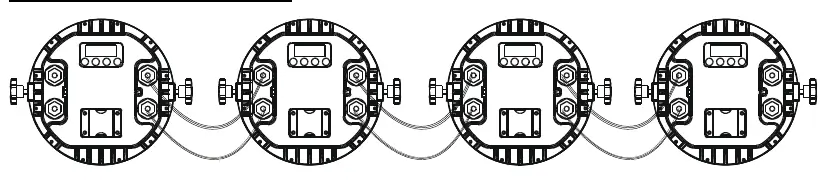
The fixture can be controlled via a universal DMX controller. Connect units in a daisy chain using 3-pin XLR cables. The last unit in the chain must be terminated with a 120-ohm resistor between pin 2 and pin 3. Each unit must be assigned a unique DMX address (1-512) to receive data.
Troubleshooting and Maintenance
If the unit does not work, check the power connection and voltage. If it does not respond to the DMX controller, verify the DMX address, check cable connections, and ensure DMX cables are not running alongside high-voltage lines. Clean the external optical lens at least every 20 days using a soft, lint-free cloth and glass cleaning fluid. Do not use solvents.
Practical help
Common problems
Unit does not work and no light
Check the power connection, measure the voltage, and verify if the power indicator is lit.
Not responding to DMX controller
Check DMX cable connections, verify the DMX address is correctly set, and ensure DMX cables are not near high-voltage lines.
Channel not working
The stepper motor or the cable connected to the PCB might be damaged; contact an authorized technician.
Before use
- Unpack and inspect for transportation damage.
- Ensure the installation area can support 10 times the fixture's weight.
- Install a safety cable capable of holding 12 times the fixture's weight.
- Verify the power voltage matches the specification label.
- Ensure 50cm of clearance for ventilation.
- Confirm the unit is grounded.
Specs in practice
- 14x15W RGBW LED
- The light source consists of 14 LEDs, each 15 watts, capable of Red, Green, Blue, and White color mixing.
- DMX Channels
- The fixture supports 4, 5, or 7 channel modes for different levels of control complexity.
Images and diagrams
- The control panel uses four buttons: MENU (select functions), DOWN (forward), UP (backward), and ENTER (confirm).
- DMX connection requires a daisy chain setup with a 120-ohm terminator at the end of the line.
Model compatibility
- Do not connect the device to any external dimmer pack.
- Compatible with standard DMX512 controllers.
- Firmware can be upgraded via DMX link.

Manual page author
David Miller
Documentation analyst
Organizes user manual content into clear summaries, with attention to model details, product context, and everyday usability.