Electronics / Microphones
User manual for ADAM GRAVITY Pro 100W Power Bank
Quick guide for the ADAM GRAVITY Pro 100W Power Bank. Learn how to use the LED display, power on/off, activate low-current mode, and understand power allocation for your devices.
Table of contents
Quick guide from the manual
The ADAM GRAVITY Pro 100W Power Bank is a high-capacity portable charger. To ensure optimal performance, use an ADAM cable or a certified cable (such as MFi). The device features an LED display for monitoring battery levels and charging status.
Product Overview
The power bank includes the following components:
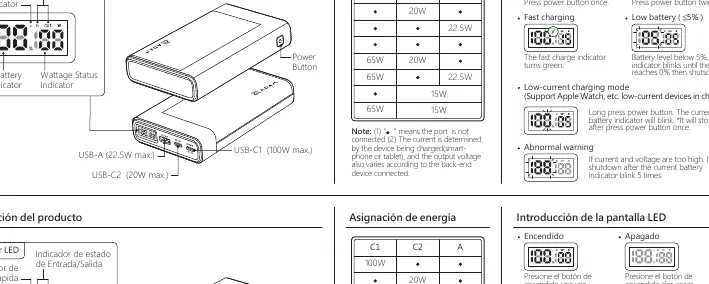
- Power Button: Located on the side, used for power control and mode selection.
- LED Display: Shows current battery percentage, wattage status, and input/output status.
- Ports: Includes USB-C1 (100W max), USB-C2 (20W max), and USB-A (22.5W max).
Operation
Follow these steps to operate the power bank:
- Power On: Press the power button once.
- Power Off: Press the power button twice.
- Low-Current Charging Mode: Long press the power button. The battery indicator will blink. This mode is designed for low-current devices like the Apple Watch. Press the button once to exit this mode.
LED Display Status
The LED display provides real-time information:
- Fast Charging: The fast charge indicator turns green when active.
- Low Battery: If the battery level is below 5%, the indicator blinks until it reaches 0% and shuts down.
- Abnormal Warning: If current or voltage is too high, the battery indicator will blink 5 times, and the device will shut down.
Power Allocation
The power output varies depending on the connected devices and the number of ports in use. The power bank automatically determines the output based on the connected smartphone, tablet, or laptop. When using multiple ports simultaneously, the total output is distributed (e.g., 65W + 20W or 65W + 22.5W).
Safety and Maintenance
- Do not expose the device to liquids.
- Keep away from children.
- Do not shake the device while charging.
- Avoid extreme temperatures (operating range: 0-35°C).
- Do not disassemble, puncture, drop, bend, or modify the unit.
- Unplug the device when fully charged.
Specifications
- Battery Capacity: 20000mAh / 3.7V / 74Wh
- Input Power (USB-C1): 5V/3A, 9V/3A, 12V/3A, 15V/3A, 20V/3.25A
- Dimensions: 142 x 86 x 27 mm
- Weight: 408 g
- Warranty: 1 year
Practical help
Common problems
Battery indicator blinks 5 times
The current or voltage is too high. The device will automatically shut down to protect itself.
Battery level below 5%
The indicator will blink until the battery reaches 0%, then the device will shut down.
Before use
- Check the battery level on the LED display before use.
- Use an ADAM cable or a certified cable (e.g., MFi) for the fastest and safest charging.
- Ensure the device is used within the operating temperature range of 0-35°C.
- Disconnect the device once it is fully charged.
Specs in practice
- Low-current mode
- A specific mode for charging small devices like Apple Watch that require lower power.
Images and diagrams
- The power button is located on the side of the unit.
- The LED display is located on the top surface, showing battery percentage and status icons.
- Ports are clearly labeled for their maximum output (100W, 20W, 22.5W).
Model compatibility
- Supports Apple Watch and other low-current devices via the dedicated low-current charging mode.
- 100W output is compatible with devices such as iPhone, iPad, iPad Pro, MacBook, MacBook Air, and MacBook Pro (13", 14", 16").

Manual page author
Michael Turner
Technical manual editor
Reviews PDF manuals for structure, safety notes, and practical product details so readers can find the right information quickly.