Computers / Laptops
Alienware 17R5 Gaming Laptop
Experience high-performance gaming with the Alienware 17R5, featuring advanced thermal technology, customizable RGB lighting, and support for VR and external graphics.
Table of contents
Product Overview
The Alienware 17R5 is a flagship gaming notebook engineered for users who prioritize screen size, performance, and immersion. It features a VR-capable design, support for optional Tobii eye-tracking technology, and is powered by 8th generation Intel Core processors with dynamic overclocking capabilities. The chassis is constructed from premium materials including anodized aluminum and magnesium alloy, ensuring both durability and a high-quality feel.
Design and Performance
The laptop incorporates Alienware Cryo-Tech V2.0 thermal technology, utilizing thinner fan blades and a vapor chamber on the CPU to maintain optimal temperatures during intense gaming sessions. The steel-reinforced TactX keyboard offers 2.2mm of travel and 9 programmable keys, complemented by 13 programmable AlienFX lighting zones that support over 80 quadrillion color combinations.
Key Technical Specifications
- Processor: Up to 8th Gen Intel Core i9-8950HK (6-Core, overclocking up to 5.0GHz).
- Graphics: Up to NVIDIA GeForce GTX 1080 with 8GB GDDR5X.
- Memory: Up to 32GB DDR4 at 2400MHz.
- Storage: Multiple configurations up to 3TB total capacity.
- Display: 17.3-inch options ranging from FHD to UHD, with optional NVIDIA G-SYNC and Tobii eye-tracking.
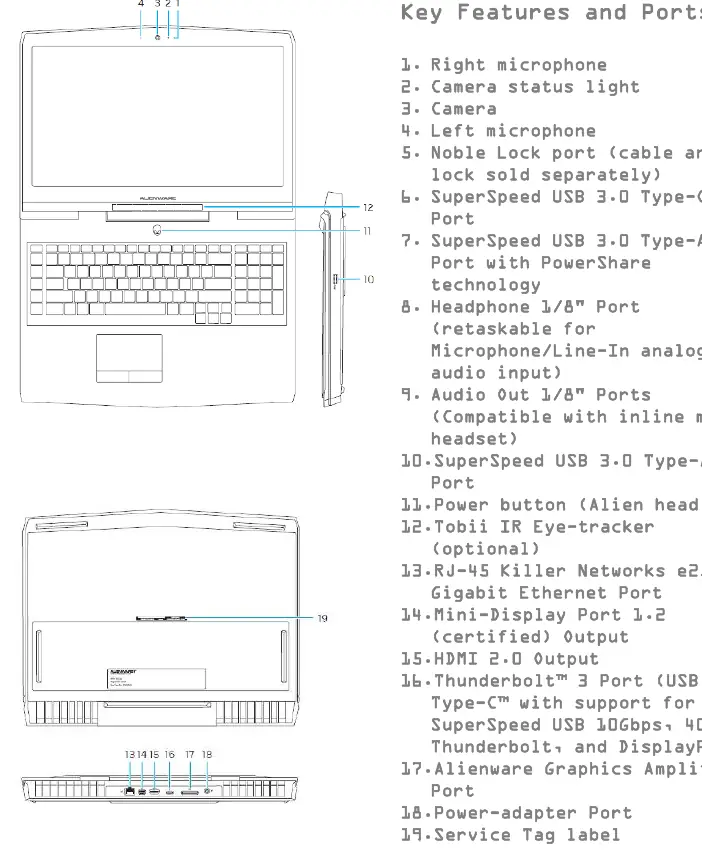
- Connectivity: Includes Thunderbolt 3, USB 3.0 with PowerShare, Killer Networks e2500 Gigabit Ethernet, and Bluetooth 5.0.
Advanced Features
The integration of Tobii eye-tracking provides unique gaming and system features, such as intelligent presence detection, secure facial recognition login, and enhanced in-game immersion. Gamers can further expand their setup using the optional Alienware Graphics Amplifier, which allows for the connection of high-performance desktop graphics cards.
Maintenance and Support
The system is designed for accessibility, featuring a bottom door mechanism that allows for easy access to internal components for upgrades and maintenance. Users are advised to operate components within factory settings to ensure system stability and longevity. For technical issues or inquiries, users should consult official support channels.
Related manuals
Related manuals from the same brand or category.
Computers / Storage
Corsair Carbide Series 175R RGB Mid-Tower Gaming Case
CorsairComputers / Storage
How to Format a 16GB USB Drive for Vigor2927 Syslog Storage
DraytekComputers / Storage
EG4 12kPV LCD Firmware Update Guide
EG4
Manual page author
Michael Turner
Technical manual editor
Reviews PDF manuals for structure, safety notes, and practical product details so readers can find the right information quickly.