General / Service Manuals
Amazon Basics 106D Espresso Machine Grinder Maintenance Guide
Step-by-step instructions for cleaning, disassembling, and reassembling the integrated grinder of your Amazon Basics 106D Espresso Machine to ensure consistent coffee extraction.
Table of contents
Manual images
Jump to the sectionMaintaining Your Grinder
Regular cleaning of the integrated grinder in your Amazon Basics 106D espresso machine is essential for maintaining consistent grinding results and achieving the best possible coffee extraction. Over time, coffee oils and residue can accumulate, which may affect the performance of the machine and the flavor of your espresso. Following a routine maintenance schedule ensures that your grinder operates smoothly and lasts longer.
Disassembly and Cleaning
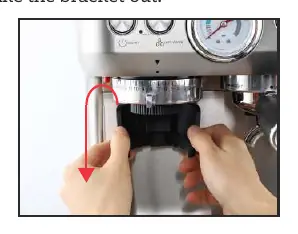
To begin the cleaning process, first remove the portafilter bracket from the machine. Locate the red release button on the grinder assembly, press it, and rotate the grinder clockwise until you hear a click, indicating it is unlocked. Carefully pull the grinder unit downward to remove it from the machine. Once removed, rotate the internal distributor clockwise to release it from the grinder housing. Use the provided cleaning brush to thoroughly remove coffee grounds from both the inside of the grinder and the distributor component. Ensure all surfaces are free of debris before reassembly.
Reassembly and Installation
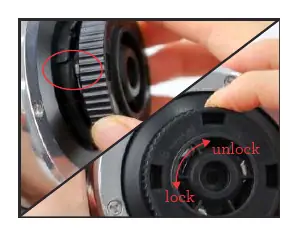
When reassembling, start by attaching the distributor to the grinder by rotating it anti-clockwise. It is critical to ensure that the fastener on the distributor aligns perfectly with the groove on the grinder; failure to align these correctly will prevent successful assembly. You will know the distributor is installed correctly when a small triangle plate becomes visible on the top. Once the distributor is secure, insert the grinder unit back into the espresso machine. Hold the grinder firmly and rotate it anti-clockwise to lock it into position. You should hear a distinct click and feel the unit tighten securely in place. Finally, reattach the bracket to the machine.
Troubleshooting Assembly Issues
If you find that the grinder does not lock into place correctly, do not force it. Instead, inspect the internal baffle inside the coffee machine. Ensure that the baffle is in the locked position as indicated by the machine's internal markings. If the baffle is not properly aligned, the grinder will not seat correctly. Always verify that all components are clean and free of obstructions before attempting to lock the grinder back into the machine housing.
Practical help
Common problems
Grinder will not lock into place
Check if the internal baffle inside the machine is locked correctly and ensure the distributor fastener is aligned with the grinder groove.
Distributor does not fit
Ensure the distributor fastener is pointing at the groove of the grinder before rotating anti-clockwise.
Before use
- Ensure the machine is powered off
- Have the cleaning brush ready
- Remove the portafilter bracket
- Press the red release button
- Verify the distributor triangle plate is visible after installation
- Listen for the click sound when locking the grinder
Images and diagrams
- The red release button is located on the side of the grinder housing.
- The distributor must be aligned with the internal groove to lock.
- A small triangle plate appears on top when the distributor is correctly installed.
- The internal baffle must be in the locked position for the grinder to seat.
Model compatibility
- This procedure is specific to the Amazon Basics 106D integrated grinder system.

Manual page author
Emily Carter
User documentation editor
Prepares concise manual descriptions and highlights the most useful setup, operation, and maintenance information for readers.