General / Service Manuals
Amazon Basics 1080P High Speed 4K HDMI Cable Instructions
Essential setup guide for the Amazon Basics 1080P High Speed 4K HDMI cable, focusing on correct unidirectional connection and device compatibility.
Table of contents
Understanding Your HDMI Cable
The Amazon Basics 1080P High Speed 4K HDMI cable is designed for high-quality digital signal transmission between multimedia devices and display units. It is important to understand that this specific cable features a unidirectional transmission design. This means the signal flows in one direction only, from the source device to the display device. Proper installation is critical to ensure that your audio and video signals are transmitted correctly without interruption.
Correct Connection Procedure
To achieve a successful connection, you must identify the correct ends of the cable. The cable is clearly marked to prevent incorrect installation. The connector intended for the source device is labeled as the Input side. This end should be connected to devices such as DVD players, TV boxes, gaming consoles, or laptops. These devices act as the signal originators.
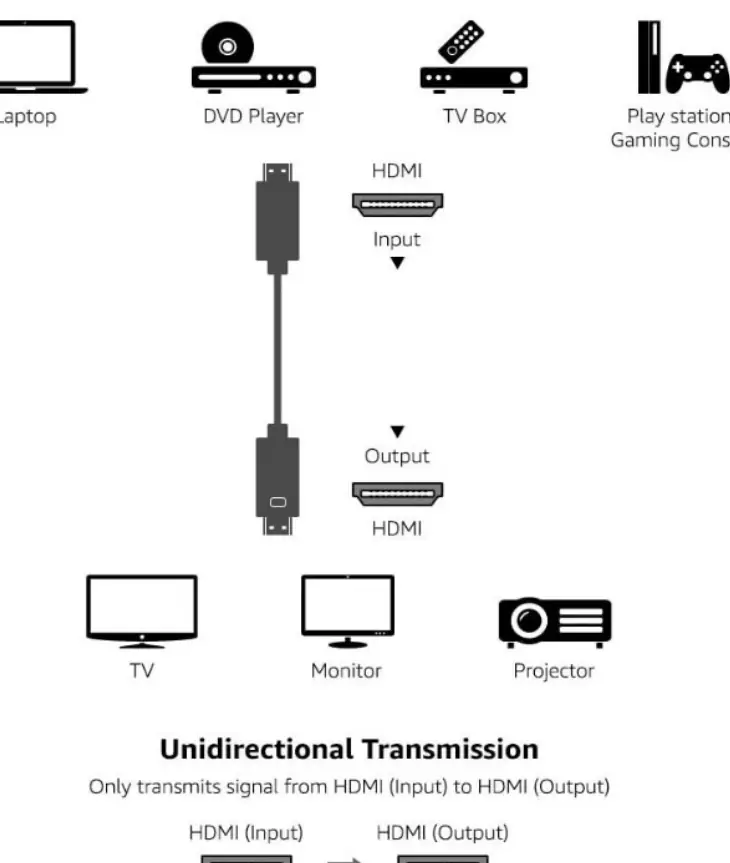
The opposite end of the cable is designated as the Output side and is marked with a monitor logo. This end must be connected to your display hardware, which includes televisions, computer monitors, or projectors. Connecting the cable in reverse will result in a failure to display the signal, as the internal architecture of this cable is optimized for one-way communication only.
Safety and Maintenance
While the cable is robust, proper handling is recommended to maintain signal integrity. Avoid bending the cable at sharp angles or placing heavy objects on top of it, as this can damage the internal wiring and shielding. When disconnecting the cable, always pull by the connector housing rather than the cable itself to prevent strain on the internal connections. Keep the connectors clean and free of dust or debris to ensure a secure fit into your device ports. If you experience issues with the display, verify that both ends are firmly seated in their respective ports and that the source device is powered on and set to the correct output resolution. This cable is designed for standard home and office environments and should be kept away from extreme heat or moisture to ensure long-term performance.
Practical help
Common problems
No signal on the display
Ensure the cable is not connected in reverse. The end with the monitor logo must be connected to the display (TV/Monitor/Projector), not the source.
Before use
- Identify the Input connector (Source device side)
- Identify the Output connector (Display device side, marked with monitor logo)
- Ensure both devices are powered off before connecting
- Verify that the ports on both devices are clean and free of debris
Specs in practice
- Unidirectional Transmission
- The cable only carries signals from the source (Input) to the display (Output) and will not work if reversed.
Images and diagrams
- The diagram illustrates the flow of data from source devices like laptops or consoles to display devices like TVs or projectors.
- It highlights the specific marking on the connector that identifies the Output side.
Model compatibility
- Compatible with DVD players, TV boxes, gaming consoles, and laptops as source devices.
- Compatible with TVs, monitors, and projectors as display devices.

Manual page author
Emily Carter
User documentation editor
Prepares concise manual descriptions and highlights the most useful setup, operation, and maintenance information for readers.