Home Appliances / Vacuum Cleaners
ANKO 17LY67 Bluetooth Headphones User Guide
Comprehensive user guide for the ANKO 17LY67 Bluetooth headphones, covering setup, operation, troubleshooting, and safety instructions.
Table of contents
Product Overview
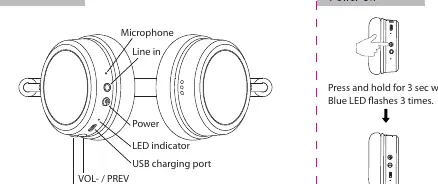
The ANKO 17LY67 Bluetooth headphones offer a wireless audio experience with integrated controls. The device features a built-in microphone, volume and track navigation buttons (VOL-/PREV and VOL+/NEXT), a power button, an LED indicator, a USB charging port, and a line-in (aux) port for wired connections.
Getting Started
To power on the headphones, press and hold the power button for 3 seconds until you hear a tone and the blue LED flashes three times. To enter Bluetooth pairing mode, ensure the device is powered on; the red and blue LED will flash alternately. Select "anko headphone" in your mobile device's Bluetooth settings to connect. The headphones will automatically reconnect to the last paired device when powered on.
Operation
- Music Playback: Use the volume buttons to adjust sound levels or skip tracks.
- Calling Mode: Press the power button once to answer or hang up a call. Press and hold for 1 second to decline an incoming call.
- Wired Mode: Connect the included 3.5mm aux-in cable to use the headphones with a mobile phone. Note that in this mode, playback must be controlled directly from the connected phone.
Charging
Charge the headphones by connecting the provided micro-USB cable to the charging port on the headphones and the other end to a computer USB port or a compatible wall charger.
Safety Information
To ensure safe operation, observe the following guidelines:
- Operating temperature range is 0 - 45°C.
- Do not expose the battery to extreme temperatures, low air pressure at high altitudes, or mechanical damage such as crushing or cutting.
- Only replace the battery with the correct type to avoid explosion or leakage risks.
- Do not dispose of the battery in fire or a hot oven.
Troubleshooting
If you encounter issues, check the following:
- If the headphones do not turn on, ensure they are fully charged.
- If the device fails to pair, verify that the headphones are in pairing mode and the LED is flashing.
- If you cannot hear audio during a call, ensure the device is connected properly and the volume is increased on your mobile device.
- If there is no sound while listening to music, check the connection and ensure the playback app is not paused.
Related manuals
Related manuals from the same brand or category.
General / Accessories
ANKO 150LT Solar Powered Icicle String Lights
ANKOGeneral / Other Manuals
ANKO Paint Your Own Giant Squishy Instructions
ANKOHome Appliances / Washing Machines
Product Safety Recall: Anko Active Sand Tub 14-Piece Sand Castle
ANKOGeneral / Service Manuals
ANKO 13-Piece Paint Your Own Vehicle Set
ANKO
Manual page author
Michael Turner
Technical manual editor
Reviews PDF manuals for structure, safety notes, and practical product details so readers can find the right information quickly.