Electronics / Headphones Earbuds
Operating instructions for ANKO AMP Headphones 23BF02
Quick guide for ANKO AMP Headphones 23BF02. Learn how to pair via Bluetooth, control music, manage calls, charge the battery, and understand technical specifications.
Quick answers from the manual
Quick answer
- To power on, hold the multi-function button for 3 seconds. To pair, ensure the device is on and search for 'anko43574261' in your phone's Bluetooth menu. p. 2
Key actions
- Power On/Off: Hold multi-function button for 3 seconds. p. 2
- Play/Pause: Click multi-function button. p. 2
- Volume/Track Control: Use buttons. p. 2
First start
- Charge the device fully using the provided USB cable, then power on and pair via Bluetooth. p. 2
Show 3 more answers Show less
Problems and fixes
Buttons not working
Ensure the audio cable is not connected, as controls are disabled in wired mode.
p. 2Technical specifications
| Parameter | Value | Meaning | Pages |
|---|---|---|---|
| Music Time | Up to 22 Hours | Battery life during music playback. | p. 2 |
| Talk Time | Up to 20 Hours | Battery life during phone calls. | p. 2 |
| Charge Time | 2 hours | Time required for a full charge. | p. 2 |
Where to find it in the PDF
- Warranty and Safety p. 1
- Controls and Specifications p. 2
Table of contents
Quick guide from the manual
The ANKO AMP Headphones are designed for wireless audio playback via Bluetooth. To get started, ensure the device is charged, power it on by holding the multi-function button for 3 seconds, and pair it with your mobile device using the Bluetooth menu. Note that button controls are disabled when using the included audio cable.
Device Overview
The headphones feature a multi-function button and two volume/track control buttons. The charging port, microphone, and auxiliary cable port are located on the ear cup.
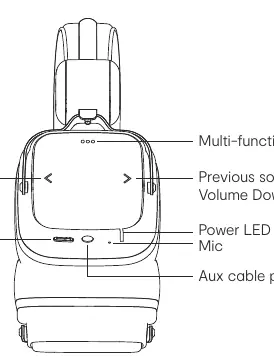
- Multi-function button: Controls Power, Play/Pause, and Phone Calls.
- < button: Volume Up (click) / Previous song (hold).
- > button: Volume Down (click) / Next song (hold).
Usage Instructions
Power and Pairing
- Power ON: Press and hold the multi-function button for 3 seconds until you hear the prompt.
- Power OFF: Press and hold the multi-function button for 3 seconds.
- Pairing: Once powered on, the headphones enter pairing mode automatically (LED flashes). Search for 'anko43574261' in your phone's Bluetooth menu.
Music and Calls
- Play/Pause: Click the multi-function button.
- Voice Assistant: Press and hold the multi-function button for 1 second and release.
- Phone Calls: Click the multi-function button to pick up or hang up. Press and hold for 2 seconds to reject a call.
Battery and Charging
The headphones use a rechargeable Li-ion battery. To charge:
- Insert the accessory USB cable into a suitable USB port.
- Connect the cable to the headset charging port.
- The LED indicator turns RED while charging and turns off when fully charged.
- A full charge takes approximately 2 hours.
Safety Information
- Do not connect to a power supply exceeding 5V DC 1A.
- Avoid exposing the battery to extreme temperatures, low air pressure at high altitudes, or mechanical damage (crushing/cutting).
- Do not dispose of the battery in fire or a hot oven.
Manufacturer information
Anko
Practical help
Common problems
Headphones will not pair
Ensure the headphones are powered on and in pairing mode (LED flashes). Check your phone's Bluetooth menu for 'anko43574261'.
Buttons are unresponsive
Check if the audio cable is connected. Button controls are disabled when using the headphones in wired mode.
Before use
- Charge the headphones fully before first use.
- Ensure your charging source is 5V DC 1A.
- Keep the device within 10 meters of the Bluetooth source.
- Retain your receipt as proof of purchase for warranty claims.
Show more Show less
Specs in practice
- Bluetooth Version V5.4
- The wireless communication standard used for connection.
- Working Distance 10 meters
- The maximum range for a stable Bluetooth connection.
- Charging Voltage DC 5V
- The required voltage for the charging port.
Images and diagrams
- The multi-function button is the primary control for power and calls.
- The buttons serve dual purposes for volume and track navigation.
Model compatibility
- Compatible with Bluetooth-enabled mobile devices.
- Wired connection via audio cable is supported but disables button controls.

Manual page author
David Miller
Documentation analyst