Electronics / Headphones Earbuds
User Manual for anko 22BN23 Noise Cancelling PRO Headphones
Quick guide for anko 22BN23 Noise Cancelling PRO Headphones. Learn how to pair, control music, manage calls, use ANC modes, and charge your device.
Quick answers from the manual
Quick answer
- The anko 22BN23 headphones are controlled via a multi-function button for power/media/calls and an ANC button for noise cancellation and sound modes. They charge via USB-C and support both Bluetooth and wired (Aux) connections. p. 2
Key actions
- Power On/Off p. 2
- Charging p. 2
First start
- Power on the headphones to enter pairing mode, then select 'anko43646715' in your device's Bluetooth menu. p. 2
Show 3 more answers Show less
Problems and fixes
Controls unresponsive
Multi-function and volume buttons do not work when using the audio cable.
p. 2Technical specifications
| Parameter | Value | Meaning | Pages |
|---|---|---|---|
| Music Time (ANC ON) | 40 hours | Playback duration with ANC active | p. 2 |
| Music Time (ANC OFF) | 60 hours | Playback duration with ANC inactive | p. 2 |
| Charging Voltage | DC 5V | Required input voltage | p. 2 |
Where to find it in the PDF
- Warranty and Safety p. 1
- Controls and Specifications p. 2
Table of contents
Quick Guide from the Manual
The anko 22BN23 Noise Cancelling PRO Headphones are designed for wireless audio playback via Bluetooth. This guide covers the essential operations, including pairing, playback controls, and charging. Please note that physical button controls are disabled when using the wired audio cable connection.
Device Overview
The headphones feature the following controls and ports:
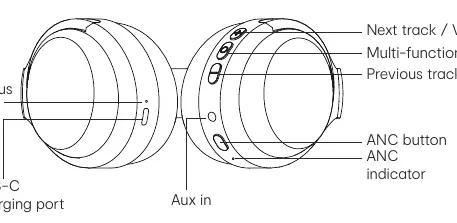
- Multi-function button: Used for Power, Play/Pause, and Call management.
- Volume +/- buttons: Used for volume adjustment and track skipping.
- ANC button: Used for toggling Active Noise Cancelling, Transparent mode, and sound modes (Music/Gaming/Cinema).
- Ports: USB-C charging port and Aux-in port.
- Indicators: LED status indicator and ANC indicator.
Operation
Powering On/Off
- Power ON: Press and hold the multi-function button for 2 seconds until you hear the prompt.
- Power OFF: Press and hold the multi-function button for 3 seconds until you hear the prompt.
Pairing
Once powered on, the headphones automatically enter pairing mode (LED flashes). Search for 'anko43646715' in your mobile device's Bluetooth menu to connect.
Music and Calls
- Play/Pause: Click the multi-function button.
- Next Track: Press and hold the '+' button.
- Previous Track: Press and hold the '-' button.
- Volume Up/Down: Click the '+' or '-' button.
- Voice Assistant: Double-click the multi-function button.
- Phone Calls: Click the multi-function button to pick up or hang up; press and hold for 1 second to reject a call.
ANC and Sound Modes
- ANC/Transparent Mode: Click the ANC button to cycle through modes.
- Sound Mode Switch: Double-click the ANC button to switch between Music, Gaming, and Cinema modes.
Battery and Charging
The headphones are powered by a rechargeable Li-ion battery.
- Connect the accessory USB cable to the headset USB port and a suitable power source.
- The LED indicator turns RED while charging.
- The LED indicator turns GREEN when fully charged.
- A full charge takes approximately 2 hours.
Safety Information
- Do not connect to a power supply exceeding PS1 (5V d.c. 1A).
- Avoid exposing the battery to extreme temperatures, low air pressure at high altitudes, or mechanical damage (crushing/cutting), as this may cause an explosion or leakage.
Manufacturer information
Anko
Practical help
Common problems
Controls not working
The multi-function and volume buttons do not function when the audio cable is connected.
Headphones not pairing
Ensure the headphones are powered on. They automatically enter pairing mode if not connected to a previously paired device.
Before use
- Charge the headphones fully using the provided USB cable (approx. 2 hours).
- Ensure the device is within 10 meters of the Bluetooth source.
- Verify the battery is not exposed to extreme temperatures or low air pressure.
Show more Show less
Specs in practice
- ANC ON Music Time
- Up to 40 hours of playback with Active Noise Cancelling enabled.
- ANC OFF Music Time
- Up to 60 hours of playback with Active Noise Cancelling disabled.
- Charging Voltage
- Requires a DC 5V power source.
Images and diagrams
- The diagram illustrates the location of the LED status indicator, USB-C charging port, Aux-in port, ANC button, and the multi-function/volume buttons.
Model compatibility
- Supports Bluetooth profiles: A2DP, AVRCP, HFP.
- Compatible with mobile phones via Bluetooth.

Manual page author
Emily Carter
User documentation editor