Electronics / Headphones Earbuds
User Manual for Anko Bluetooth Headphones 43107254
Quick guide for Anko Bluetooth Headphones 43107254. Learn how to pair, control music, charge, and troubleshoot your earbuds with this easy-to-follow manual.
Quick answers from the manual
Quick answer
- To use the Anko 43107254 earbuds, remove the insulation stickers, charge the device, and pair via Bluetooth by selecting 'KM43107254' on your phone. p. 2
Key actions
- Power ON: Hold MFB 3s or remove from case. p. 2
- Power OFF: Hold MFB 4s or place in case. p. 2
First start
- Remove insulation stickers from contactors before use. p. 2
Show 3 more answers Show less
Problems and fixes
Earbuds lost connection to each other
Put earbuds back in case and take out, or turn off and on again.
p. 2Technical specifications
| Parameter | Value | Meaning | Pages |
|---|---|---|---|
| Bluetooth Version | V5.0 | Wireless standard | p. 2 |
| Charging Time | Earbuds 1h, Case 2h | Time to full charge | p. 2 |
Where to find it in the PDF
- Warranty and Safety p. 1
- Usage and Specs p. 2
Table of contents
Quick guide from the manual
Before using your new Anko Bluetooth Headphones, it is essential to remove the transparent insulation stickers from the earbuds' charge contactors. Ensure both the earbuds and the charging case are fully charged before first use.
Function overview
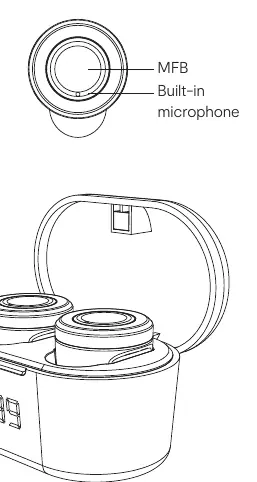
The earbuds feature a Multi-Function Button (MFB) and a built-in microphone. The charging case includes an LED indicator to show the battery status.
How to use these earbuds
The earbuds are controlled via the MFB button on each earbud:
- Pause: Click MFB button.
- Play: Click MFB button.
- Next Song: Click L earbud 3 times.
- Previous Song: Click R earbud 3 times.
- Volume Up: Click L earbud twice.
- Volume Down: Click R earbud twice.
Power ON / OFF
- Power ON: Press and hold the MFB button for 3 seconds, or take the earbuds out of the charging case.
- Power OFF: Press and hold the MFB button for 4 seconds, or put the earbuds back into the charging case.
Pairing and connection
Once powered on, the earbuds automatically enter pairing mode (LED flashes red and blue). Search for KM43107254 in your mobile phone's Bluetooth menu to connect. If the earbuds lose connection to each other, place them back in the charging case and take them out again, or turn them off and back on to resync.
Battery charging
Use the provided USB cable to charge the case. Connect the cable to a suitable USB port. The indicator LED turns red while charging. The digital LED on the case will flash to show the battery percentage. It takes approximately 1 hour to charge the earbuds and 2 hours to fully charge the case.
Specifications
- Bluetooth Version: V5.0
- Working Distance: 10 meters
- Music/Talk Time: Up to 2.5 hours
- Standby Time: Up to 100 hours
- Charging Voltage: DC 5V
- Cable Length: 0.3m
Manufacturer information
Anko
Practical help
Common problems
Earbuds lost connection to each other
Put the earbuds back into the charging case and take them out, or turn them off and then back on.
Earbuds not charging
Ensure the transparent insulation stickers have been removed from the earbuds' charge contactors.
Before use
- Remove transparent insulation stickers from charge contactors
- Charge the earbuds fully (1 hour)
- Charge the case fully (2 hours)
Show more Show less
Specs in practice
- Bluetooth V5.0
- The wireless communication standard used for connection.
- Working Distance: 10 meters
- Maximum range between the earbuds and the connected device.
- Charging Voltage: DC 5V
- Required input voltage for the charging cable.
Images and diagrams
- MFB: Multi-Function Button used for playback and power controls.
- LED indicator: Shows charging status and pairing mode.
Model compatibility
- Supports A2DP, AVRCP, HFP profiles.

Manual page author
David Miller
Documentation analyst