Electronics / Headphones Earbuds
User Guide for anko 21BF02 Bluetooth Headphones
Quick start guide and troubleshooting for anko 21BF02 Bluetooth Headphones. Learn how to pair, charge, use TF card mode, and resolve common connection issues.
Quick answers from the manual
Quick answer
- The anko 21BF02 is a Bluetooth headphone that supports wireless pairing, TF card playback, and wired Aux-in connections. It is charged via a Micro-USB cable. p. 1
Key actions
- Power On/Off: Press and hold the power button for 3 seconds. p. 1
- Pairing: With the device powered on, enter pairing mode until the LED flashes Red and Blue, then select the model on your phone. p. 1
- Charging: Connect the Micro-USB cable to the charging port and a power source. p. 1
First start
- Charge the device fully before first use. p. 1
Show 3 more answers Show less
Problems and fixes
Headphones won't turn on
Charge the headphones.
p. 1
Bluetooth connection issues
Check pairing mode, range, and obstructions.
p. 1Technical specifications
| Parameter | Value | Meaning | Pages |
|---|---|---|---|
| Working temperature | 0 - 35°C | Operating environment range | p. 1 |
Where to find it in the PDF
- User Guide p. 1
Table of contents
Manual images
Click an image to enlargeQuick Guide
The anko 21BF02 Bluetooth Headphones support wireless audio playback, TF card mode, and Aux-in connectivity. Key operations include holding the power button for 3 seconds to turn on/off and entering pairing mode by holding the power button until the LED flashes red and blue. Ensure the device is charged before first use and kept within range of your mobile device for stable connectivity.
Device Overview
The headphones feature the following controls and ports:
- Power On/Off: Press and hold for 3 seconds.
- Volume/Track Control: Use the + and - buttons to adjust volume or skip tracks.
- Play/Pause/Answer/Hang up: Central button for media and call control.
- TF Card Slot: Insert a TF card to switch to TF card playing mode.
- Charging Port: Micro-USB port for charging.
- Line-in: Aux-in port for wired connection.
- LED Indicator: Shows status (flashing red/blue for pairing, solid/flashing for connection status).
Power and Pairing
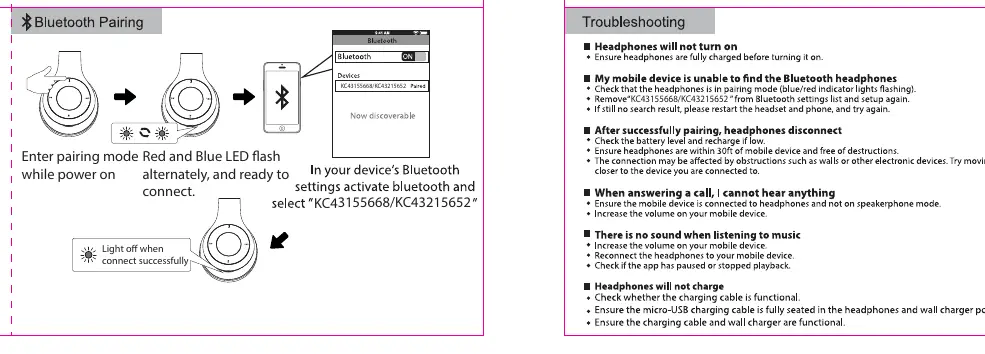
To power on, press and hold the power button for 3 seconds; the blue LED will flash 3 times. To enter pairing mode, ensure the device is powered on, then initiate pairing. The LED will flash red and blue alternately. Select "KC43155668" or "KC43215652" in your device's Bluetooth settings to connect.
Playback Modes
The headphones support three modes:
- Bluetooth: Default mode after pairing.
- TF Card: Automatically switches to TF card mode when a card is inserted. Use the "M" button to switch between Bluetooth and TF modes.
- Aux-in: Connect the provided 1.25M Aux-in cable to your mobile phone. Note that in this mode, you can only operate the headset via the phone.
Calling Mode
When connected via Bluetooth, use the central button to manage calls:
- Answer: Press once.
- Hang up: Press once.
- Decline: Press and hold for 1 second.
Charging
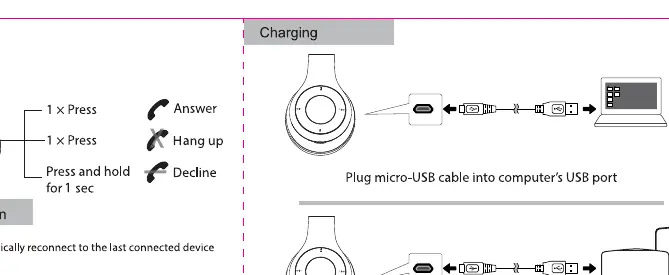
Connect the provided 0.3M Micro-USB cable to the headphones' charging port and the other end to a computer USB port or a USB wall charger. The light will turn off when the connection is successful.
Troubleshooting
If you encounter issues, check the following:
- Headphones won't turn on: Ensure the device is charged.
- Bluetooth connection issues: Check if the headphones are in pairing mode (red/blue LED flashing). Ensure the device is within range and there are no obstructions.
- No sound: Increase the volume on both the mobile device and the headphones.
- Headphones won't charge: Verify that the charging cable is functional and fully seated in the port.
Safety Information
Observe the following safety precautions:
- Working temperature: 0 - 35°C.
- Do not expose the battery to extreme temperatures, low air pressure at high altitudes, or mechanical damage (crushing/cutting).
- Do not dispose of the battery in fire or a hot oven.
- Replacement with an incorrect battery type may cause an explosion or leakage.
Manufacturer information
Anko
Practical help
Common problems
Headphones will not turn on
Ensure the headphones are charged before attempting to turn them on.
Bluetooth connection fails
Check if the headphones are in pairing mode (Red and Blue LED flashing). Ensure the device is within range and remove any obstructions between the phone and headphones.
No sound during playback
Increase the volume on both the mobile device and the headphones. Ensure the headphones are not in phone-only mode.
Headphones will not charge
Check that the charging cable is functional and fully seated in the charging port.
Before use
- Charge the headphones fully using the provided Micro-USB cable.
- Ensure the headphones are powered on and in pairing mode (Red/Blue LED flashing).
- Check that your mobile device has Bluetooth enabled.
- Verify the charging cable is functional.
Show more Show less
Specs in practice
- Working temperature
- 0 - 35°C. Do not operate outside this range.
- Aux-in cable length
- 1.25 meters.
- Charging cable length
- 0.3 meters.
Images and diagrams
- The overview diagram identifies the Power button, Volume/Track buttons, Play/Pause/Answer button, TF card slot, USB charging port, and Line-in port.
- The pairing diagram shows the LED status (Red/Blue flashing) when ready to connect.
- The charging diagram illustrates connecting the Micro-USB cable to a computer or wall charger.
Model compatibility
- Compatible with devices supporting Bluetooth.
- Supports TF card playback.
- Supports wired connection via 3.5mm Aux-in cable.

Manual page author
Michael Turner
Technical manual editor