Lighting / Outdoor Lighting
Service Manual for Anolis Calumma Calibration
Learn how to restore lost calibration values for white colors (CTC) on your Anolis Calumma fixture using the RDM Manager software. This service guide covers the step-by-step DMX configuration and calibration process.
Table of contents
Important Information
This document provides a specific repair procedure for Anolis Calumma fixtures in the event of lost calibration values for white colors (channel CTC). This guide is intended for service purposes only and requires the use of RDM Manager software.
Calibration Procedure
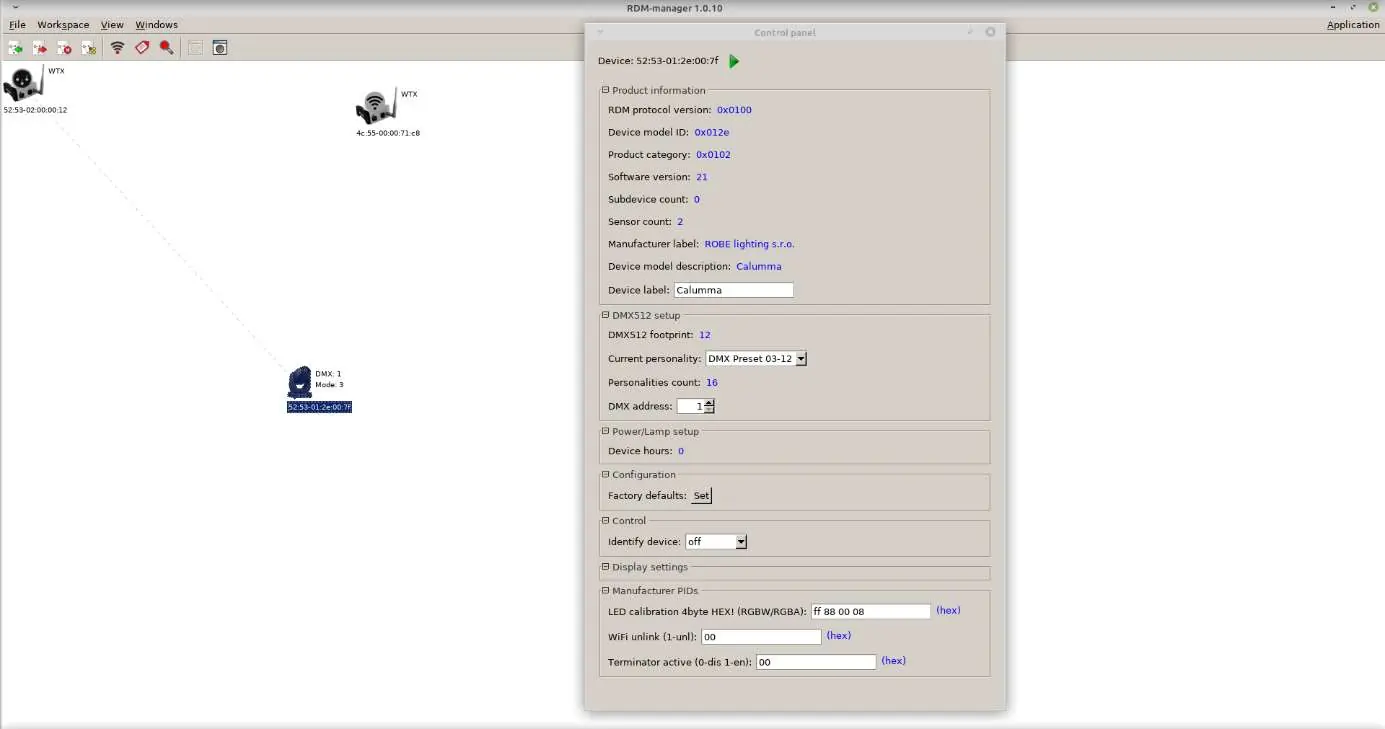
- Switch the calibrated Calumma fixture to DMX mode 3 (12 channels).
- Send a DMX data packet where the CTC data matches the calibrated color (see the CTC Values Reference section below). It is recommended to also send RGBW values and a Dimmer value to ensure the fixture responds.
- Open the RDM Manager and read the calibrated Calumma.
- Locate the Manufacturer PIDs section. Find the field labeled LED calibration 4 bytes HEX! (RGBW/RGBA). The values are read from the first processor.
- Enter the factory calibration values for the specific fixture and save them using the green arrow icon.
- If the color beam does not change, try changing one byte of the calibration values, save it to the Calumma, then change the byte back to the correct value and save again.
- Repeat the process for other CTC colors as needed.
CTC Values Reference
Use the following values when sending DMX data packets for specific color temperatures:
- 1800K: 21 CTC
- 2700K: 66 CTC
- 3200K: 91 CTC
- 4200K: 141 CTC
- 5600K: 211 CTC
- 6500K: 255 CTC
Troubleshooting
If the color beam does not change after saving, you may have set an incorrect CTC value in the DMX data packet. If the CTC color is set incorrectly, the field LED calibration 4 bytes HEX! (RGBW/RGBA) will display FF FF FF FF, and the saving process will not be successful.
Manufacturer information
Anolis
Practical help
Common problems
Color beam does not change after saving
Try changing one byte of the calibration values, save it to the fixture, then change the byte back to the correct value and save again.
Saving fails / Values show FF FF FF FF
This indicates an incorrect CTC value was set in the DMX data packet. Verify the CTC value and retry.
Before use
- Ensure the fixture is set to DMX mode 3 (12 channels).
- Have the RDM Manager software installed and running.
- Verify you have the factory calibration values for the specific fixture.
- Ensure you are sending RGBW and Dimmer values alongside the CTC data.
Model compatibility
- Procedure requires RDM Manager software.
- Fixture must be in DMX mode 3 (12 channels) for this procedure.

Manual page author
David Miller
Documentation analyst
Organizes user manual content into clear summaries, with attention to model details, product context, and everyday usability.