Electronics / Monitors
Apple 10th Gen 10.9 Inch 2022 iPad Screen Protector Installation Guide
A quick guide for applying a protective film to your Apple 10th Gen 10.9 Inch 2022 iPad, including step-by-step cleaning and application instructions.
Table of contents
Quick guide from the manual
This document provides the necessary steps for the correct application of a protective film on the Apple 10th Gen 10.9 Inch 2022 iPad screen. Proper preparation and alignment are essential for a bubble-free installation.
Installation steps
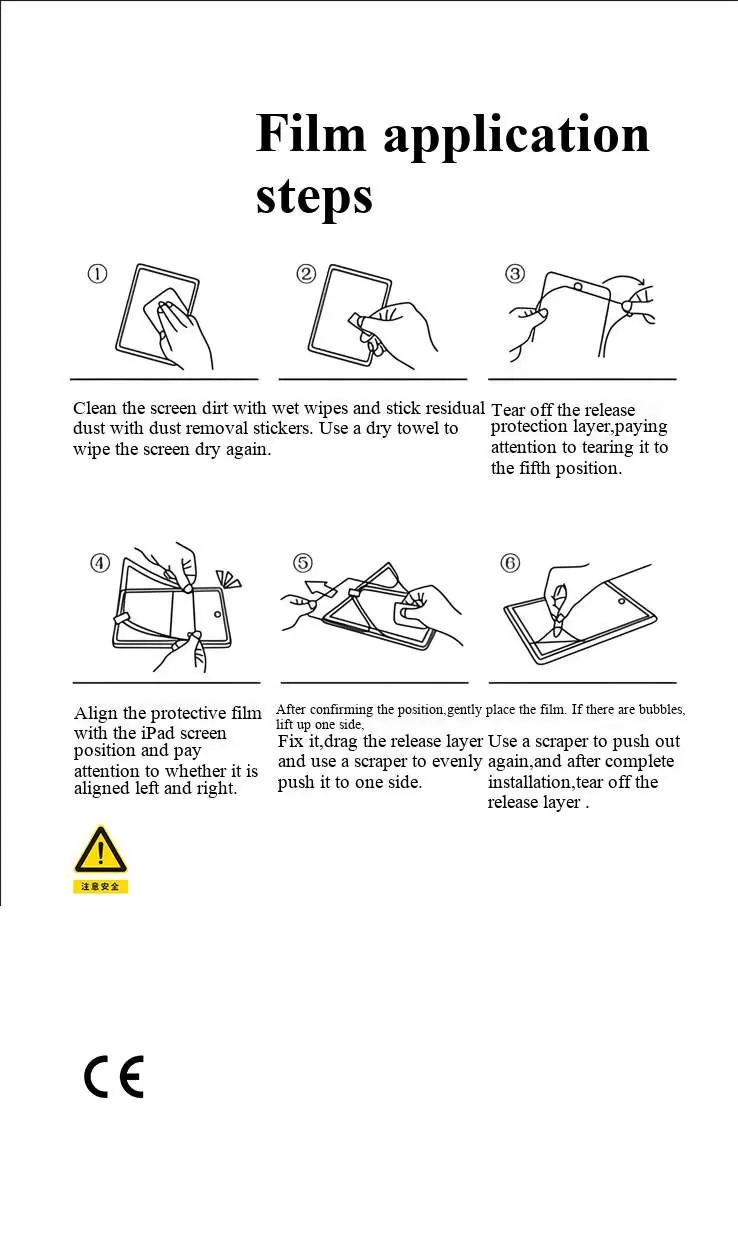
- Clean the screen thoroughly using wet wipes to remove dirt.
- Use dust removal stickers to pick up any residual dust particles.
- Wipe the screen dry with a clean, dry towel.
- Tear off the release protection layer from the film, being careful to handle it at the designated fifth position.
- Align the protective film with the iPad screen, ensuring it is correctly positioned on both the left and right sides.
- Gently place the film onto the screen after confirming the position.
- If bubbles appear, lift one side of the film, fix the position, and use a scraper to push out the air.
- Use a scraper to evenly smooth the film across the screen.
- Once the installation is complete, remove the final release layer.
Safety warnings
- Age restriction: This product is prohibited for use by children under 13 years old.
- Handling: Be careful when handling the product if it is damaged, as sharp edges may cause skin scratches.
Manufacturer information
Apple Inc.
Practical help
Common problems
Air bubbles under the film
Lift one side of the film, reposition it, and use a scraper to push the air out towards the edge.
Dust trapped under the film
Ensure the screen is completely clean using wet wipes and dust removal stickers before applying the film.
Before use
- Ensure you have wet wipes for cleaning.
- Have dust removal stickers ready.
- Prepare a clean, dry towel.
- Ensure you have a scraper tool for smoothing the film.
- Verify the environment is free of excessive dust.
Images and diagrams
- Step 1-2: Cleaning the screen surface.
- Step 3: Removing the protective release layer.
- Step 4: Aligning the film with the device edges.
- Step 5-6: Applying the film and removing bubbles with a scraper.
Model compatibility
- Designed for Apple 10th Gen 10.9 Inch 2022 iPad.

Manual page author
Emily Carter
User documentation editor
Prepares concise manual descriptions and highlights the most useful setup, operation, and maintenance information for readers.