Electronics / Cameras
Arenti Mini 15T IP Camera User Manual
Quick guide for the Arenti Mini 15T IP Camera. Includes setup instructions, LED status indicators, configuration steps, and technical specifications.
Table of contents
Manual images
Click an image to enlargeQuick Start Guide
This guide provides the essential steps to set up and operate your Arenti Mini 15T IP Camera. Ensure you have a stable Wi-Fi connection and your smartphone ready before beginning the configuration process.
Packing List
The package includes the following items:
- 1x Camera
- 1x Tape
- 1x USB cable
- 1x Quick start guide
- 1x Power adaptor
Product Description
The camera features the following components:
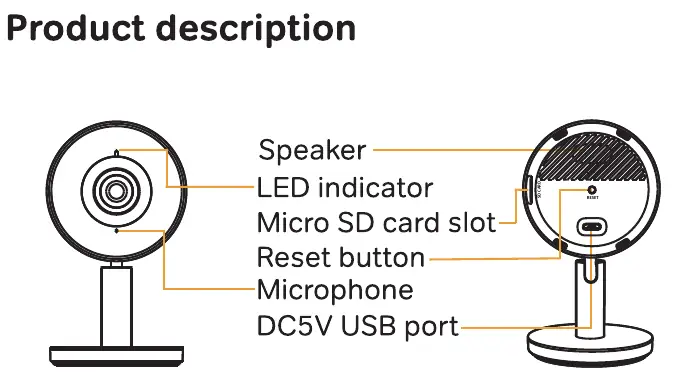
- Front: Lens, Microphone, LED indicator.
- Back: Speaker, Micro SD card slot, Reset button, DC5V USB port.
Camera Configuration
- Power On: Plug in the power adapter to turn on the camera.
- Network: Connect your smartphone to your local Wi-Fi network.
- App Download: Download the Arenti app from the App Store or Google Play.
- Account Setup: Launch the Arenti app and sign up for your first use.
- Add Camera: Follow the in-app instructions to add your camera. Keep your phone near the router for the best signal during setup.
LED Status Indicators
The LED light indicates the current status of the camera:
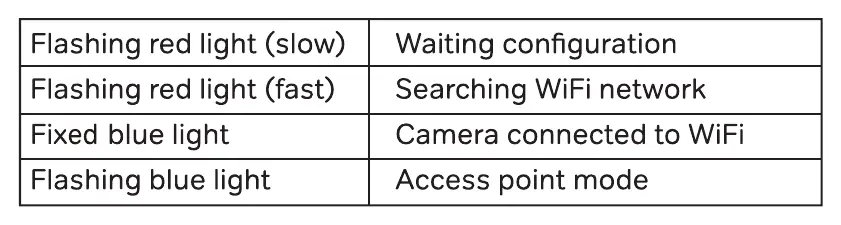
- Flashing red light (slow): Waiting for configuration.
- Flashing red light (fast): Searching for Wi-Fi network.
- Fixed blue light: Camera connected to Wi-Fi.
- Flashing blue light: Access point mode.
Resetting the Device
To reset the camera to factory settings, press and hold the reset button for 5 seconds. The camera will beep when the operation is complete.
Technical Specifications
- Sensor: 1/2.9" CMOS
- Resolution: 1920 x 1080 (2 Mega pixels)
- Lens: 3.6mm F2.0
- Storage: Micro SD card (Max 128GB)
- Audio: Two-way audio
- Wi-Fi: 2.4GHz / 5GHz (IEEE802.11 a/b/g/n)
- Power: DC5V, 1A
- Operating Temperature: -20°C to 55°C
Support
For more information, visit the official website at www.arenti.com.
Official resources from the manual
Manufacturer information
Arenti
Practical help
Common problems
Camera not connecting to Wi-Fi
Ensure the camera is in configuration mode (slow flashing red light) and that your smartphone is connected to the Wi-Fi network you intend to use.
Need to change Wi-Fi network
Restore the camera to factory settings by holding the reset button for 5 seconds, then follow the configuration steps again.
Multiple cameras setup
If you have multiple cameras, follow the configuration steps for each device one by one.
Before use
- Ensure the camera is powered on using the provided adapter.
- Download the Arenti app from the App Store or Google Play.
- Connect your smartphone to the Wi-Fi network.
- Keep the camera near the router during the initial setup for the best signal.
Specs in practice
- Working Temperature
- Designed to operate between -20°C and 55°C.
Images and diagrams
- The front of the camera houses the lens, microphone, and LED indicator.
- The back of the camera contains the speaker, Micro SD card slot, reset button, and DC5V USB power port.
Model compatibility
- Compatible with Amazon Alexa.
- Compatible with Google Assistant.
- For indoor use only.

Manual page author
David Miller
Documentation analyst
Organizes user manual content into clear summaries, with attention to model details, product context, and everyday usability.