Wearables / Watches
User Manual for AURIOL Spotting Scope 20-60x60
Quick guide for the AURIOL Spotting Scope 20-60x60. Learn how to set up the tripod, adjust focus and zoom, use the smartphone holder, and maintain your spotting scope.
Quick answers from the manual
Quick answer
- The AURIOL Spotting Scope 20-60x60 is a high-quality optical device for observing distant objects. It includes a table tripod and an optional smartphone holder for monitoring or recording. p. 8
Key actions
- Mounting the spotting scope on the tripod p. 9
- Using the smartphone holder p. 10
First start
- Assemble the tripod and attach the spotting scope. p. 9
Show 4 more answers Show less
Problems and fixes
Flickering image
Use early morning hours or decrease magnification.
p. 10Maintenance and reset
- Cleaning lenses p. 10
Technical specifications
| Parameter | Value | Meaning | Pages |
|---|---|---|---|
| Magnification | 20x to 60x | Zoom range | p. 8 |
| Lens | 60 mm | Objective lens diameter | p. 8 |
Where to find it in the PDF
- English Instructions p. 5, 6, 7, 8
Table of contents
Manual images
Click an image to enlargeQuick guide from the manual
The AURIOL Spotting Scope 20-60x60 is designed for the observation of distant objects, animals, and trees. It features a variable magnification of 20x to 60x and includes a table tripod and an optional smartphone holder for live monitoring, taking photos, or recording videos. The product is suitable for protected use in the open air.
Description of parts
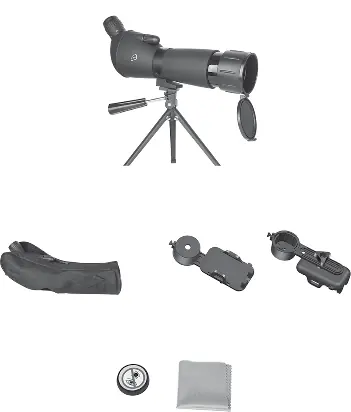
- 1 Eyepiece
- 2 Zoom wheel
- 3 Focus control
- 4 Tube clamp
- 5 Optical tube
- 6 Lens hood
- 7 Dust cap
- 8 Axes for vertical and horizontal movement
- 9 Tripod legs
- 10 Guiding handle with locking function
- 11 Mounting screw for tripod head
- 12 Tripod head with thread screw
- 13 Tripod mount
- 14 Locking screw for tube clamp
- 15 Carry bag
- 16 Screw for smartphone holder
- 17 Smartphone holder head
- 18 Smartphone clamps
- 19 Adjustment bar
- 20 Phone holder lock
- 21 Eyepiece cover
- 22 Cleaning cloth
Preparing for use
Commissioning
Take the supplied tripod out of the box and pull the legs 9 apart. Place the stand on a firm, level surface. Locate the tripod mount 13 below the tube clamp 4. Place the tripod mount 13 on the tripod head 12 and secure the spotting scope by tightening the mounting screw 11.
Adjustments
- Moving the scope: Use the guiding handle 10 to move the scope vertically and horizontally. Turn clockwise to fix the position and counterclockwise to unlock.
- Focus: Use the focus control 3 to sharpen the image.
- Zoom: Rotate the zoom wheel 2 clockwise to zoom in and counterclockwise to zoom out. Readjust the focus after changing the zoom setting.
- Tube moving: Rotate the locking screw 14 counterclockwise to move the tube 5. Tighten clockwise to fix the position.
Using smartphone holder
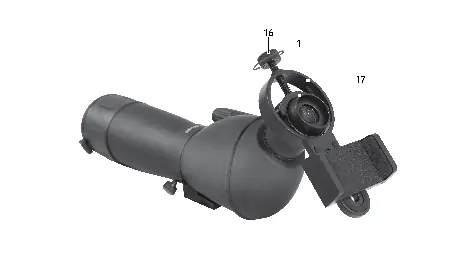
Adjust the zoom setting before mounting the holder, as the zoom wheel 2 cannot be adjusted once the holder is attached. Mount the smartphone holder head 17 on the eyepiece 1 and tighten the screw 16 firmly. Place the smartphone in the clamps 18. Loosen the phone holder lock 20 slightly to adjust the position and angle on the adjustment bar 19 so the camera is aligned with the eyepiece. Tighten the lock 20. If using a phone with multiple cameras, set it to use only one rear camera.
Cleaning and care
Never take the product apart for cleaning. Use the provided cleaning cloth 22 or a soft, lint-free cloth. If lenses are very dirty, dampen the cloth with a little clear alcohol. Always cover lenses with the dust cap 7 and eyepiece cover 21 when not in use.
Storage
Remove the tripod and phone holder after each use. Store the spotting scope in the carry bag 15. Keep the tripod and phone holder stored separately to prevent scratching the scope body. Store in a cool, dry place away from direct sunlight.
Technical data
- Magnification: 20x to 60x
- Field of view: 29 m at 1000 m distance (at 20x)
- Close range adjustment: from 12 m (at 20x)
- Lens: 60 mm
- Smartphone holder width: 64-90 mm
Practical help
Common problems
Flickering image during observation
Restless air during summer temperatures can cause this. Observe during early morning hours or decrease the magnification.
Unclear image on smartphone
Adjust both the focus control on the scope and the focus setting on your smartphone.
Smartphone switches cameras automatically
Set your smartphone to use only one rear camera.
Before use
- Ensure the tripod is on a firm, level surface.
- Check stability after mounting the smartphone.
- Adjust zoom before attaching the smartphone holder.
- Remove lens caps before use.
- Ensure the smartphone is securely clamped.
Show more Show less
Specs in practice
- Magnification
- The degree of enlargement (20x to 60x).
- Field of view
- The width of the area visible at 1000m distance (29m at 20x).
- Close range adjustment
- The minimum distance for a sharp image (12m at 20x).
Images and diagrams
- Figure A: Overview of all parts and accessories.
- Figure B: Tube clamp and locking screw operation.
- Figure C: Focus control location.
- Figure D: Zoom wheel operation.
- Figure E: Lens hood usage.
Model compatibility
- Smartphone holder internal width: 64-90 mm.
- Not intended for commercial use.
- Do not use in heavy rain.

Manual page author
David Miller
Documentation analyst