Optics / Spotting Scopes
User Manual for Auriol Wristwatch 2-LD4617-1
Quick guide for the Auriol wristwatch. Learn how to set the time, adjust the watch band, replace the battery, and understand water resistance and warranty terms.
PDF source: Deutsch · summary: English
Quick answers from the manual
Quick answer
- The Auriol wristwatch is designed for time display. It features a 3-year warranty and requires professional battery replacement. p. 12
Key actions
- Set the time p. 14
- Shorten the watch band p. 14
First start
- Check scope of delivery p. 12
Show 3 more answers Show less
Problems and fixes
Battery replacement
Must be performed by an expert to avoid damaging the case or gaskets.
p. 15Technical specifications
| Parameter | Value | Meaning | Pages |
|---|---|---|---|
| Water resistance | 5 bar | Resistant to water pressure up to 5 bar. | p. 15 |
Where to find it in the PDF
- English section p. 11, 12, 13, 14
Table of contents
Quick guide from the manual
This manual provides essential information for the safe use and maintenance of your Auriol wristwatch. Always keep the packaging and this manual for future reference. The watch is intended for time display and additional features described in the manual; it is not for commercial use.
Safety information
- Children: The device can be used by children aged 8 and over if supervised. Keep packaging films away from children to avoid suffocation.
- Batteries: Keep batteries out of reach of small children. If swallowed, seek medical attention immediately. Ensure correct polarity when inserting batteries. Do not attempt to recharge, short-circuit, or open batteries. Do not throw batteries into fire.
Time setting
Pull the crown out all the way. Turn the crown clockwise or counter-clockwise to set the time. Press the crown back to the case to complete the setting.
Band shortening
For model 2-LD4617-2, the band can be shortened by removing individual links:
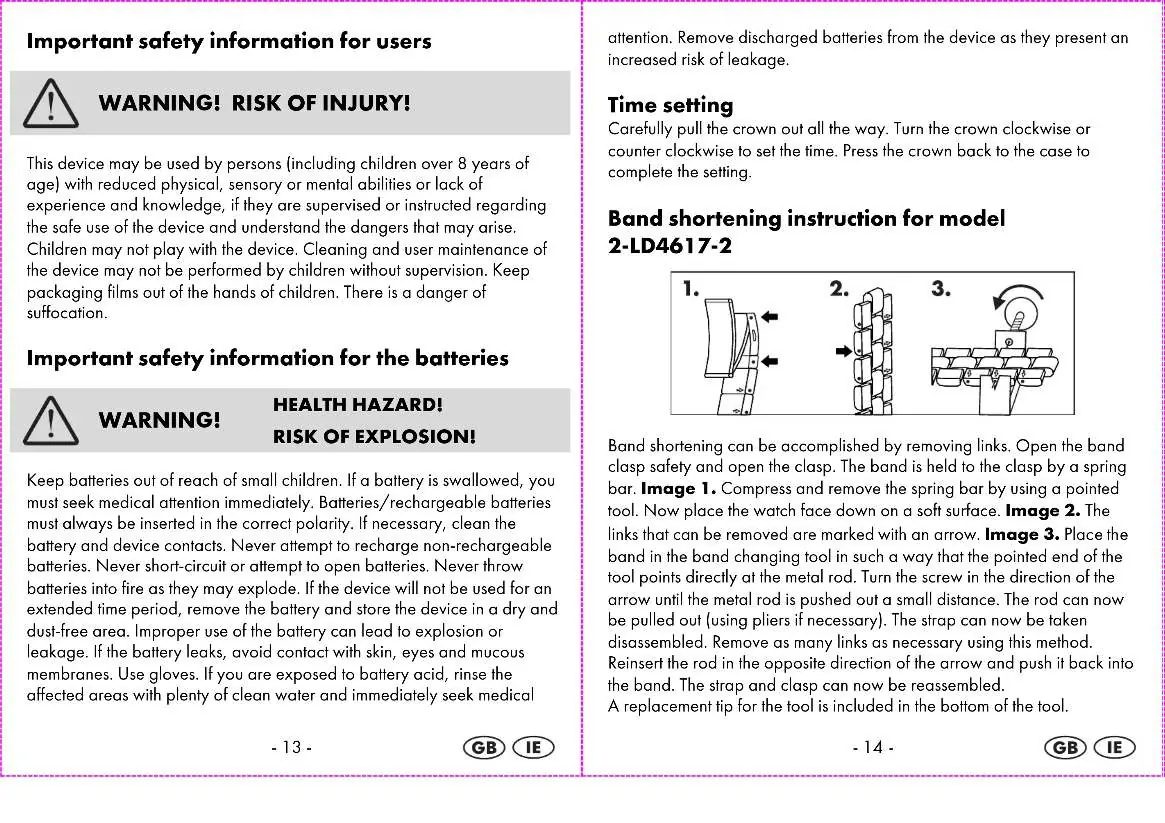
- Open the band clasp safety and the clasp.
- Compress and remove the spring bar using a pointed tool.
- Place the watch face down on a soft surface.
- Identify the removable links (marked with an arrow).
- Place the band in the band changing tool so the pointed end of the tool points directly at the metal rod.
- Turn the screw in the direction of the arrow until the rod is pushed out. Pull the rod out (use pliers if necessary).
- Remove the required number of links.
- Reinsert the rod in the opposite direction of the arrow and push it back into the band. Reassemble the strap and clasp.
Cleaning and maintenance
Clean the wristwatch only with a soft, dry, and lint-free cloth. A glasses cleaning cloth is ideal.
Battery replacement
Battery replacement (SR626SW) must be performed by an expert to avoid damaging the case or gaskets. You can send the watch to the service address for a fee-based replacement.
Water resistance
The watch is water-resistant up to 5 bar. This refers to the atmospheric overpressure applied during testing (DIN 8310). It is suitable for daily use but not for swimming or diving.
Warranty and service
The product includes a 3-year warranty from the date of purchase. Keep your receipt as proof of purchase. If a defect occurs, contact the service center via phone or email. The service address is Inter-Quartz GmbH, Valterweg 27A, 65817 Eppstein, Germany.
Practical help
Common problems
Watch stopped
The battery may be empty. Have it replaced by a professional watchmaker.
Band is too loose
Remove individual links using the provided band changing tool.
Before use
- Check the scope of delivery for all parts
- Ensure the watch is undamaged
- Keep the original receipt for warranty claims
Show more Show less
Specs in practice
- Water resistance
- Up to 5 bar; suitable for daily use, but not for swimming or diving.
- Battery type
- SR626SW
Images and diagrams
- Band shortening steps: 1. Open clasp, 2. Remove spring bar, 3. Use tool to push out rod.
Model compatibility
- Band shortening instructions apply specifically to model 2-LD4617-2.

Manual page author
David Miller
Documentation analyst