Electronics / Video Transmission
User Manual for AVPro Edge AC-DANTE-D Dante Decoder
Quick guide for the AVPro Edge AC-DANTE-D 2-Channel Dante Audio Decoder. Includes installation, wiring, Dante Controller configuration, and troubleshooting steps.
Quick answers from the manual
Quick answer
- The AC-DANTE-D is a 2-channel Dante network decoder that converts digital Dante audio streams into analog audio. It is configured using Audinate's Dante Controller software. p. 5, 11
Key actions
- Connect the device to power and the network switch. p. 8
- Use Dante Controller to subscribe to audio channels. p. 11
First start
- Power the unit using the provided 5V 1A adapter. p. 8
Show 4 more answers Show less
Problems and fixes
Dante link LEDs not illuminating
Check cable length (max 100m), bypass patch panels, and re-terminate connectors.
p. 9Maintenance and reset
- Factory reset via Dante Controller Device View. p. 12, 13
Technical specifications
| Parameter | Value | Meaning | Pages |
|---|---|---|---|
| Frequency Response | 20-20kHz | Audio frequency range | p. 6 |
| Sample Rates | 44.1, 48, 88.2, 96 kHz | Supported digital audio sample rates | p. 6 |
Where to find it in the PDF
- Installation p. 8
- Device Configuration p. 11, 12, 13
Table of contents
Manual images
Click an image to enlargeQuick Guide
The AVPro Edge AC-DANTE-D is a compact, 2-channel Dante network decoder. It converts digital Dante audio streams into analog audio. The device is automatically discovered on a Dante network and requires the Dante Controller software for configuration and signal routing.
Product Overview
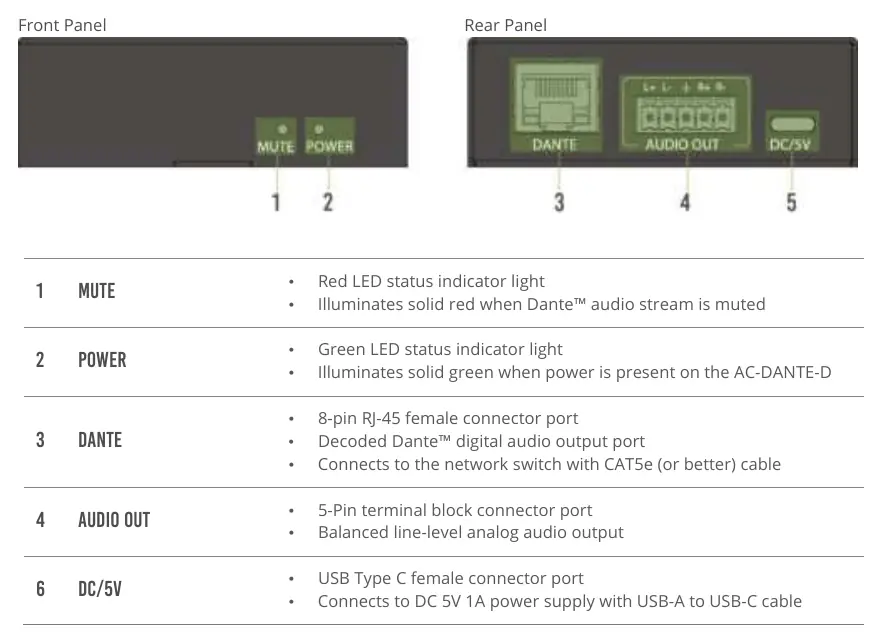
The unit includes the AC-DANTE-D decoder, a 5V 1A USB power adapter, a USB-A to USB-C cable, a 5-pin terminal block, and mounting hardware. The front panel features MUTE and POWER LED indicators. The rear panel contains the DANTE RJ-45 port, AUDIO OUT 5-pin terminal block, and the DC/5V power input.
Installation
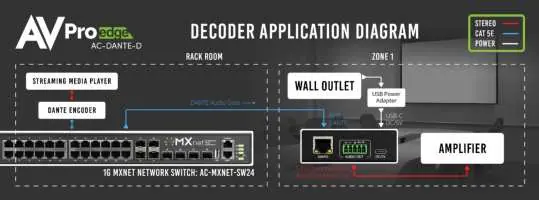
To install the device, connect the provided USB-A to USB-C cable to the DC/5V port and plug it into a power outlet. Connect your audio output device to the AUDIO OUT port. Connect a CAT5e or better cable from the DANTE port to your network switch. Ensure the computer running Dante Controller is also connected to the same network.
Wiring
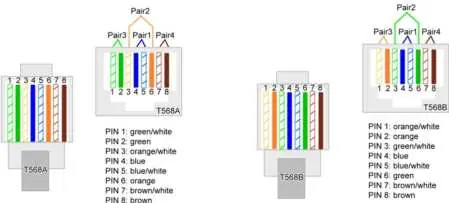
The DANTE port uses standard RJ-45 connections. Wiring should follow TIA/EIA T568A or T568B standards for maximum performance. The AUDIO OUT port provides 2-channel balanced audio. It can be converted to unbalanced (L/R) audio using a custom cable or a pre-made 5-pin to RCA adapter.
Device Configuration
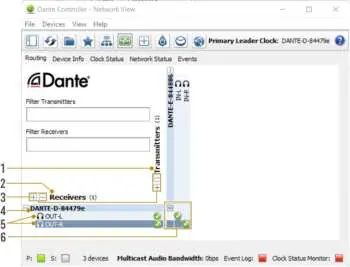
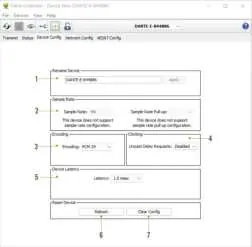
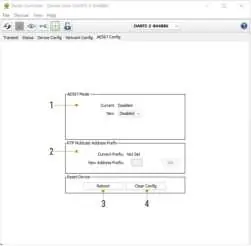
Configuration is performed via the Dante Controller software. Open the Device View by double-clicking the device name. You can configure network settings (DHCP or static IP), sample rates (44.1, 48, 88.2, 96 kHz), bit depths (16, 24, 32), and device latency. The AES67 Config tab allows for enabling AES67 multicast flows for non-Dante devices.
Troubleshooting and Maintenance
If the device is not working, verify the power supply is outputting 5V, check all cable connections, and ensure the source device is powered on and not muted. Clean the unit only with a soft, dry cloth. Do not use alcohol or solvents. If the device is damaged, exposed to moisture, or dropped, it should be serviced by qualified personnel.
Practical help
Common problems
No power or LEDs not illuminating
Ensure the provided 5V 1A power supply is connected and the outlet is active.
Dante Controller does not discover the device
Ensure both the computer and the AC-DANTE-D are physically connected to the same Dante network.
No audio output
Check that the Dante stream is subscribed in Dante Controller and that the source device is not muted.
LEDs on DANTE port not illuminating
Verify cable length is under 100 meters, ensure direct connection to the switch, and re-terminate cable ends if necessary.
Before use
- Verify you have the 5V 1A power adapter and USB-A to USB-C cable.
- Ensure you have CAT5e or better network cabling.
- Install the latest version of Audinate Dante Controller software on your computer.
- Ensure the audio output device is powered on and ready.
Show more Show less
Specs in practice
- Frequency Response
- 20-20kHz, the range of audio frequencies the device can reproduce.
- Analog Output Voltage
- 1VRMS (2.828VP-P) at 0 dBFS, indicating the signal level.
- Supported Sample Rates
- 44.1kHz, 48kHz, 88.2kHz, 96kHz, defining the digital audio resolution.
Images and diagrams
- T568A/T568B wiring diagrams show the correct pinout for RJ-45 cables.
- The application diagram illustrates the signal flow from a streaming media player through a network switch to the AC-DANTE-D and finally to an amplifier.
Model compatibility
- Does not support PoE; must be powered locally.
- Does not downmix audio; outputs 2-channel balanced audio.
- Compatible with AES67 multicast reception.

Manual page author
Michael Turner
Technical manual editor