Home Appliances / Small Kitchen Appliances
User Manual for Bartscher 1.5LD Water Kettle
Quick guide for the Bartscher 1.5LD water kettle. Learn how to operate, set temperatures, clean, and descale your appliance safely.
Table of contents
Manual images
Click an image to enlargeQuick guide from the manual
This Bartscher 1.5LD water kettle is designed for heating and keeping water warm. Before first use, it is recommended to boil fresh water twice to remove any production residues. Always ensure the kettle is placed on a stable, heat-resistant surface and never operate it without water or below the minimum fill level. The device features a dry-run protection system that automatically switches off the kettle if it is empty.
Product Overview
The kettle consists of the main water container, a base plate with power cable, and a control panel located on the handle/body. Key components include the spout, lid release button, and the base plate with cable storage.
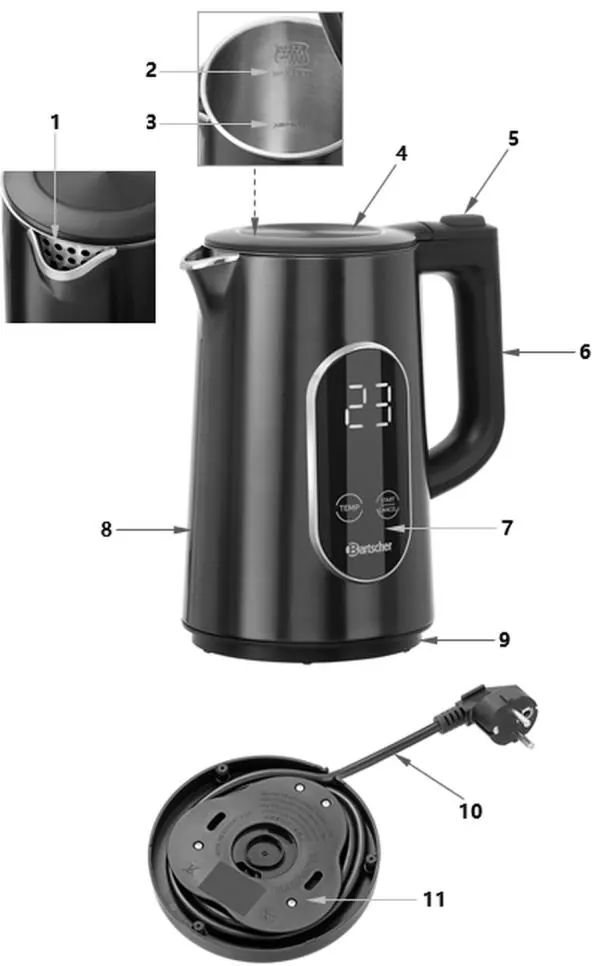
Installation
- Unpack the device and remove all packaging materials and protective films.
- Place the kettle on a flat, heat-resistant, and stable surface.
- Ensure there is a minimum distance of 10 cm from flammable walls or objects.
- Connect the base plate to a properly grounded, single power outlet. Do not use extension cords or power strips.
- Ensure the power cable is positioned to prevent tripping.
Operation
The kettle features touch controls for temperature selection and operation.
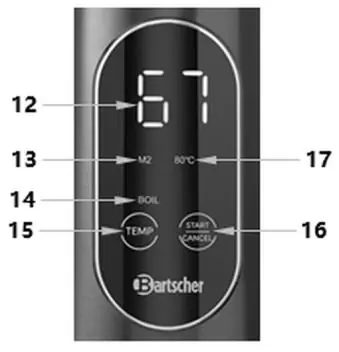
- Switching on: Touch the START/CANCEL field briefly to activate the display.
- Boiling: Press START/CANCEL again. The display will show 100°C, and the BOIL indicator will flash. The kettle will heat the water and switch off automatically once finished.
- Temperature Modes: You can select between three temperature modes: M1 (40°C), M2 (80°C), and M3 (90°C).
- Selecting Temperature: After activating the display, touch the TEMP field to cycle through the modes (M1, M2, M3). The selected mode will flash. If no further action is taken, the kettle starts automatically after a few seconds, or you can press START/CANCEL to begin immediately.
- Keep Warm Function: To keep water warm for one hour, select a temperature mode (M1, M2, or M3) and then touch and hold the TEMP field for approximately 3 seconds until the BOIL indicator disappears and the WARM indicator lights up.
Cleaning and Descaling
- Daily Cleaning: Rinse the water container thoroughly with fresh water. Wipe the exterior and base plate with a soft, damp cloth.
- Descaling: Regular descaling is essential to prevent long heating times and damage. Use a suitable descaler (e.g., Bartscher liquid or granulate).
- Descaling Process: Fill the kettle with water and descaler, boil the solution, let it sit, then discard. Rinse thoroughly with fresh water multiple times, boiling and discarding the water to ensure all residues are removed.
Safety Instructions
- Never touch hot surfaces; use the handle.
- Do not open the lid during operation to avoid steam burns.
- Keep the device away from children.
- Do not immerse the kettle or base in water.
- If the device is damaged, do not use it and contact customer service.
Manufacturer information
Bartscher GmbH
Practical help
Common problems
Device does not heat
Check the power connection. If the dry-run protection has triggered, remove the kettle from the base, let it cool down, and refill with water.
Long heating times
This is often caused by limescale buildup. Descale the device regularly.
Before use
- Remove all packaging and protective films.
- Place the kettle on a stable, heat-resistant surface.
- Boil fresh water twice to remove production residues.
- Ensure the power supply matches the rating plate specifications.
- Check that the water level is between the MIN and MAX markings.
Specs in practice
- Temperature Range
- 40°C - 100°C (4 levels)
Images and diagrams
- The parts diagram identifies the spout, lid, lid release button, handle, control panel, and base plate.
- The control panel diagram shows the display, temperature mode indicators (M1, M2, M3), and touch fields for TEMP and START/CANCEL.
Model compatibility
- Use only with the provided base plate.
- Not suitable for permanent commercial use.

Manual page author
David Miller
Documentation analyst
Organizes user manual content into clear summaries, with attention to model details, product context, and everyday usability.