Software / Apps Services
Beghelli 12128C Central Logica Compact SD LGFM Control Unit Instruction Manual
Quick guide for the Beghelli 12128C Central Logica Compact SD LGFM control unit. Includes wiring instructions, system setup via B.connect app, manual configuration, test commands, and status LED indicators.
Table of contents
Quick guide from the manual
The Beghelli 12128C Central Logica Compact SD LGFM is a control unit designed for managing emergency lighting systems. It supports up to 256 lamps and offers connectivity via WiFi, Ethernet, and RS485. Configuration can be performed via the B.connect app or manually using the onboard interface.
Wiring
The unit requires a power supply of 85-265Vac 50/60Hz. Maximum cable cross-section is 2.5mm2. Interfaces include:
- LSSA: Auxiliary input for local network monitoring.
- Radio: 2.4GHz-2.4835GHz for Logica FM series lamps.
- RS485: For supervision (ModBus RTU, PC).
- USB: For software updates and configuration backups.
- Ethernet: For LAN, ModBus TCP, and PC connection.
- WiFi: Access Point mode for local connection or Station mode for WLAN.
Central configuration via app
It is recommended to use the B.connect app (available on App Store and Google Play) for setup. The default password is 123456789. Using the app allows for advanced functions, including precise control of individual lamps, system reports, and PDF maintenance logs.
Manual system set-up
If using multiple control units, switch off lamps not intended for the current unit before starting. Press the SEL key 5 times, then press OK to enter configuration mode. The unit will then search for lamps.
Manual set-up and test commands
Use the SEL key to scroll through functions and the OK key to activate them:
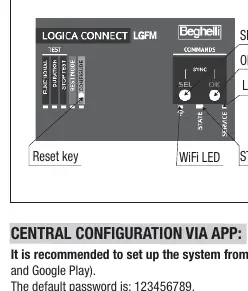
- Functional Test: Press SEL once, then OK.
- Autonomy Test: Press SEL twice, then OK.
- Stop Test: Press SEL three times, then OK.
- Rest Mode: Press SEL four times, then OK (disconnect lamps first to inhibit emergency).
Status LED indicators
- Status LED (Yellow): Unit not configured.
- Status LED (Red): Faulty appliance detected.
- Status LED (Green): System normal.
- WiFi LED: Indicates connection status (Steady: ready; Rapid flashing: local app connection; 1 flash: internet connected; 2 flashes: nuBe cloud connected).
- Ethernet LED: Steady: internet connected; Flashing: not connected.
Automatic test schedule
- Functional Test: 30 seconds, every 28 days.
- Autonomy Test: 1 hour, every 26 weeks. Even-numbered lamps perform the test one week after odd-numbered lamps.
Official resources from the manual
Manufacturer information
Beghelli S.p.A.
Practical help
Common problems
Status LED is steady yellow
The control unit is not configured; no lamps are associated.
Status LED is steady red
At least one appliance connected to the system is faulty.
Cannot inhibit emergency
Ensure lamps are disconnected before sending the REST MODE command.
Before use
- Verify power supply is 85-265Vac 50/60Hz.
- Ensure total number of lamps does not exceed 256.
- Download the B.connect app for advanced configuration.
- Switch off lamps not intended for the specific control unit before manual configuration.
- Check that the environment temperature is between 0 and 50 degrees Celsius.
Images and diagrams
- The front panel features SEL and OK keys for navigation and configuration.
- LED indicators provide real-time feedback on WiFi, Ethernet, and system status.
- Wiring terminals are located on the top and bottom of the unit for mains, output, and communication interfaces.
Model compatibility
- Radio interface is compatible with Logica FM series lamps.
- RS485 interface supports ModBus RTU protocol.
- Ethernet interface supports ModBus TCP protocol.

Manual page author
Emily Carter
User documentation editor
Prepares concise manual descriptions and highlights the most useful setup, operation, and maintenance information for readers.