Electronics / Audio
Behringer UL 1000G2-R UHF Wireless Belt Pack Receiver User Guide
Comprehensive user guide for the Behringer UL 1000G2-R UHF wireless belt-pack receiver, covering setup, operation, and technical specifications.
Table of contents
Manual images
Jump to the sectionProduct Overview
The Behringer UL 1000G2-R is a professional UHF wireless belt-pack receiver designed specifically for use with the UL 1000G2 in-ear monitoring system. This compact receiver provides high-quality audio monitoring with a working distance of up to 60 meters (200 feet). It features an integrated LCD display for monitoring channel frequency, squelch settings, and gain control, offering flexibility for both mono and stereo monitoring applications.
Getting Started
To begin using your UL 1000G2-R, ensure you have two fresh AA batteries installed in the battery compartment. Connect the supplied earphones to the 3.5 mm stereo output. Before putting on the earphones, ensure the volume is turned down to prevent potential hearing damage. The receiver is designed to work exclusively with the UL 1000G2 transmitter.
Receiver Setup and Configuration
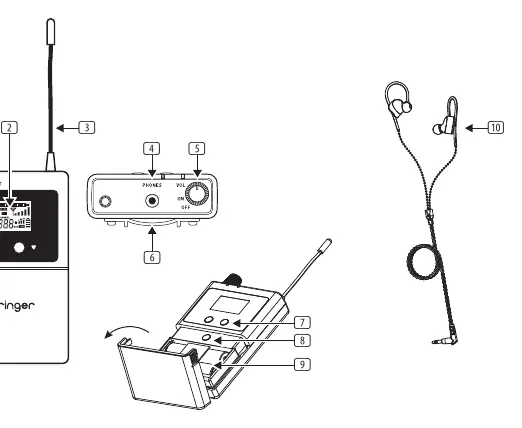
The receiver features an intuitive menu system accessible via the SET button located inside the battery compartment. Use the MENU UP/DOWN buttons to navigate and select settings. Key configuration options include:
- Frequency Group and Channel: Ensure the receiver is set to the same frequency group and channel as your transmitter for a stable connection.
- Equalizer (EQ): Enabling the EQ enhances treble frequencies at 10 kHz by 6 dB.
- Limiter (LIM): The limiter function protects your hearing by capping the audio signal level at 400 mV. It is highly recommended to keep this enabled.
- Mixer (MIX): The mixer function allows you to balance two mono signals, which is ideal for performers who need to balance their own voice against instrument tracks.
- Squelch (SQ): Adjust the squelch threshold (Low, Medium, High) to eliminate unwanted background noise and interference.
- Balance: Fine-tune the stereo image by adjusting the volume balance between the left and right channels.
Safety and Maintenance
Always handle batteries with care, ensuring correct polarity and replacing them as a set. Keep the device away from water and heat sources. If the device will not be used for an extended period, remove the batteries to prevent leakage. To protect your hearing, avoid listening at high volume levels for prolonged periods. If you experience any malfunctions, please refer to the support section on the official website for troubleshooting or warranty claims.
Manufacturer information
Behringer
Practical help
Common problems
No audio or poor signal reception
Ensure the receiver and transmitter are set to the same frequency group and channel. Check battery levels and ensure the squelch setting is not too high.
Distorted audio
Check if the Limiter (LIM) is enabled. If the signal is too hot, adjust the volume on the transmitter or receiver.
Buttons not responding
The receiver may be in LOCK mode. Press and hold the SET button for 2 seconds to temporarily disable the lock.
Before use
- Install two fresh AA batteries with correct polarity.
- Connect the supplied earphones to the 3.5 mm output.
- Turn the volume down before putting on the earphones.
- Ensure the transmitter is powered on and set to the desired frequency.
- Verify the receiver is set to the same frequency group and channel as the transmitter.
Specs in practice
- RF Frequency range
- The operating radio frequency bands (584-608 MHz / 823-832 MHz / 863-865 MHz).
- Switching bandwidth
- The range of frequencies the device can tune across (24 MHz).
- Audio Frequency range
- The range of audible frequencies the system can reproduce (70 Hz - 13.5 kHz).
Images and diagrams
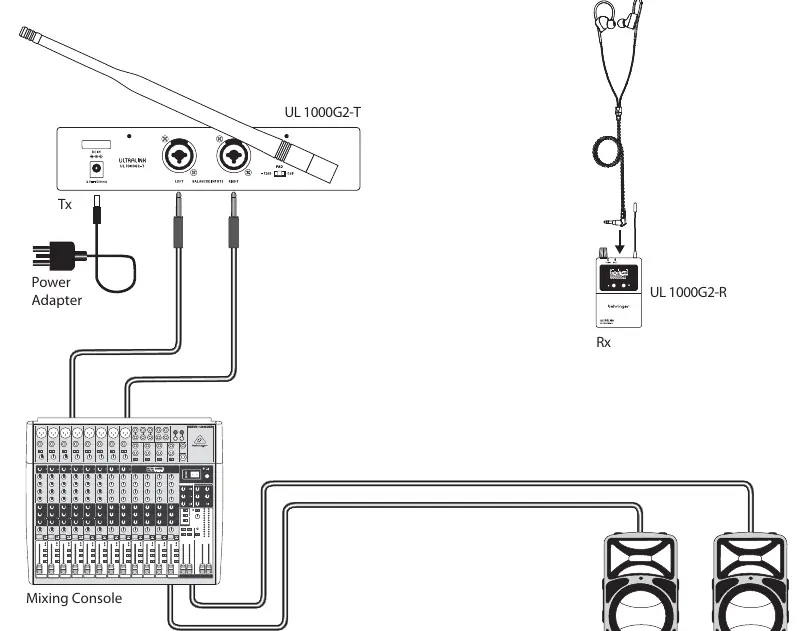
- The hook-up diagram shows the transmitter (Tx) connected to a mixing console via balanced inputs.
- The receiver (Rx) is shown with earphones connected to the 3.5 mm output.
- The controls diagram identifies the LED indicators, LCD screen, antenna, volume/power knob, and menu navigation buttons.
- The battery compartment access is shown by flipping open the cover to reach the SET button.
Model compatibility
- Designed to work exclusively with the Behringer UL 1000G2 in-ear monitoring system.
- Multiple UL 1000G2-R receivers can be used simultaneously with a single UL 1000G2 transmitter.

Manual page author
David Miller
Documentation analyst
Organizes user manual content into clear summaries, with attention to model details, product context, and everyday usability.