Electronics / USB Hubs & Docking
Magnetic Wireless Car Charger User Guide
Quick guide for the Magnetic Wireless Car Charger. Learn how to assemble the vent mount, connect the USB-C cable, and charge your iPhone 12 or newer devices safely.
Table of contents
Quick guide from the manual
This Magnetic Wireless Car Charger provides 10W fast wireless charging for compatible devices. It features a 360-degree rotating mount for optimal viewing angles. The device is compatible with iPhone 12 series and newer. For non-MagSafe devices or thick cases, an included magnetic ring must be used.
Assembly
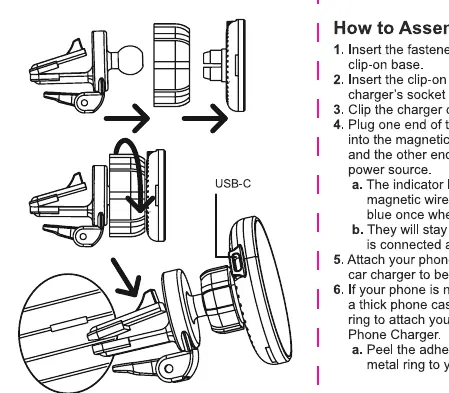
- Insert the fastener onto the ball joint of the clip-on base.
- Insert the clip-on base's ball joint into the charger's socket and tighten the fastener.
- Clip the charger onto your vehicle's vents.
- Plug one end of the USB-C charging cable into the magnetic wireless car charger, and the other end into your vehicle's USB power source.
Operation
Once connected to power, the indicator light on the side of the charger will flash blue. When you attach your phone, the light will turn solid blue, indicating that charging has begun.
Note: If your phone is not MagSafe enabled, or if you are using a thick phone case, peel the adhesive backing off the included magnetic ring and stick it to your phone or phone case to ensure a secure magnetic connection.
Specifications
- Input voltage: 9V / 1.6A
- Output power: 10W / 7.5W / 5W
- Transmission distance: ≤ 8mm
- Frequency Range: 110-205KHz
Safety Precautions
- Do not expose this unit to extreme high or low temperatures.
- Avoid exposing the device to high levels of humidity.
- Keep the charger away from children.
- This device is not a toy.
- Always unplug the charger from its power source when not in use.
- Do not attempt to modify or disassemble the device in any way.
- Stop using the charger immediately if it is damaged or has visibly exposed parts.
Manufacturer information
Belkin
Practical help
Common problems
Phone not charging
Ensure the phone is aligned correctly with the magnetic center. If using a thick case, attach the included magnetic ring to the back of the phone or case.
LED indicator not lighting up
Check that the USB-C cable is securely connected to both the charger and the vehicle's USB power source.
Before use
- Ensure your vehicle vent is compatible with the clip-on base.
- Verify you have a USB-C power source available in your vehicle.
- If your phone is not MagSafe compatible, prepare the included magnetic ring.
- Check that the phone case is not too thick (transmission distance is ≤ 8mm).
Specs in practice
- Transmission distance
- The charger works through cases up to 8mm thick.
Images and diagrams
- The assembly diagram shows the fastener being placed on the ball joint of the clip-on base.
- The diagram illustrates the connection of the USB-C cable to the charger.
Model compatibility
- Compatible with iPhone 12 series and up.
- Magnetic ring included for non-MagSafe devices or thick cases.

Manual page author
David Miller
Documentation analyst
Organizes user manual content into clear summaries, with attention to model details, product context, and everyday usability.