Power / Batteries & Chargers
User Manual for Boompods Powersnap 10 10,000mAh Magnetic Wireless Power Bank
Quick guide for the Boompods Powersnap 10 10,000mAh Magnetic Wireless Power Bank. Learn how to charge the power bank, use wireless charging, understand LED indicators, and follow safety guidelines.
Quick answers from the manual
Quick answer
- This manual provides instructions for charging the Boompods Powersnap 10 power bank and using it to charge devices via Type-C cable or wireless charging. p. 1
Key actions
- Charge the power bank: Connect a Type-C cable to the power bank. The LED will flash to indicate remaining power. p. 1
- Charge a device via cable: Connect a cable to the Type-C port. p. 1
- Charge a device wirelessly: Place the device on the magnetic wireless charging surface. p. 1
- Power on/off: Single click the button to turn on. Double-click the button to enter sleep mode. p. 1
First start
- Charge the power bank fully before first use. p. 1
Maintenance and reset
- Calibrate battery level display: Fully discharge the power bank, then charge from 0% to 100% without interruption. p. 1
Technical specifications
| Parameter | Value | Meaning | Pages |
|---|---|---|---|
| Model | powersnap 10 | Product model identifier | p. 1 |
| Capacity | 10000 mAh / 3.85V / 38.5Wh | Battery capacity | p. 1 |
| Input | Type-C port / PD18W (5V-3A, 9V-2A, 12V-1.5A) | Power bank charging input specifications | p. 1 |
| Output | Type-C port / PD20W (5V-3A, 9V-2.22A, 12V-1.67A) | Wired charging output specifications | p. 1 |
| Wireless output | 5W/7.5W/10W/15W Max | Wireless charging output power | p. 1 |
| Total output | 5V-3A (15W Max) | Maximum combined output | p. 1 |
| Dimension | 104 x 68 x 15mm | Physical size | p. 1 |
| Weight | 185g±5g | Product weight | p. 1 |
Where to find it in the PDF
- Product Diagram and Instructions p. 1
Table of contents
Quick guide from the manual
The Boompods Powersnap 10 is a magnetic wireless power bank designed for portable charging. Before first use, it is recommended to fully charge the device. The power bank features a Type-C port for both input and output, and supports magnetic wireless charging for compatible devices.
Device Overview
The device consists of the following components:
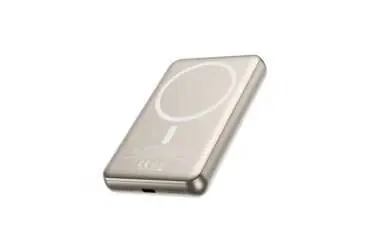
- 1: Wireless charging green light
- 2: Power LED indicator
- 3: Type-C port (Input & Output)
- 4: Power button
- 5: Magnetic wireless charging surface
Charging the Power Bank
Use a Type-C cable to connect the power bank to a computer, car charger, or wall charger. The power bank will start charging automatically. While charging, the power LED light will flash to indicate the current remaining power. Once charging is complete, you can disconnect the cable. The power bank will automatically enter sleep mode immediately.
Charging Your Device
Type-C Port Output: Use a Type-C quick charging cable to connect your device. It will start charging automatically. The power LED indicator will stay lit and show the remaining power of the power bank.
Wireless Charging Output: Place a wireless charging-compatible phone on the magnetic wireless charging surface. The charging will start automatically. During the charging process, the green wireless charging light will remain on, and the power LED will stay lit to show the remaining power of the power bank.
Power On/Off Mode
Single-click the button to turn the power bank on. Double-click the button to put the power bank into sleep mode. The power bank will enter sleep mode automatically after approximately 35 seconds when under non-loaded condition.
Safety Instructions
- Never leave a charging battery unattended.
- Do not expose the power bank to excessive humidity or liquids. Store in a cool, dry place when not in use.
- Do not damage or puncture the casing of the power bank.
- Do not expose the power bank to heat sources such as radiators, stoves, or open flames.
- If the power bank emits an odor, excessive heat, becomes discolored or deformed, discontinue use immediately.
- If the power bank is not used for three months or more, its battery capacity may temporarily decrease. This is normal and will recover after 3-4 full charge and discharge cycles.
- Calibrate the battery level display after purchasing the power bank, fully discharge it before charging it from 0% to 100% without interruption.
Technical Specifications
- Model: powersnap 10
- Capacity: 10,000mAh / 38.5Wh
- Input/Output: Type-C PD (5V-3A, 9V-2A, 12V-1.5A)
- Wireless Output: 5W / 7.5W / 10W / 15W Max
- Total Output: 5V-3A (15W Max)
- Dimensions: 104 x 68 x 15mm
- Weight: 185g
Manufacturer information
Boompods
Practical help
Common problems
Power bank enters sleep mode
Double-click the power button to wake the device.
Wireless charging not starting
Ensure your device is MagSafe compatible and correctly aligned with the magnetic surface.
Battery capacity seems low after storage
If not used for 3+ months, perform 3-4 full charge and discharge cycles to recover capacity.
Before use
- Fully charge the power bank before first use.
- Calibrate the battery level display by fully discharging and then charging to 100% without interruption.
- Ensure your device supports magnetic wireless charging.
Specs in practice
- Wireless Output
- Supports up to 15W fast wireless charging.
Images and diagrams
- The device features a single button for power control and a Type-C port for charging the bank or connected devices.
- LED indicators provide visual feedback on charging status and remaining battery level.
Model compatibility
- Wireless charging is compatible with devices supporting magnetic attachment (e.g., iPhone 12 series and later).
- The device includes protection against overcurrent, overvoltage, overcharge, and short circuits.

Manual page author
Michael Turner
Technical manual editor
Reviews PDF manuals for structure, safety notes, and practical product details so readers can find the right information quickly.