Power / Batteries & Chargers
User Manual for BOOMPODS POWERLOOP 10,000mAh Power Bank
Quick guide for the BOOMPODS POWERLOOP 10,000mAh power bank. Learn how to charge your devices, understand the LED indicators, and follow safety guidelines for optimal performance.
Quick answers from the manual
Quick answer
- To charge the BOOMPODS POWERLOOP, slide up the integrated USB-C cable and plug it into a compatible USB-C power source. The LED bar will flash while charging and turn off when fully charged. p. 1
Key actions
- Charge the power bank fully before first-time use. p. 1
First start
- Charge the device fully before first use. p. 1
Problems and fixes
Device overheating or swelling
Stop using the device immediately.
p. 1Maintenance and reset
- Maintain battery health by charging and discharging every 3 months. p. 1
Technical specifications
| Parameter | Value | Meaning | Pages |
|---|---|---|---|
| Capacity | 10,000mAh / 37Wh | Total battery capacity | p. 1 |
Where to find it in the PDF
- Product Manual p. 1
Table of contents
Manual images
Click an image to enlargeQuick guide from the manual
The BOOMPODS POWERLOOP is a 10,000mAh power bank designed for portable charging. Before using the device for the first time, ensure it is fully charged. The device features an integrated USB-C cable for convenience, eliminating the need for extra cables in many scenarios.
Device overview
The power bank consists of the following components:
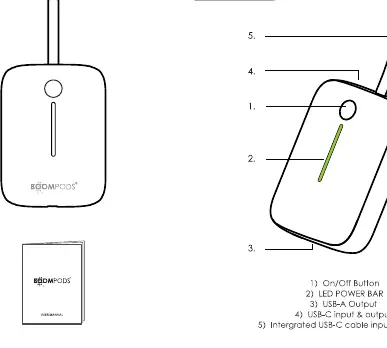
- On/Off Button
- LED POWER BAR: Indicates battery status.
- USB-A Output
- USB-C input & output
- Integrated USB-C cable
Charging the power bank
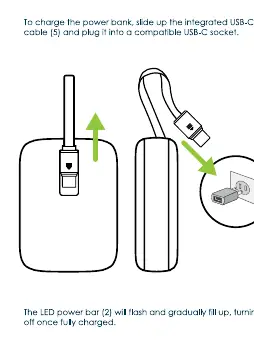
To charge the power bank, slide up the integrated USB-C cable and plug it into a compatible USB-C socket. The LED power bar will flash and gradually fill up, indicating the charging progress. It will turn off once fully charged.
Using the charge ports
The device supports fast charging through its ports:
- USB-C port: Supports input and output up to 20W (5V/3A, 9V/2A, 12V/1.5A).
- USB-A port: Supports QC3.0 fast charging up to 22.5W.
Safety and maintenance
Follow these guidelines to ensure safe operation:
- Do not disassemble the power bank shell.
- Keep the device out of reach of children.
- Avoid exposing the device to high temperatures, water, or strong magnetic environments.
- Do not leave the device on a car dashboard, as strong sunlight can cause damage.
- Use qualified charging cables and power adapters.
- Do not attempt to charge multiple devices simultaneously if it causes overheating.
- Discharge and charge the power bank at least every 3 months if it is not being used for long periods.
Technical specifications
- Capacity: 10,000mAh / 37Wh
- Dimensions: 83.3 x 61 x 26.3mm
- Weight: 193g
Manufacturer information
Boompods
Practical help
Common problems
Device not charging
Ensure the input voltage of your power source matches the power bank's requirements. Check that the cable is securely connected.
Overheating
Stop using the device immediately if it shows signs of swelling, leakage, or overheating.
Before use
- Fully charge the power bank before first-time use.
- Verify that your device's input voltage matches the power bank's output.
- Ensure the environment is dry and away from high temperatures.
Specs in practice
- USB-C Input/Output
- Supports fast charging up to 20W.
- USB-A Output
- Supports QC3.0 fast charging up to 22.5W.
Images and diagrams
- The device features an integrated USB-C cable that slides out for charging.
- The LED power bar indicates charging status by flashing and filling up.
Model compatibility
- Compatible with a wide range of mobile phones.
- Use qualified charging cables and power adapters.

Manual page author
Emily Carter
User documentation editor
Prepares concise manual descriptions and highlights the most useful setup, operation, and maintenance information for readers.