Tools / Power Tools
User Manual for Bosch GPB 18V-6 C Professional Bluetooth Speaker
Quick guide for the Bosch GPB 18V-6 C Professional Bluetooth speaker. Learn how to operate, connect via Bluetooth, use USB playback, and charge external devices.
Table of contents
Manual images
Jump to the sectionQuick guide from the manual
The Bosch GPB 18V-6 C Professional is a cordless Bluetooth speaker designed for playing audio signals from connected sources or via Bluetooth. It can be powered by Bosch 18V or 10.8V/12V Li-ion batteries or a USB-C power supply with Power Delivery (USB-PD).
Product Description
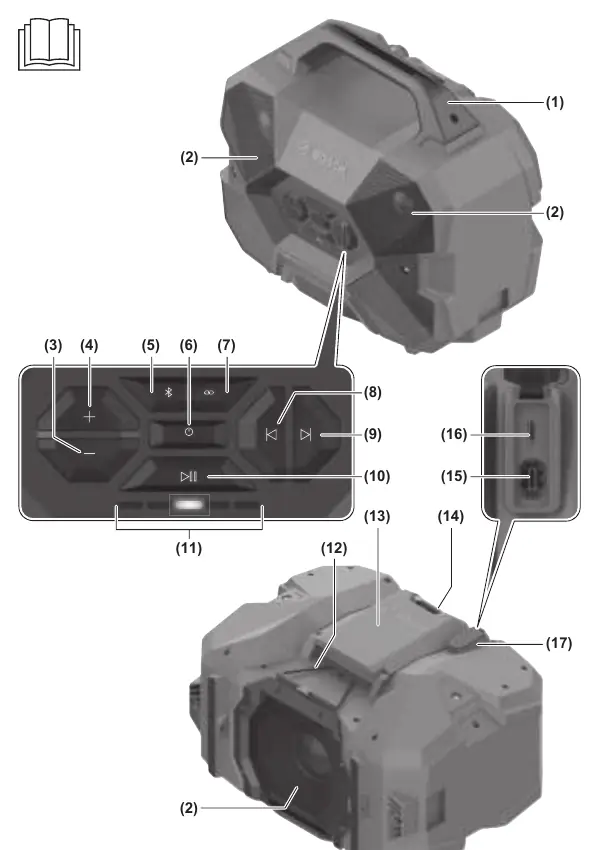
The speaker features a carrying handle, volume control buttons, Bluetooth and Multi-Speaker Sound buttons, and a connector compartment containing USB-C input and output ports. The status indicator provides information about the current audio source and battery charge level.
Power Supply
The speaker can be powered by:
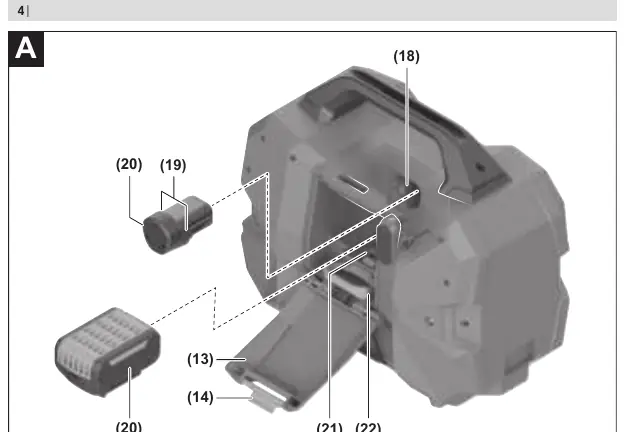
- Bosch 18V Li-ion battery
- Bosch 10.8V/12V Li-ion battery
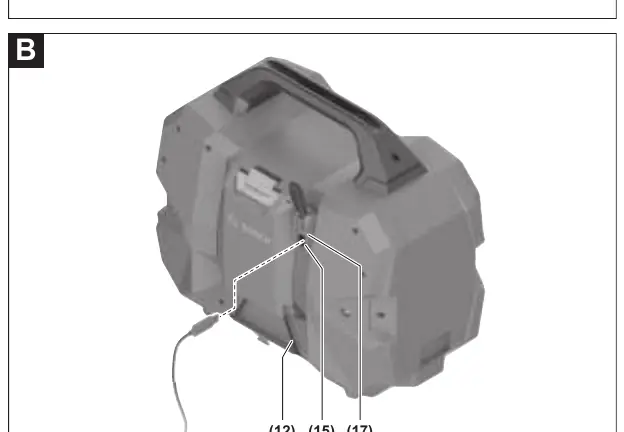
- USB Type-C power supply with Power Delivery (USB-PD)
When connected to the mains via a power supply, the speaker is powered by the mains even if a battery is inserted.
Audio Operation
Switching On/Off: Press and hold the on/off button until the status indicator LEDs light up. The speaker switches off automatically after 20 minutes if no connection is established or playback is active.
Bluetooth Operation: Playback via Bluetooth is the default setting. To connect, press and hold the Bluetooth button for more than 0.5 seconds. The speaker will appear as 'GPB 18V-6 C xxxx' on your audio source.
USB Playback: Insert a USB storage medium into the output port for external devices. The speaker will automatically switch to USB playback if the medium is readable.
Multi-Speaker Sound: This feature allows you to transmit the current playback (Bluetooth or USB) to other devices with the same feature. Press the Multi-Speaker Sound button to switch to this mode or to transmit the current playback.
Charging External Devices
The USB output port can be used to charge devices powered via USB (e.g., mobile phones). The maximum charging current is 1.5 A. The speaker must be switched on to charge external devices.
Maintenance and Cleaning
Keep the speaker clean to ensure effective and safe operation. Wipe off any dirt using a damp, soft cloth. Do not use any detergents or solvents.
Manufacturer information
Bosch
Practical help
Common problems
Speaker switches off automatically
The speaker switches off after 20 minutes if no connection is established or no playback is active. Also, check if the power supply provides sufficient power (100W recommended).
USB medium not readable
Ensure files are in MP3 format and located in the top file level or top folder of the storage medium.
Before use
- Check the speaker for any damage before use.
- Fully charge the battery before first use.
- Ensure the battery compartment cover and connector compartment cap are closed to maintain IP54 protection.
Images and diagrams
- (1) Carrying handle
- (6) On/off button
- (15) USB Input Type-C port for power supply
- (16) USB Output Type-C port for external devices
Model compatibility
- Compatible with Bosch 18V and 10.8V/12V Li-ion batteries.
- Requires USB-C power supply with Power Delivery (USB-PD) for mains operation.

Manual page author
Michael Turner
Technical manual editor
Reviews PDF manuals for structure, safety notes, and practical product details so readers can find the right information quickly.