Tools / Power Tools
Bosch GDR 18V-220 C Cordless Impact Wrench User Manual
Quick guide for the Bosch GDR 18V-220 C cordless impact wrench. Includes setup, operation, settings, maintenance, and troubleshooting.
Table of contents
Manual images
Jump to the sectionQuick guide from the manual
This cordless impact wrench is designed for driving and loosening screws and bolts. Always ensure the battery is charged and the correct bit is inserted before use. The tool features a 1/4" internal hexagon tool holder, a user interface for speed and mode selection, and optional Bluetooth connectivity via the GCY 42 module.
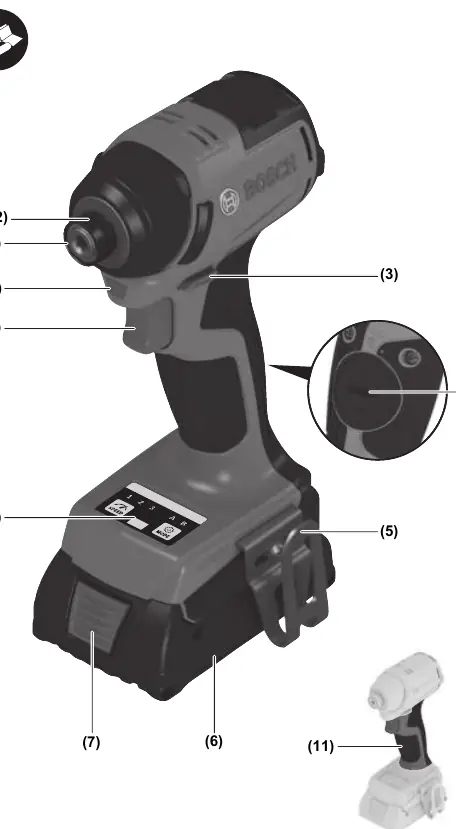
Assembly
Battery: Slide the charged battery into the holder until it clicks. To remove, press the release button and pull the battery out. Do not use force.
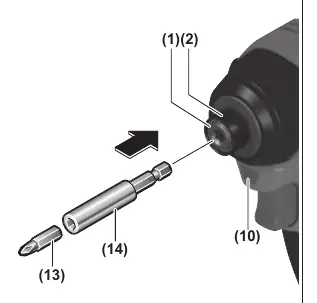
Tool Change: Insert the bit into the tool holder (1). If insertion is difficult, pull the locking sleeve (2) forward and then push the bit in until it stops. Ensure the bit is securely locked.
Operation
Direction: Use the rotational direction switch (3) to change between clockwise (right) and counter-clockwise (left) rotation. This cannot be changed while the On/Off switch (9) is pressed.
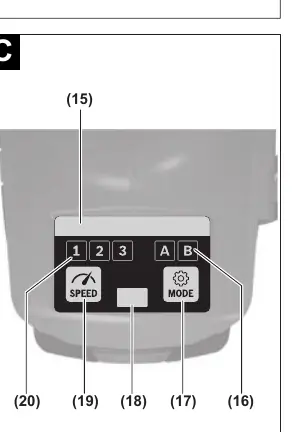
Speed/Impact Rate: Regulate the speed and impact rate by varying the pressure on the On/Off switch (9). Light pressure results in low speed; increasing pressure increases the speed.
User Interface: Use the interface (8) to preselect speed settings (19) and working modes (17). The status indicator (15) shows the tool's current state.
Maintenance
Clean the air vents regularly to prevent dust accumulation, which can cause electrical hazards. Periodically clean the tool holder (1) and locking sleeve (2). Always remove the battery before performing any maintenance or transport.
Manufacturer information
Bosch
Practical help
Common problems
Tool does not start
Check if the battery is charged or if the tool is overheated (indicated by the status light).
Tool overheated
Allow the tool to run at no load to cool down, or replace/charge the battery.
Bluetooth connection issues
Ensure the mobile device is compatible and the GCY 42 module is correctly installed.
Before use
- Ensure the battery is fully charged.
- Check that the correct bit is securely inserted into the tool holder.
- Verify the rotational direction switch is set correctly.
- Ensure the work area is well-lit.
- Check that the tool is clean and free of debris.
Specs in practice
- No-load speed
- The speed of the tool without a load, adjustable in 3 settings (0-800, 0-2300, 0-3400 min-1).
- Max. tightening torque
- The maximum force applied to the fastener, rated at 220 Nm.
Images and diagrams
- (1) Tool holder
- (3) Rotational direction switch
- (8) User Interface
- (9) On/Off switch
- (10) Worklight
Model compatibility
- Compatible with Bosch 18V batteries (GBA 18V, ProCORE18V).
- Bluetooth connectivity requires the optional GCY 42 module.

Manual page author
David Miller
Documentation analyst
Organizes user manual content into clear summaries, with attention to model details, product context, and everyday usability.