Tools / Power Tools
User Manual for Bosch Professional Cordless Impact Wrenches GDR 120-LI & GDS 120-LI
Quick guide for Bosch Professional Cordless Impact Wrenches GDR 120-LI and GDS 120-LI. Includes assembly, operation, maintenance, and technical specifications.
Table of contents
Manual images
Jump to the sectionQuick guide from the manual
This manual provides essential information for operating the Bosch Professional GDR 120-LI and GDS 120-LI cordless impact wrenches. Always read the safety instructions before use.
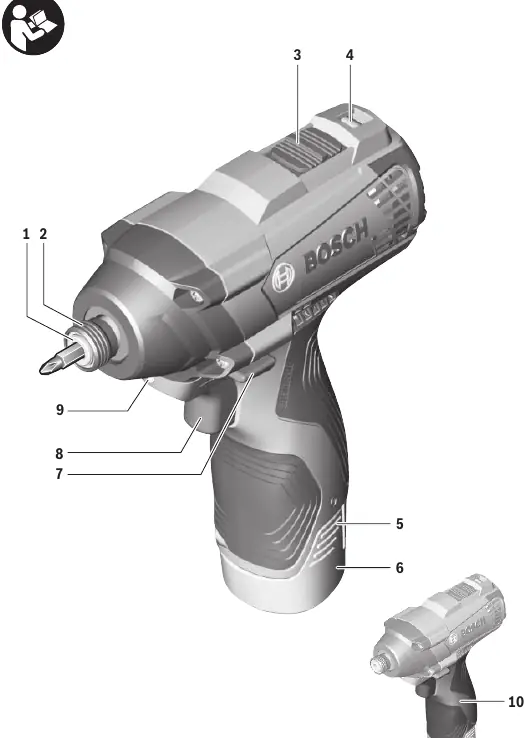
Safety Notes
General Power Tool Safety Warnings: Read all safety warnings and instructions. Failure to follow them may result in electric shock, fire, or serious injury. Keep work area clean and well-lit. Do not operate in explosive atmospheres. Use appropriate personal protective equipment.
Product Description
The tool is intended for driving in and loosening screws and bolts, as well as for tightening and loosening nuts within the specified dimension range. Features include a gear selector, rotational direction switch, and a 'PowerLight' for illuminating the work area.
Technical Data
- Rated voltage: 12V
- No-load speed: 0-1300 rpm (Setting 1), 0-2600 rpm (Setting 2)
- Impact rate: 0-1900 bpm (Setting 1), 0-3200 bpm (Setting 2)
- Max. torque (hard): 100 Nm (GDR), 105 Nm (GDS)
Assembly
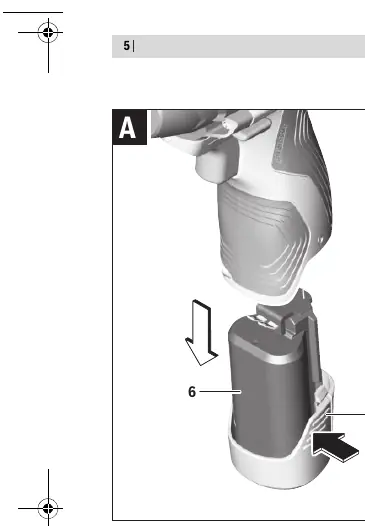
Removing the Battery: Press the unlocking buttons and pull the battery downwards out of the tool. Do not use force.
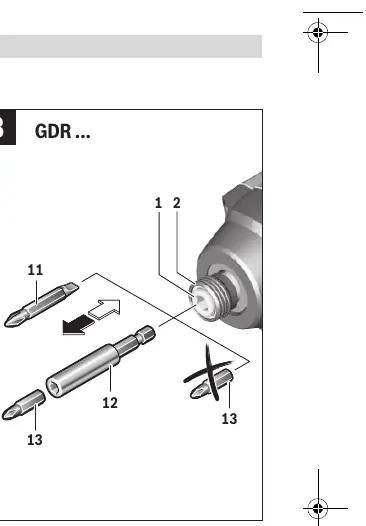
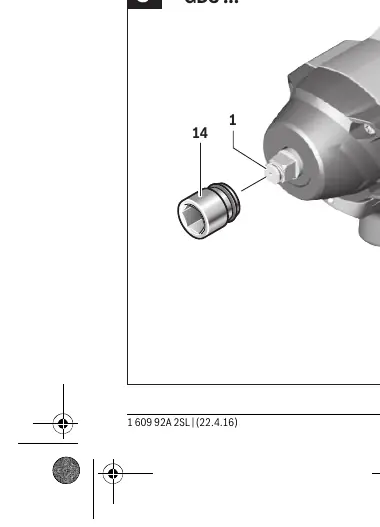
Changing the Tool: Remove the battery before any work on the machine. Regularly clean the air vents.
- GDR 120-LI: Pull the locking sleeve forward, push the insert tool into the tool holder, and release the sleeve to lock.
- GDS 120-LI: Slide the application tool onto the square drive of the tool holder.
Operation
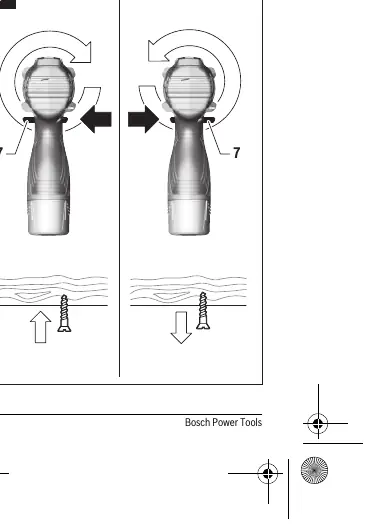
Starting Operation: Set the rotational direction switch to the center position to protect against accidental starting. Insert the charged battery from the front.
Gear Selection: Use the gear selector only when the machine is at a standstill. Gear I is for low speed (screwdriving), Gear II is for high speed.
On/Off: Press and hold the On/Off switch to start. Release to stop.
Working Advice
The torque depends on the impact duration. The maximum torque is achieved after 6-10 seconds of impact. Always check the actual tightening torque with a torque wrench.
Maintenance and Cleaning
Remove the battery before any work on the machine. Keep the tool and ventilation slots clean for safe operation.
Disposal
Power tools, batteries, accessories, and packaging should be sorted for environmentally friendly recycling. Do not dispose of power tools and batteries in household waste.
Manufacturer information
Bosch
Practical help
Common problems
Tool stops automatically
Battery is empty or overloaded. Recharge the battery or allow it to cool down.
Tool does not start
Check if the rotational direction switch is in the center position (locked).
Gear selector cannot be pushed
Lightly turn the drill chuck with the bit.
Before use
- Ensure the battery is fully charged
- Check that the correct bit or socket is securely attached
- Set the rotational direction switch to the desired direction
- Ensure the gear selector is fully engaged
Specs in practice
- Rated voltage
- 12V DC
- No-load speed
- 0-1300 rpm (Setting 1), 0-2600 rpm (Setting 2)
Images and diagrams
- Figure A: Battery removal
- Figure B: Inserting tool (GDR)
- Figure C: Inserting tool (GDS)
- Figure D: Setting rotational direction
Model compatibility
- Compatible with GBA 12V batteries
- Compatible with GAL 12.. CV chargers

Manual page author
Emily Carter
User documentation editor
Prepares concise manual descriptions and highlights the most useful setup, operation, and maintenance information for readers.