Tools / Power Tools
User Manual for Bosch GKH 18V-50 Hydraulic Cable Cutter
Quick guide and user manual for the Bosch GKH 18V-50 Hydraulic Cable Cutter. Includes operating instructions, safety warnings, maintenance, and troubleshooting.
Table of contents
Quick guide from the manual
The Bosch GKH 18V-50 is a hydraulic cordless cable cutter designed for cutting multi-wire and fine-wire aluminum and copper cables without steel reinforcement. Always wear safety goggles and keep hands away from the tool head during operation.
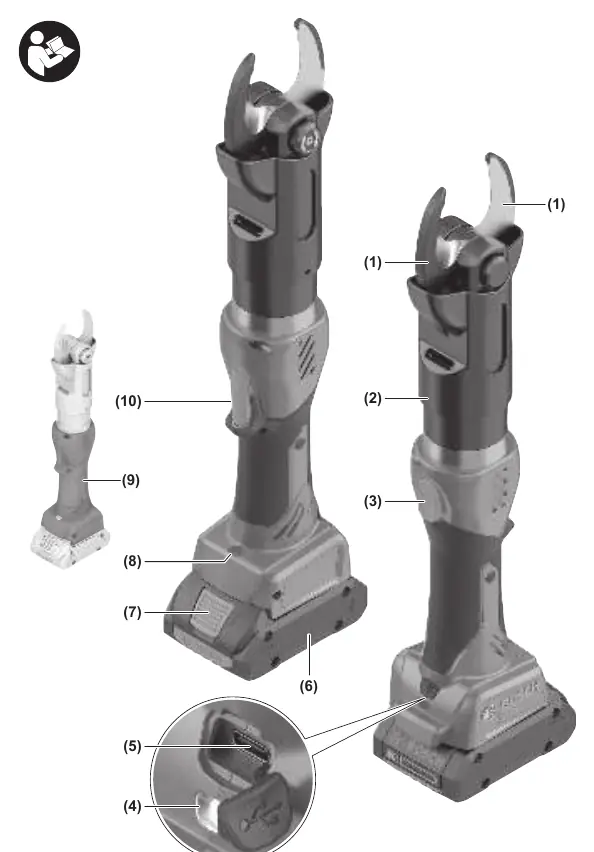
Product Description
The tool features a 360-degree rotating cutting head, a status indicator, and a USB port for data readout. It is powered by an 18V battery system.
Operation
Cutting Process:
- Insert the battery into the tool.
- Press and hold the On/Off button (10) to start the cutting process. The worklight (8) will turn on.
- Once the tool detects a complete cut, the blades (1) will open and the motor will switch off automatically.
- Release the On/Off button.
Manual Stop: To stop the cutting process prematurely, release the On/Off button. If the blades do not open automatically, press the reset button (3) until they are fully open.
Maintenance and Cleaning
Always remove the battery before performing any maintenance or tool changes. The tool requires maintenance after 20,000 work cycles or at least every 4 years. If the status indicator (4) lights up yellow continuously, the maintenance interval has been exceeded. Do not sharpen blunt blades yourself; send the tool to an authorized Bosch service center.
Troubleshooting
The status indicator (4) provides feedback on the tool's condition. A red light (3s) after inserting the battery indicates the battery is too weak or the temperature is out of range. A red light (3s) during operation indicates an incomplete cut or an internal error.
Manufacturer information
Bosch
Practical help
Common problems
Status indicator flashes red (3s) after inserting battery
Battery is too weak or temperature is outside the operating range. Charge/change battery or allow tool to reach ambient temperature.
Status indicator flashes red (3s) during operation
Incomplete cut, internal error, or temperature out of range. Restart the process, reinsert the battery, or allow the tool to cool down.
Before use
- Check that blades are clean and free of defects
- Ensure the battery is fully charged
- Verify the tool head is fully visible and clear of obstructions
Specs in practice
- System pressing force
- 50 kN
- Max. cable cutting diameter
- 40 mm
- Cutting head rotation
- 360 degrees
Images and diagrams
- (2) Cutting head
- (3) Reset button
- (4) Status indicator
- (10) On/Off button
Model compatibility
- Compatible with GBA 18V and ProCORE18V battery series

Manual page author
Michael Turner
Technical manual editor
Reviews PDF manuals for structure, safety notes, and practical product details so readers can find the right information quickly.