Electronics / Speakers Soundbars
BOSE 109L Left Earbuds User Guide
Comprehensive user guide for the BOSE 109L Left Earbuds, covering setup, Bluetooth connectivity, maintenance, and troubleshooting.
Table of contents
Manual images
Jump to the sectionProduct Overview
The Bose Sport Open Earbuds are designed for an open-ear listening experience, allowing you to enjoy audio while remaining aware of your surroundings. These earbuds feature a secure, comfortable fit and are IPX4 rated for sweat and weather resistance, making them ideal for active use.
Getting Started
To begin, download the Bose Music app on your mobile device. The app facilitates the initial setup, allows you to customize settings, select voice prompt languages, and receive software updates. Ensure your earbuds are charged using the provided charging base before first use.
Bluetooth Connectivity
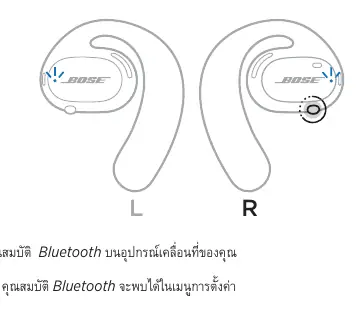
You can store up to seven devices in the earbuds' device list. To connect, power on the earbuds and press and hold the button on the right earbud for 5 seconds until you hear "Ready to connect" or see the status light blinking blue. Enable Bluetooth on your mobile device and select your Bose earbuds from the list. Once connected, you will hear a confirmation tone.
Controls and Operation
The earbuds feature intuitive controls located on the right unit for media playback and phone calls. A single press plays or pauses media, while double and triple presses skip tracks forward or backward. For calls, a single press answers or ends a call, and double presses reject incoming calls. The left earbud button is used to access voice control features on your mobile device.
Maintenance and Care
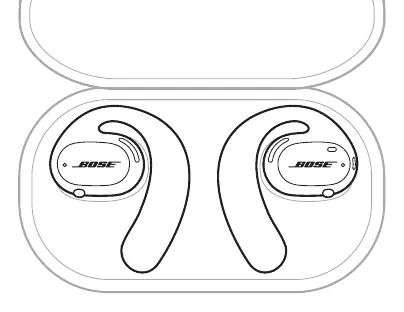
To ensure optimal battery performance, store the earbuds in the charging base when not in use. Use the provided carry case for protection during travel. Clean the earbuds and charging base regularly using a soft, dry cotton swab. Avoid using harsh chemicals, solvents, or sprays. If the earbuds are exposed to water, hold them by the ear hook and shake them to remove excess moisture.
Troubleshooting
If you encounter issues, first ensure the earbuds are powered on and charged. Check the status light indicators to diagnose connectivity or battery issues. If problems persist, try clearing the device list by holding the right earbud button for 10 seconds, then re-pairing. For further assistance, visit the official Bose support website.
Manufacturer information
Bose Corporation
Practical help
Common problems
Earbuds do not turn on
Ensure they are charged and, if new, that you pressed the left button followed by the right button.
Earbuds not connecting to mobile device
Clear the device list, turn Bluetooth off and on, and re-pair the device.
No sound
Ensure earbuds are powered on, within range, and that audio is playing on the source device.
Poor sound quality
Move the device closer to the earbuds and disable any audio enhancement features on the source app.
Earbuds not charging
Ensure they are correctly placed in the charging base and the USB cable is securely connected.
Before use
- Download the Bose Music app
- Charge the earbuds using the charging base
- Ensure Bluetooth is enabled on your mobile device
- Check that the earbuds are correctly positioned in the base
- Verify the earbuds are powered on
Specs in practice
- Bluetooth Range
- Up to 30 feet (9 meters).
- Device Memory
- Stores up to 7 devices in the list.
Images and diagrams
- The right earbud contains the primary control button and microphone.
- The left earbud button is dedicated to voice control access.
- Charging contacts on the earbuds must align with pins on the base.
- Status lights on the outer surface indicate connection and battery state.
Model compatibility
- Compatible with most Bluetooth-enabled mobile devices.
- Requires Bose Music app for full functionality and updates.

Manual page author
David Miller
Documentation analyst
Organizes user manual content into clear summaries, with attention to model details, product context, and everyday usability.