Electronics / Speakers & Soundbars
User Manual for Bose SoundLink Revolve+ II Bluetooth Speaker
Quick guide for the Bose SoundLink Revolve+ II Bluetooth speaker. Learn how to set up, pair via Bluetooth or NFC, use speaker controls, manage wired connections, and troubleshoot common issues.
Table of contents
Manual images
Click an image to enlargeQuick Start Guide
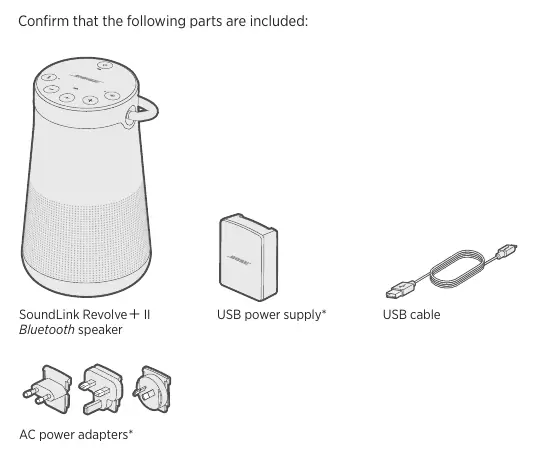
The Bose SoundLink Revolve+ II is a portable Bluetooth speaker. To get started, charge the speaker using the provided USB cable and power supply. Download the Bose Connect app on your mobile device to manage Bluetooth connections, update software, and customize settings. Ensure the speaker is placed on its base for optimal sound quality.
Power and Charging
The speaker ships with a partial charge. Connect it to an AC outlet using the provided USB cable and power supply to activate the battery. The battery light blinks amber while charging and glows green when fully charged. To check the battery level, press and hold the Power button for three seconds.
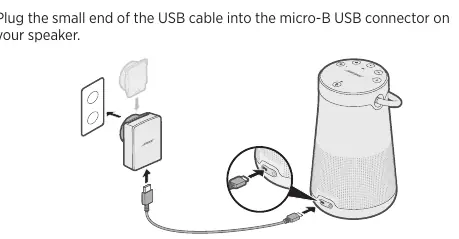
Battery Protection Mode: If the speaker is unplugged and unused for more than three days with less than 10% charge, it enters battery protection mode. Connect to AC power to reactivate.
Auto-off: The speaker powers off after 20 minutes of inactivity. To disable this, press and hold the + and Input mode buttons simultaneously.
Speaker Controls
The top button pad allows you to control playback and calls:
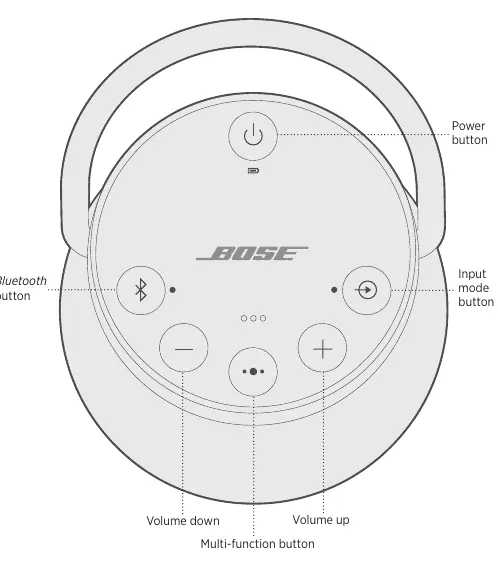
- Power: Press to turn on/off.
- Bluetooth: Press to pair or switch devices.
- Input mode: Switch between Bluetooth, AUX, and USB audio.
- Volume +/-: Adjust volume levels.
- Multi-function button: Controls play/pause (single press), skip forward (double press), skip backward (triple press), and phone calls.
Bluetooth and Wired Connections
Bluetooth Pairing: Turn on Bluetooth on your mobile device and select the speaker from the list. Alternatively, use NFC by tapping your device to the top center of the speaker (Bose logo).
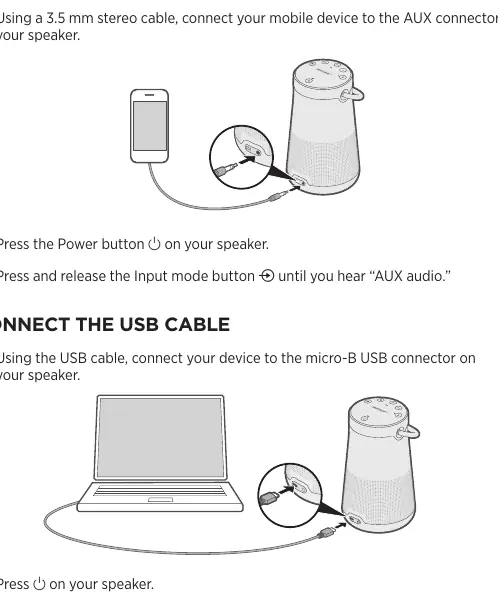
Wired Connections: You can connect devices via the 3.5 mm AUX connector or the micro-B USB connector. Press the Input mode button until you hear the corresponding audio source.
Pairing Bose Products
You can pair two SoundLink speakers for Party mode (unison) or Stereo mode (left/right channels). Use the Bose Connect app for the easiest setup. Alternatively, use the speaker buttons to pair manually by holding the Bluetooth and Volume Up buttons on the first speaker, then Bluetooth and Volume Down on the second.
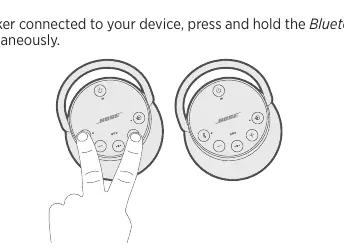
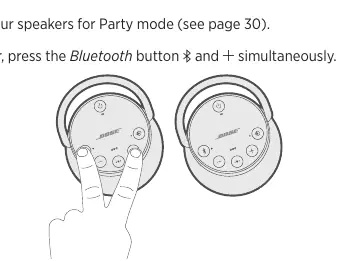
SimpleSync: You can pair the speaker with a Bose Home Speaker or Soundbar using the Bose Music app to play audio in multiple rooms.
Speaker Status
The lights on the top of the speaker indicate the system state:
- Battery light: Indicates charge level (Green/Amber/Red).
- Bluetooth light: Indicates connection status (Blue/White).
- Input light: Indicates active wired connection.
Care and Maintenance
Clean the surface with a soft, damp cloth (water only). Do not use sprays, solvents, chemicals, or cleaning solutions containing alcohol, ammonia, or abrasives. Ensure no liquids spill into openings.
Troubleshooting
If you experience issues, try these steps first:
- Check the battery light and charge if necessary.
- Secure all cables.
- Check status lights.
- Ensure the speaker is placed according to guidelines.
- Verify your mobile device supports Bluetooth or NFC.
For persistent issues, perform a factory reset by powering on the speaker and holding the Power button for 10 seconds.
Manufacturer information
Bose Corporation
Practical help
Common problems
No power
The battery may be in protection mode or discharged. Connect the speaker to AC (mains) power.
Battery does not charge
Ensure you are using the Bose-provided USB cable and power supply. Try a different USB cable or power source.
Speaker does not pair with mobile device
Turn Bluetooth off and on on your device. Remove the speaker from your device's Bluetooth list and pair again. Clear the speaker's pairing list by holding the Bluetooth button for 10 seconds.
No sound from cabled device
Increase volume on both the speaker and the device. Press the Input mode button until the Input light glows white.
Before use
- Charge the speaker using the provided USB cable and power supply.
- Download the Bose Connect app for easier setup and management.
- Ensure the speaker is placed on its base for optimal sound quality.
- Check that your mobile device supports Bluetooth or NFC.
- Ensure the speaker is within 30 ft (9 m) of the source device.
Specs in practice
- Input Voltage
- 5V DC
- Input Current
- 1.6A
- Bluetooth Range
- 30 ft (9 m)
Images and diagrams
- The top panel features the Power button, Bluetooth button, Input mode button, Volume up/down buttons, and the Multi-function button.
- The rear of the speaker contains the micro-B USB connector and the 3.5 mm AUX connector.
Model compatibility
- Compatible with Bose Home Speaker family via SimpleSync technology.
- Supports Party mode and Stereo mode with other Bose SoundLink Bluetooth speakers.

Manual page author
Emily Carter
User documentation editor
Prepares concise manual descriptions and highlights the most useful setup, operation, and maintenance information for readers.