Electronics / Speakers & Soundbars
User Manual for Bose Wireless Mic/Line and Instrument Transmitter
Quick guide for the Bose Wireless Mic/Line (469M) and Instrument (469G) transmitters. Includes setup, charging, pairing, safety, and technical specifications.
Table of contents
Quick Start Guide
Follow these steps to set up and use your Bose Wireless Transmitter:
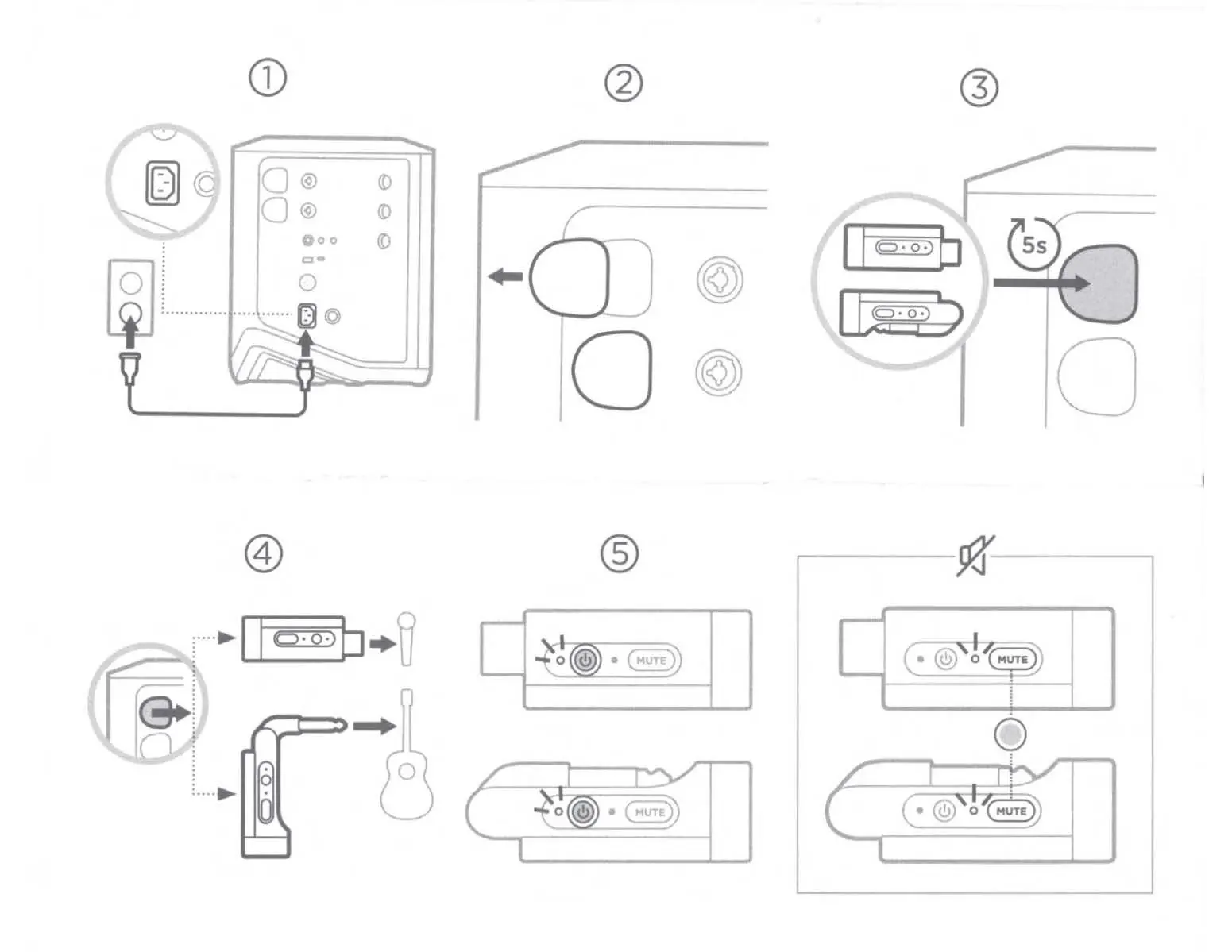
- Charging: Connect the transmitter to the Bose S1 Pro+ Wireless PA System to charge.
- Insertion: Insert the transmitter into the designated slot on the PA system.
- Pairing: Press and hold the button on the transmitter for 5 seconds to initiate pairing.
- Connection: Connect the transmitter to your microphone or instrument as required.
- Mute Function: Use the Mute button on the device to silence the signal when needed.
Safety Instructions
To ensure safe operation, please adhere to the following guidelines:
- Do not use the apparatus near water.
- Clean the device only with a dry cloth.
- Keep the product away from fire and heat sources.
- Do not place naked flame sources, such as lighted candles, on or near the product.
- Refer all servicing to qualified personnel if the apparatus has been damaged, exposed to liquid, or dropped.
Regulatory and Legal Information
This equipment has been tested and complies with the limits for a Class B digital device, pursuant to Part 15 of the FCC Rules. It is designed to provide reasonable protection against harmful interference in a residential installation. If interference occurs, try reorienting the receiving antenna, increasing separation between equipment, or connecting to a different circuit.
Technical Specifications
- Input Rating: 3.5 - 6.45V, 300mA
- Battery Capacity: 530mAh
- Charging Temperature Range: 32°F - 113°F (0°C - 45°C)
- Discharging Temperature Range: -4°F - 140°F (-20°C - 60°C)
Battery and Disposal
Do not attempt to remove the rechargeable lithium-ion battery from this product. Contact your local Bose retailer or other qualified professional for removal. Dispose of used batteries properly according to local regulations and do not incinerate.
Manufacturer information
Bose Corporation
Practical help
Common problems
Radio or TV interference
Reorient or relocate the receiving product or antenna, increase separation between the equipment and receiver, or connect the equipment into an outlet on a circuit different from that to which the receiver is connected.
Device not operating normally
Check if the apparatus has been damaged, exposed to liquid, or dropped. Refer all servicing to qualified personnel.
Before use
- Ensure you are using the Bose S1 Pro+ Wireless PA System or an agency-approved LPS power supply.
- Verify the device is not near water or heat sources.
- Check that the battery is charged within the specified temperature range (0°C - 45°C).
- Ensure no unauthorized alterations have been made to the product.
Specs in practice
- Input Rating
- 3.5 - 6.45V, 300mA required for proper power supply.
- Battery Capacity
- 530mAh internal rechargeable lithium-ion battery.
- Charging Temperature
- Must be between 32°F - 113°F (0°C - 45°C).
- Discharging Temperature
- Operational range is -4°F - 140°F (-20°C - 60°C).
Images and diagrams
- Step 1: Charging the transmitter via the Bose S1 Pro+ system.
- Step 2: Inserting the transmitter into the system.
- Step 3: Pairing the transmitter by holding the button for 5 seconds.
- Step 4: Connecting the transmitter to a microphone or instrument.
- Step 5: Using the Mute function.
Model compatibility
- Compatible with Bose S1 Pro+ Wireless PA System.
- If not using the PA system, must use an agency-approved LPS power supply meeting local regulatory requirements (e.g., UL, CSA, VDE, CCC).

Manual page author
David Miller
Documentation analyst
Organizes user manual content into clear summaries, with attention to model details, product context, and everyday usability.