Electronics / Speakers & Soundbars
Bose Sport Open Earbuds User Guide
Quick start guide for Bose Sport Open Earbuds. Learn how to connect via Bluetooth, wear them correctly, use controls, charge, and troubleshoot common issues.
Table of contents
Manual images
Click an image to enlargeQuick guide from the manual
To get started with your Bose Sport Open Earbuds, download the Bose Music app to set up and connect your device. Ensure the earbuds are charged using the provided charging base. For the best experience, follow the in-app instructions for initial setup and firmware updates.
Product Overview
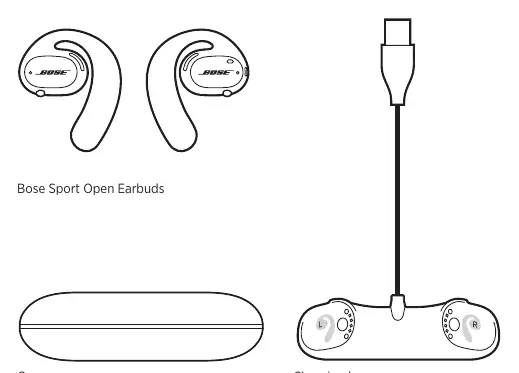
The package includes the Bose Sport Open Earbuds, a charging base, and a carry case. Ensure all components are present before use.
Wearing Instructions
Proper fit is essential for comfort and stability:
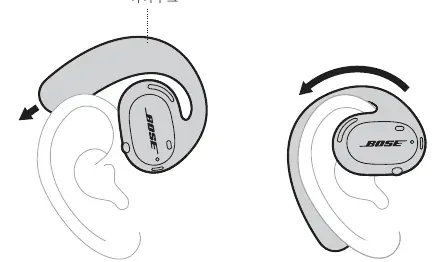
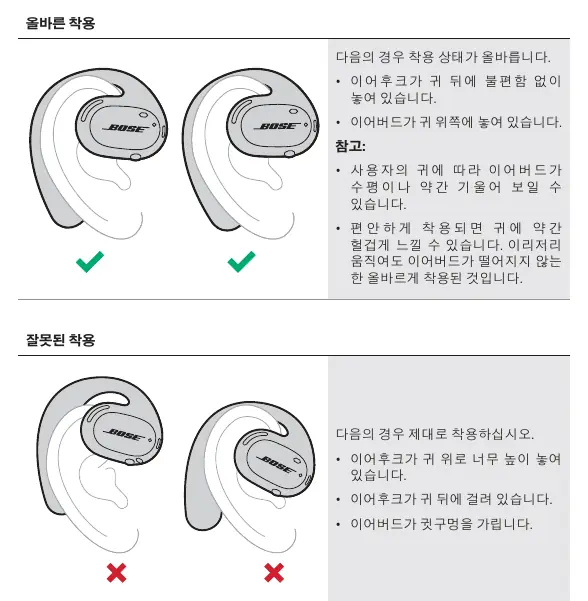
- Slide the ear hook behind your ear and rotate it backward until it rests comfortably above your ear.
- The earbud should rest on the upper part of your ear.
- Check the L (left) and R (right) markings on the inner surface of each earbud to ensure they are worn on the correct ear.
- If you wear glasses, remove them before putting on the earbuds, then put them back on once the earbuds are secure.
Power
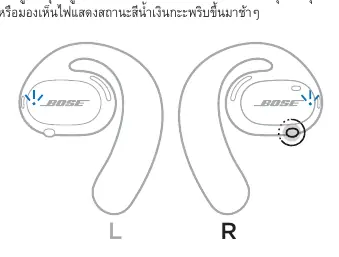
To turn on the earbuds, press the button on the right earbud. The status light will blink white twice. To turn off, press and hold the button on the right earbud for 1 second. The earbuds feature an auto-off function to conserve battery when not in use.
Controls
The right earbud controls media and calls:
- Play/Pause: Press the button once.
- Skip Forward: Press the button twice.
- Skip Backward: Press the button three times.
- Answer/End Call: Press the button once.
- Decline Call: Press the button twice.
The left earbud button is used to access voice control features on your mobile device.
Battery
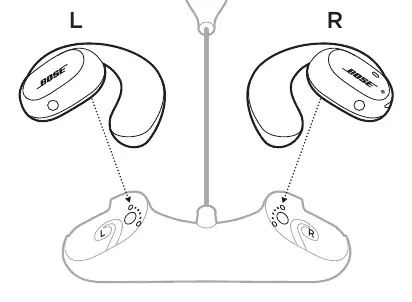
To charge, align the charging contacts on the earbuds with the pins on the charging base. The earbuds will magnetically snap into place. The status light will blink white while charging and turn solid white when fully charged.
Maintenance
Clean the earbuds and charging base using a dry, soft cotton swab. Do not use sprays, solvents, or chemicals. If the earbuds get wet, hold the ear hook and shake them to remove excess water.
Troubleshooting
If you experience issues, try these steps first:
- Ensure the earbuds are turned on and charged.
- Check the status lights.
- Ensure your mobile device supports Bluetooth and is within range (9m).
- Use the Bose Music app to check for software updates.
- Restart your mobile device or try connecting a different device.
Manufacturer information
Bose Corporation
Practical help
Common problems
Earbuds do not turn on
Ensure they are charged and have reached room temperature if previously exposed to extreme temperatures.
Earbuds do not connect to mobile device
Turn Bluetooth off and on again on your device, delete the earbuds from the Bluetooth list, clear the earbud device list, and try connecting again.
No sound
Ensure earbuds are on, volume is up, and they are within range of the device.
Microphone not picking up sound
Ensure the microphone is not muted or blocked.
Before use
- Charge the earbuds using the charging base
- Download the Bose Music app
- Ensure Bluetooth is enabled on your mobile device
- Check the L/R markings for correct ear placement
Specs in practice
- Bluetooth Range
- Up to 9 meters (30 feet).
Images and diagrams
- Earbud L/R identification markings
- Charging base pin alignment
- Button locations on right earbud for media/calls
- Button location on left earbud for voice control
Model compatibility
- Requires Bose Music app for optimal setup and features
- Compatible with most Bluetooth-enabled mobile devices

Manual page author
David Miller
Documentation analyst
Organizes user manual content into clear summaries, with attention to model details, product context, and everyday usability.