Baby / Children Products
User Manual for Bright Starts Winnie the Pooh Classic Pals Milestone Swing 17242-MEES
Quick guide for the Bright Starts Winnie the Pooh Classic Pals Milestone Swing (17242-MEES). Includes assembly instructions, safety warnings, battery installation, and operation guide.
Table of contents
Manual images
Click an image to enlargeImportant Safety Information
WARNING: Failure to follow these warnings can result in serious injury or death.
- Fall and Strangulation Hazard: Always use the restraint system and adjust to fit snugly. Stop using when the infant attempts to climb out (approx. 9 months).
- Suffocation Hazard: Never use on soft surfaces like beds, sofas, or cushions. Keep the seat fully reclined until the infant is at least 4 months old and can hold their head up.
- Usage Limits: Do not use if the child weighs less than 3kg (6 lbs) or more than 9kg (20 lbs). Do not use if the child can sit up unaided.
- Supervision: Never leave the child unattended. This product is not for sleep. If the baby falls asleep, move them to a firm, flat sleep surface like a crib.
Battery Installation
The swing control module requires (4) size C/LR14 (1.5V) alkaline batteries (not included).
- Install batteries with correct polarity as marked in the compartment.
- Do not mix old and new batteries or different types.
- Remove exhausted batteries immediately.
- Replace batteries if functions fail or operation becomes erratic (distorted sound, dim lights, slow motor).
Assembly Instructions
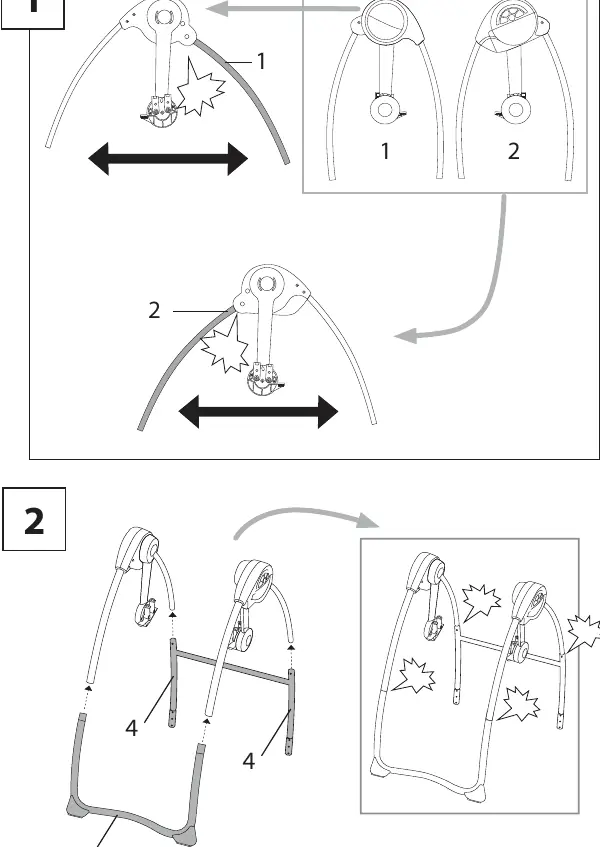
- Assemble the swing frame by connecting the left and right frame assemblies.
- Attach the front and rear foot assemblies to the frame.
- Attach the seat pad and headrest to the frame.
- Install the toy bar and toys.
Using the Swing
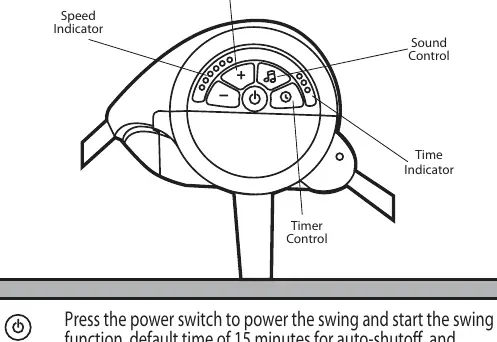
Control Module
- Power: Press the power switch to start the swing. Default time is 15 minutes, default speed is 3.
- Speed: Use the +/- buttons to select from 6 speed settings.
- Timer: Press the timer button to select 15, 20, or 30 minutes.
- Music: Use the volume control switch to adjust or turn off music.
Recline and Restraint
- Recline: Use the recline function to adjust the seat angle.
- Restraint: Always secure the child using the seat restraint system.
Care and Cleaning
- Seat pad and headrest: Remove from frame. Machine wash cold, gentle cycle. Tumble dry low.
- Toy bar and toys: Wipe clean with a damp cloth and mild soap. Air dry. Do not immerse in water.
- Frame: Wipe with a soft, clean cloth and mild soap.
Manufacturer information
Bright Starts
Practical help
Common problems
Erratic operation, distorted sound, or slow motor
Replace the batteries. Weak batteries cause these issues.
Baby's head drops forward
Ensure the seat is fully reclined until the infant is at least 4 months old and can hold their head up.
Swing stops working
Check if the timer has expired (default is 15 minutes) or if batteries need replacement.
Before use
- Ensure adult assembly is complete.
- Verify all parts are present and undamaged.
- Install 4 fresh size C/LR14 alkaline batteries.
- Ensure the swing is placed on a flat, hard floor.
- Adjust the restraint system to fit the baby snugly.
Specs in practice
- Battery Type
- 4x C/LR14 (1.5V) alkaline batteries.
- Weight Limit
- 3kg (6 lbs) minimum to 9kg (20 lbs) maximum.
- Auto-shutoff
- Default swing time is 15 minutes if no timer is set.
- Speed Settings
- 6 adjustable speed levels.
Images and diagrams
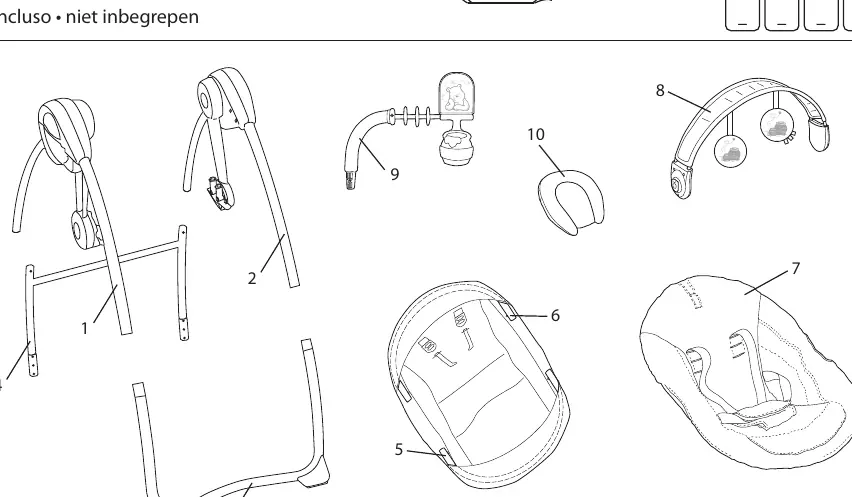
- Page 17 shows the parts list and component identification.
- Pages 18-21 provide step-by-step assembly instructions.
- Page 27 illustrates the control module buttons and indicators.
Model compatibility
- Not for use on elevated surfaces like tables.
- Not for use on soft surfaces like beds or sofas.
- Not intended for sleep; move baby to a crib if they fall asleep.

Manual page author
Emily Carter
User documentation editor
Prepares concise manual descriptions and highlights the most useful setup, operation, and maintenance information for readers.