Electronics / Trail Cameras
User Manual for Bushnell 119533CW Digital Trail Camera
Quick guide for the Bushnell 119533CW Digital Trail Camera. Learn how to install batteries and SD cards, configure settings, mount the camera, and troubleshoot common issues.
Table of contents
Manual images
Click an image to enlargeQuick Start Guide
The Bushnell 119533CW is a digital trail camera designed for outdoor wildlife monitoring. To get started, install 4 AA batteries and a compatible SD card (up to 32GB). Use the Setup menu to configure the date, time, and camera modes before mounting the device in your desired location.
Battery and SD Card Installation
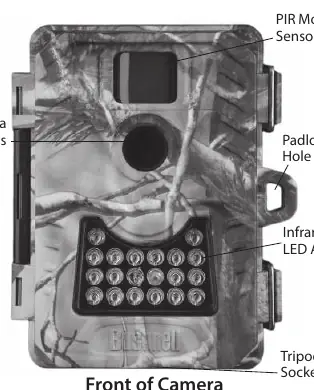
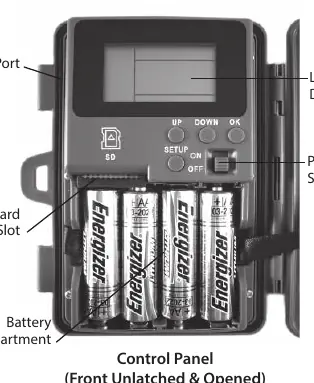
- Batteries: Use 4 AA batteries. Bushnell recommends Energizer Lithium batteries for maximum life. Do not mix old and new batteries, or different battery types. Rechargeable batteries are not recommended.
- SD Card: Insert an SD card (up to 32GB) into the slot. Ensure the power switch is in the OFF position during installation. If the card was used in another device, format it using the 'Format' option in the Setup menu.
Using the Setup Menu
Slide the power switch to the ON position to enter the Setup menu. Use the UP, DOWN, and OK buttons to navigate and change settings.
- Date/Time: Set the current year, month, day, hour, and minute.
- Delay: Set the interval (5-59 seconds or 1-10 minutes) the camera waits between triggers. Default is 10 seconds.
- Mode: Select 1P (single photo), 3P (burst of 3), or Movie mode. Set resolution (3MP, 5MP, or 8MP) or video length (5-60 seconds).
- Format: Erases all files on the SD card.
- Duty (Overwrite): When set to 'Y', the camera replaces the oldest files when the card is full. Note: Not recommended for SD cards 16GB or larger as it may slow down camera response.
Camera Operation
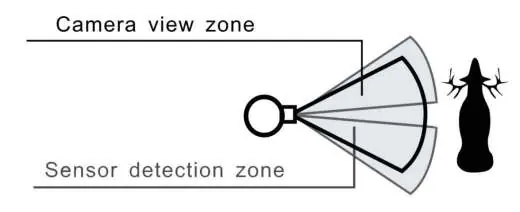
Once configured, mount the camera 4-5 feet (1.2-1.5 meters) above the ground, pointing at a slight downward angle. Avoid facing the camera east or west to prevent false triggers from the sun. Clear debris from the front of the lens and PIR sensor. Use the Setup mode to test the coverage area; the PIR indicator light will blink when motion is detected.
Viewing Photos and Videos
You can view your media by removing the SD card and using a card reader, or by connecting the camera to a computer via a USB cable. When connected via USB, the camera acts as a mass storage device. Ensure the camera is in Setup mode when connecting to a computer.
Troubleshooting
- Camera won't power up: Check battery installation and polarity. Use 4 new AA batteries.
- Camera stops taking images: Ensure the SD card is not full and the write-protect switch is not locked. Format the card if necessary.
- Night photos too dark: Ensure the subject is within the 30ft (10m) flash range. Replace batteries if low.
- Slow response: Avoid using the 'Duty' (Overwrite) setting with high-capacity SD cards (16GB+).
Technical Specifications
- Sensor: 3.0 MP Low Light Sensor (up to 8MP via interpolation).
- Night Vision: 18 IR LEDs, effective up to 40 feet (12 meters).
- Trigger Speed: 0.8 seconds.
- Power Supply: 4 AA batteries (Lithium or Alkaline).
- Storage: SD/SDHC card up to 32GB.
- Water Resistance: Weatherproof construction.
Manufacturer information
Bushnell
Practical help
Common problems
Camera won't power up
Ensure all 4 AA batteries are installed correctly with proper polarity. Use fresh, non-rechargeable batteries.
Camera stops taking images
Check if the SD card is full or if the write-protect switch is in the lock position. Format the card if it was used in another device.
Night photos appear too dark
Ensure the subject is within the 30ft (10m) range. Replace batteries, as the flash requires power.
Camera responds slowly or misses triggers
Disable the 'Duty' (Overwrite) setting if using an SD card of 16GB or higher.
Before use
- Install 4 new AA batteries (Lithium recommended).
- Insert a compatible SD card (up to 32GB).
- Format the SD card using the Setup menu if previously used in another device.
- Set the Date and Time in the Setup menu.
- Test the coverage area using the PIR indicator before final mounting.
Specs in practice
- Trigger Speed
- 0.8 seconds - the time it takes for the camera to capture an image after motion is detected.
- Duty (Overwrite)
- Allows the camera to replace old files with new ones when the card is full. Not recommended for cards 16GB or larger.
Images and diagrams
- Mount the camera 4-5 feet (1.2-1.5m) above the ground.
- Avoid facing the camera east or west to prevent false triggers from the sun.
- The PIR sensor detects motion; ensure no branches or debris block the sensor or lens.
Model compatibility
- Supports SD/SDHC cards up to 32GB.
- USB mass storage mode is not compatible with Windows 98 or earlier.

Manual page author
Emily Carter
User documentation editor
Prepares concise manual descriptions and highlights the most useful setup, operation, and maintenance information for readers.