Electronics / Cameras
Instruction Manual for Bushnell CelluCORE 20 Dual Sim Trail Camera
Quick guide for the Bushnell CelluCORE 20 Dual Sim trail camera, covering setup, battery installation, SD card requirements, mounting, and status indicator interpretation.
Table of contents
Manual images
Jump to the sectionQuick guide from the manual
This document provides essential instructions for setting up and operating the Bushnell CelluCORE 20 Dual Sim trail camera. Key requirements include using 12 AA batteries (lithium recommended) and a high-speed SD card (Class 10, up to 32GB). The camera is designed for use in the United States and North America only. Ensure you have at least two bars of cellular signal strength for optimal performance.
Camera Overview
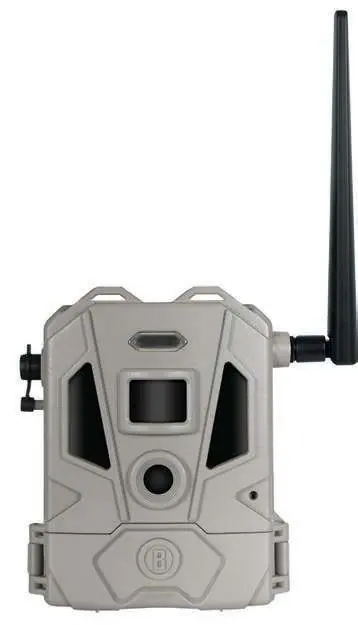
The camera features a PIR sensor, lens, LED IR flash, and a temperature sensor on the front. The control panel, located inside, includes the power switch, battery tray, SD card slot, and status indicator lights.

Quick Start Guide
- Download the Bushnell Trail Camera app on your smartphone.
- Create an account and sign in.
- Click the Camera icon, select +, and scan the QR code inside the camera or enter the serial number.
- Install 12 AA batteries, ensuring correct polarity.
- Insert a new SD card (up to 32GB).
- Power the camera on. It will automatically connect to the strongest available network (AT&T or Verizon).
Settings Menu
Settings can be managed via the mobile app. Key options include:
- Camera Mode: Image, Movie, or Hybrid (image followed by video).
- Image Resolution: Low, Medium, High.
- Video Resolution: 1280x720 or 960x544.
- PIR Delay: Time the camera ignores triggers after detection (default 10 seconds).
- Work Mode: Day, Night, or 24HRS.
- Communication Frequency: Immediately, Daily, or Weekly.
Mounting & Positioning
For best results, mount the camera on a sturdy tree or post (approx. 6 inches in diameter) at a height of 3.5 to 5 feet. The subject should be between 10 and 60 feet from the camera. Avoid aiming at heat sources or moving branches to prevent false triggers. Use the provided adjustable belt or the 1/4-20 tripod socket.

Technical Specifications
- Picture Size: Up to 20MP.
- Video Size: 720p or 544p.
- Triggering Interval: 5 seconds to 60 minutes.
- Power Supply: 12x AA batteries.
- Operating Temperature: -10 to 50 degrees Celsius.
Safety and Disposal
Do not mix old and new batteries or different brands. Lithium batteries can overheat if abused. Dispose of electronic equipment and batteries at designated community recycling points.
Manufacturer information
Bushnell
Practical help
Common problems
Camera not functioning properly or image quality issues
Check the Troubleshooting Tips section in the app or call Customer Service at (800) 423-3537.
Weak cellular signal
Power the camera off and back on to force it to re-scan for the strongest available network (AT&T or Verizon).
Red light on status indicator
Indicates 'Not Connected' or 'Flash-SD Error'. Check SD card installation and signal strength.
Before use
- Download the Bushnell Trail Camera app.
- Install 12 AA batteries (lithium recommended).
- Insert a Class 10 SD card (up to 32GB).
- Ensure the location has at least two bars of signal strength.
- Mount the camera 3.5-5 ft high, 10-60 ft from the target area.
Specs in practice
- Communication Frequency
- How often the camera transmits captured images to your account (Immediately, Daily, or Weekly).
Images and diagrams
- The camera features a detachable solar panel that can be repositioned for better sunlight exposure.
- Status indicator lights (Green/Yellow/Red) show camera status (Idle, SD Full, Not Connected) and battery life (High/Middle/Low).
Model compatibility
- Designed for operation and sale only within North America.
- Requires an active data plan for each camera to transmit images.
- Videos are stored on the SD card and cannot be transmitted wirelessly.

Manual page author
Emily Carter
User documentation editor
Prepares concise manual descriptions and highlights the most useful setup, operation, and maintenance information for readers.