Electronics / Cameras
Celestron Kids 60x-120x Pocket Microscope
Quick guide for the Celestron Kids 60x-120x Pocket Microscope (Model 44116). Learn how to install the battery, adjust magnification, focus, and use the LED illumination safely.
Table of contents
Manual images
Click an image to enlargeQuick guide from the manual
This guide provides essential instructions for operating the Celestron Kids 60x-120x Pocket Microscope. Key operations include installing one AAA battery, placing a specimen under the objective lens, adjusting the zoom knob for magnification, and using the focus ring to sharpen the image. Always use under adult supervision.
Product overview
The microscope features a compact design with the following components:
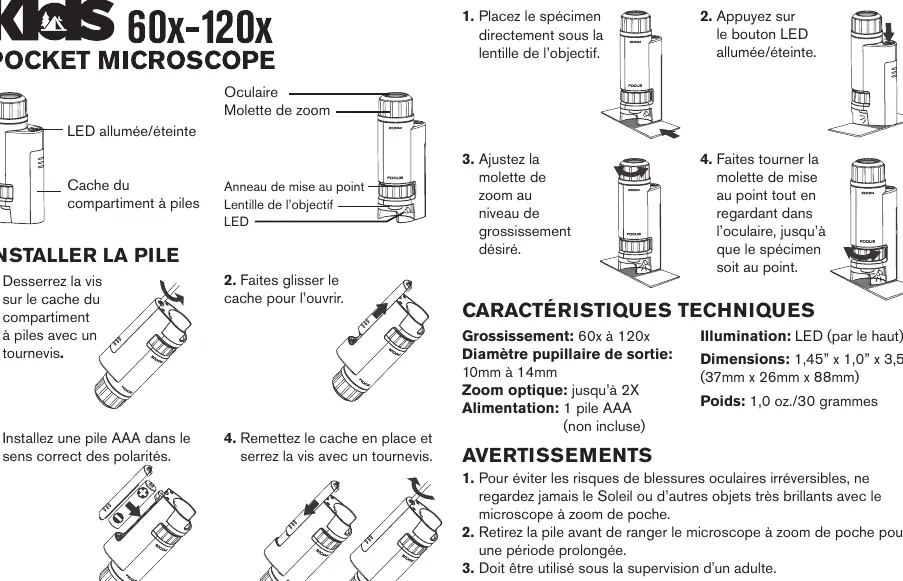
- Eyepiece: Where you look to view the specimen.
- Zoom Knob: Adjusts the magnification level (60x to 120x).
- Focusing Ring: Sharpens the image.
- Objective Lens: The lens closest to the specimen.
- LED: Provides illumination for the specimen.
- Battery Door: Located on the side of the unit.
Battery installation
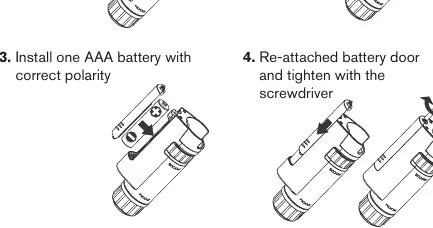
- Use a small screwdriver to loosen the screw on the battery door.
- Slide the battery door open.
- Insert one AAA battery (not included), ensuring correct polarity.
- Replace the battery door and tighten the screw with the screwdriver.
Using the microscope
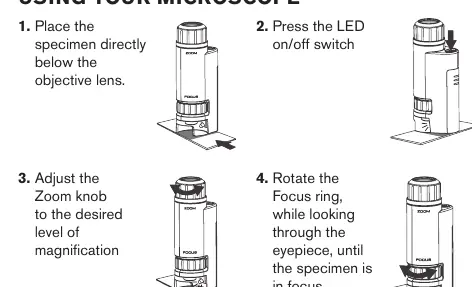
- Place the specimen directly below the objective lens.
- Press the LED on/off switch to illuminate the specimen.
- Adjust the Zoom knob to your desired level of magnification.
- Rotate the focus ring while looking through the eyepiece until the specimen is in focus.
Specifications
- Magnification: 60x to 120x
- Optical Zoom: Up to 2X
- Illumination: Top LED
- Power: 1 AAA battery (not included)
- Dimensions: 1.45 inch x 1.0 inch x 3.5 inch (37mm x 26mm x 88mm)
- Weight: 1.0 oz / 30 grams
Safety warnings
- To avoid permanent eye damage, never look at the sun or very bright objects through the microscope.
- Remove the battery before storing the microscope for an extended period.
- Use only under adult supervision.
Manufacturer information
Celestron
Practical help
Common problems
Image is blurry
Rotate the focus ring slowly while looking through the eyepiece until the image becomes clear.
LED does not turn on
Check that the AAA battery is installed with the correct polarity and that the battery door is securely closed.
Cannot see the specimen
Ensure the specimen is placed directly underneath the objective lens.
Before use
- 1 AAA battery (not included)
- Small screwdriver for the battery door
- Specimen to observe
Specs in practice
- Magnification
- The range of zoom capability from 60x to 120x.
- Illumination
- Built-in LED light located at the top to illuminate the specimen.
Images and diagrams
- The battery door is located on the side of the device.
- The zoom knob is located at the top of the eyepiece assembly.
- The focus ring is located below the zoom knob.
Model compatibility
- Designed for ages 8 and up.

Manual page author
Emily Carter
User documentation editor
Prepares concise manual descriptions and highlights the most useful setup, operation, and maintenance information for readers.