General / Accessories
Celestron StarSense Explorer LT 114AZ Telescope Setup Guide
A comprehensive setup and operation guide for the Celestron StarSense Explorer LT 114AZ telescope. Includes instructions for tripod assembly, telescope mounting, finderscope alignment, smartphone dock installation, and app activation.
Table of contents
Quick Guide from the Manual
The Celestron StarSense Explorer LT 114AZ is an astronomical telescope that utilizes a smartphone app to help locate celestial objects. Important: Never attempt to view the Sun through any telescope without a proper solar filter. Before your first night out, ensure the finderscope is aligned with the telescope's main optics during the day using a distant object (at least a quarter mile away).
Unpacking and Tripod Setup
Verify all parts are present: telescope tube, tripod with yoke mount, accessory tray, two eyepieces, 2x Barlow lens, finderscope, and smartphone dock. To set up the tripod:
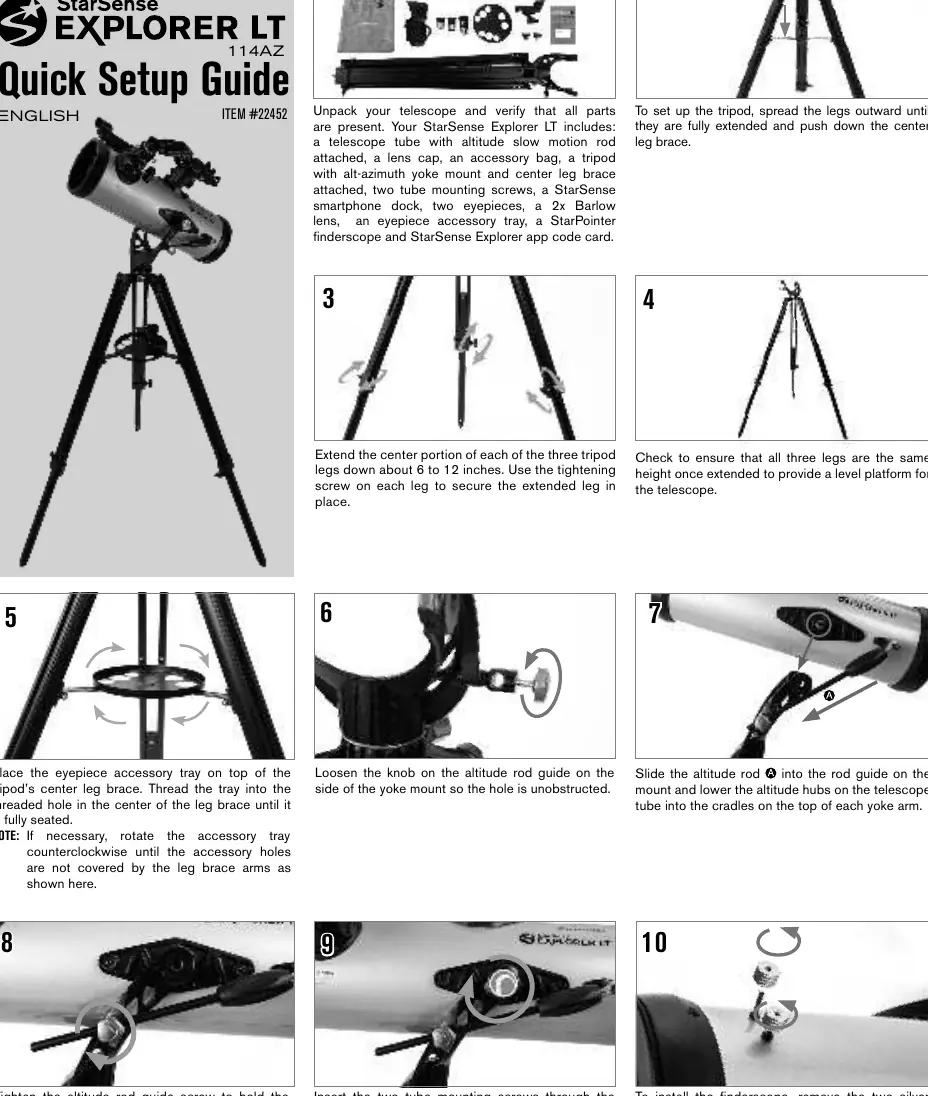
- Spread the legs outward until fully extended.
- Push down the center leg brace.
- Extend the center portion of each leg 6 to 12 inches and secure with the tightening screws.
- Ensure all legs are at the same height for a level platform.
- Attach the eyepiece accessory tray to the center leg brace and thread it until seated.
Telescope Assembly
Follow these steps to mount the telescope tube:
- Loosen the knob on the altitude rod guide on the yoke mount.
- Slide the altitude rod into the guide and lower the telescope tube hubs into the cradles on the yoke arms.
- Tighten the altitude rod guide screw to secure the telescope.
- Insert the two tube mounting screws through the yoke mount into the hubs on the telescope tube.
Finderscope and Eyepiece Installation
- Finderscope: Remove the two silver nuts from the top of the telescope tube. Place the finderscope base over the threaded posts and secure with the nuts. Remove the clear plastic tab from the battery compartment.
- Eyepiece: Loosen the setscrews on the focuser, insert the eyepiece (start with the 25 mm low-power eyepiece), and tighten the setscrews.
- Barlow Lens: To double magnification, remove the eyepiece, insert the Barlow lens into the focuser, then insert the eyepiece into the Barlow lens.
Smartphone Dock and App Activation
Download the "Celestron StarSense Explorer" app from the Apple App Store or Google Play. Locate the orange postcard in the box for your activation code (unlocks up to 5 devices). To attach the smartphone:
- Remove the large cap covering the mirror on the front of the StarSense dock.
- Loosen the setscrews on the dock mount on the telescope tube.
- Slide the dock dovetail into the mount and tighten the screws.
- Pull the spring-loaded slider on the dock, place your phone flush against the bottom lip, and release the slider.
Moving the Telescope
The telescope uses an alt-azimuth mount:
- Left/Right: Loosen the azimuth tension knob on the yoke mount.
- Up/Down: Loosen the knob on the slow motion rod guide. For fine adjustments, keep the rod guide knob locked and rotate the black handle on the slow motion rod.
Aligning the Finderscope
- Choose a recognizable target at least a quarter mile away.
- Center the target in the 25 mm eyepiece.
- Look through the finderscope and use the two adjustment knobs to move the red dot until it appears over the same object centered in the eyepiece.
Manufacturer information
Celestron
Practical help
Common problems
Image is blurry
Turn the focus knobs located below the focuser until the image is sharp.
Altitude rod has reached the end of its travel
Loosen the rod guide knob, turn the slow motion rod handle to the middle of its travel, and retighten the rod guide knob.
Finderscope red dot does not match telescope view
Perform the alignment procedure during the day using a distant, stationary object.
Before use
- Verify all parts are present (telescope, tripod, eyepieces, Barlow lens, finderscope, dock).
- Download the StarSense Explorer app via Wi-Fi.
- Locate the orange postcard with the activation code.
- Ensure the finderscope battery tab is removed.
- Choose a target at least a quarter mile away for alignment.
Specs in practice
- 25 mm Eyepiece
- Low-power eyepiece, recommended for initial target finding.
- 10 mm Eyepiece
- High-power eyepiece, used for detailed viewing.
Images and diagrams
- Altitude rod: Used for fine up-and-down adjustments.
- Azimuth tension knob: Controls the resistance for left and right movement.
- Yoke mount: The central structure connecting the telescope tube to the tripod.
Model compatibility
- The StarSense Explorer app activation code unlocks up to 5 devices.

Manual page author
Emily Carter
User documentation editor
Prepares concise manual descriptions and highlights the most useful setup, operation, and maintenance information for readers.