General / Other Manuals
Celestron Royal Observatory Greenwich Binoculars User Guide
Learn how to properly adjust and maintain your Celestron Royal Observatory Greenwich Porro prism binoculars for optimal viewing performance.
Table of contents
Manual images
Jump to the sectionProduct Overview
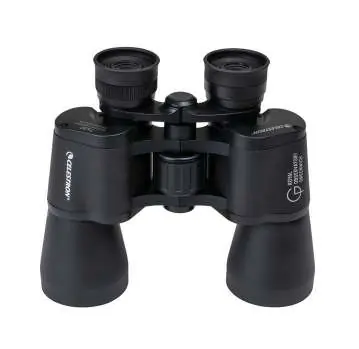
The Celestron Royal Observatory Greenwich binoculars are high-quality Porro prism optics designed for clear, long-distance viewing. These binoculars feature a durable construction with rubber eyecups and a central focusing mechanism, making them suitable for various outdoor observations.
Safety Information
WARNING: Never look directly at the sun while using these binoculars. Doing so can cause permanent and irreversible eye damage.
Adjusting Interpupillary Distance (IPD)
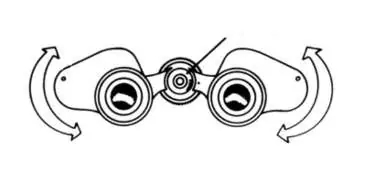
To ensure a comfortable and clear view, you must adjust the binoculars to match the distance between your eyes. Hold the binoculars with both hands and look through them at a distant object. Gently move the two halves of the binoculars around the central hinge until you see a single, clear circular image through both eyes.
Adjusting the Diopter
Proper diopter adjustment compensates for differences between your eyes, ensuring a sharp image. Follow these steps:
- Close your right eye and look through the left eyepiece with your left eye. Rotate the center focusing wheel until the image is sharp.
- Close your left eye and look through the right eyepiece (the diopter). Rotate the right eyepiece itself until the image is sharp.
- Open both eyes and look through both eyepieces. The binoculars are now calibrated to your vision.
- For future focusing on objects at different distances, use only the center focusing wheel.
Maintenance and Support
Keep your lenses clean and store the binoculars in a safe, dry place when not in use. For complete technical specifications, warranty information, or technical support, please visit the official Celestron website at celestron.com/support/warranties or celestron.com/pages/technical-support.
Official resources from the manual
Manufacturer information
Celestron
Practical help
Common problems
Seeing two separate images instead of one.
Adjust the interpupillary distance by moving the two halves of the binoculars around the hinge until the images merge into a single circle.
Image is blurry in one eye.
Perform the diopter adjustment procedure to calibrate the right eyepiece to your specific vision requirements.
Before use
- Ensure the rubber eyecups are in a comfortable position.
- Hold the binoculars with both hands for stability.
- Identify the center focusing wheel and the right diopter eyepiece.
Specs in practice
- IPD (Interpupillary Distance)
- The distance between the centers of your pupils; must be matched to the binocular hinge width.
Images and diagrams
- The hinge allows for IPD adjustment to align the eyepieces with your eyes.
- The center focusing wheel is used for general focus after the diopter is set.
- The right eyepiece acts as the diopter adjustment ring.
Model compatibility
- Features a tripod adapter thread for stable, hands-free viewing.

Manual page author
Michael Turner
Technical manual editor
Reviews PDF manuals for structure, safety notes, and practical product details so readers can find the right information quickly.