Automotive / Jump Starters
User Manual for Certa 12,000mAh Portable Jump Starter CTJMPST12KA
Quick start guide and user manual for the Certa 12,000mAh Portable Jump Starter (CTJMPST12KA). Learn how to jump start a 12V car, charge USB devices, and use the LED light features.
Table of contents
Quick Guide
This guide provides essential instructions for operating the Certa 12,000mAh Portable Jump Starter. Before using the device, ensure the battery capacity is sufficient by pressing the power switch lightly. For jump starting a vehicle, the unit must have at least 50% charge (two indicator lights ON). Always follow the safety warnings to prevent damage to the vehicle or the jump starter.
Overview
The device features the following components:
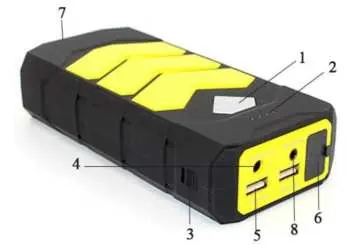
- 1: Power switch
- 2: Power indicator lights
- 3: Master ON/OFF switch
- 4: DC 12V output
- 5: USB output 5V/2.1A
- 6: EC5 output for jump starting
- 7: LED lights
- 8: 15V/1A input
Operation
Indicator Lights: Press the power switch lightly to check the remaining battery capacity:
- 0%: 4 lights Off
- 25%: 1 light Solid ON
- 50%: 2 lights Solid ON
- 75%: 3 lights Solid ON
- 100%: 4 lights Solid ON
While charging, the indicator lights will flash sequentially until full. All 4 lights will remain solid when fully charged.
LED Light: Press and hold the Power button for 3 seconds to turn on the LED light. Once on, double-press the power button to cycle through modes: Solid light → Strobe light → SOS flashing → OFF.
Charging the Jump Starter
- Plug the AC adapter into an AC electrical socket.
- Insert the adapter plug into the DC input port of the device, or use the provided car charger.
- If using the car charger, insert the other end into the DC input port of the device.
Jump Starting a 12V Car
- Ensure the jump starter battery capacity is above 50% (at least two indicator lights ON).
- Connect the red battery clip to the battery's positive pole (+) and the black clip to the negative pole (-).
- Insert the battery clips plug into the car jump port of the portable jump starter.
- Start the car.
- Disconnect the battery clip plug from the jump starter.
- Disconnect the red and black battery clips from the vehicle battery poles.
Warning: Do not touch the red and black clamps together or connect both to the same piece of metal. Do not use the jump start cable for any other purpose. Keep away from children.
Charging Mobile Devices
- Select the appropriate cable (Phone/Micro USB/Mini USB).
- Plug the USB end into the USB 5V output port of the jump starter.
- Connect the other end to your device.
- Press the power switch to begin charging.
Note: If the device does not charge for more than 3 seconds, the USB indicator light will automatically turn off.
Specifications
- Weight: 400g
- Output: 5V/2.1A, 12V/2A
- Dimensions: 170x80x38mm
- Start current: 300A
- Peak current: 600A
- Input: DC 15V/1A
Practical help
Common problems
Jump starter fails to start the car
Ensure the battery capacity is above 50% (at least two indicator lights must be ON).
USB device not charging
Ensure the cable is connected properly. If the device does not draw power for 3 seconds, the jump starter will automatically turn off the USB output.
Jump starter not charging
Verify the AC adapter or car charger is securely connected to the DC input port.
Before use
- Check battery level by pressing the power switch lightly.
- Ensure at least 2 indicator lights are ON before attempting to jump start a vehicle.
- Verify you are using the correct charging cable for your mobile device.
- Ensure the jump starter is kept away from children.
Specs in practice
- Start current: 300A
- The initial current provided to crank the engine.
- Peak current: 600A
- The maximum current the device can provide for a short burst.
- Capacity: 12,000mAh
- The total energy storage capacity of the internal battery.
Images and diagrams
- The device features a Master ON/OFF switch and a separate Power switch for checking battery status.
- The EC5 output port is specifically for the jump start cable connection.
- The LED light has multiple modes including Strobe and SOS.
Model compatibility
- Designed for 12V car batteries.
- Includes adapters for Phone, Micro USB, and Mini USB devices.
- Do not use cables other than those provided to avoid damaging the device.

Manual page author
David Miller
Documentation analyst
Organizes user manual content into clear summaries, with attention to model details, product context, and everyday usability.