Power / Batteries & Chargers
User Manual for Green Lion 12V Jump Starter Savior GL-JX33
Comprehensive user guide for the Green Lion 12V Jump Starter Savior (GL-JX33). Includes setup instructions, jump-starting procedures, air pump operation, safety precautions, and troubleshooting.
Table of contents
Manual images
Click an image to enlargeQuick Guide from the Manual
The Green Lion Savior 12V Jump Starter is a multi-functional device designed for jump-starting vehicles, inflating tires, and providing portable power. Before using the device to start a car, ensure it has at least 80% charge. Always verify that battery clamps are clean and securely connected to the correct terminals.
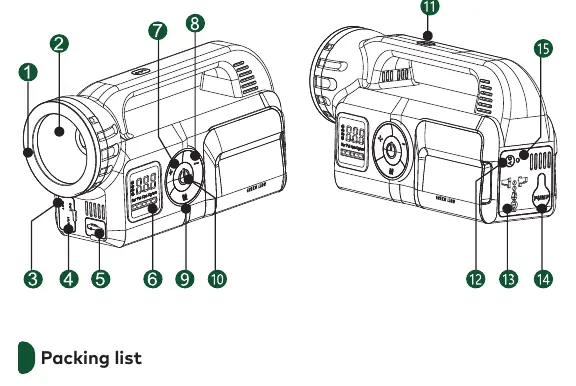
Product Overview
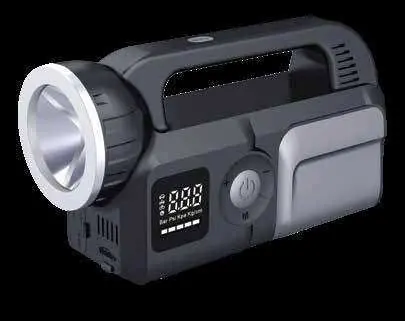
This device features a 24,000mAh battery, 3000A peak current, built-in air inflator, flashlight, and multiple output ports (USB and AC). It is designed to operate in extreme temperatures as low as -40°C.
Setup and Operation
Jump Starting a Vehicle
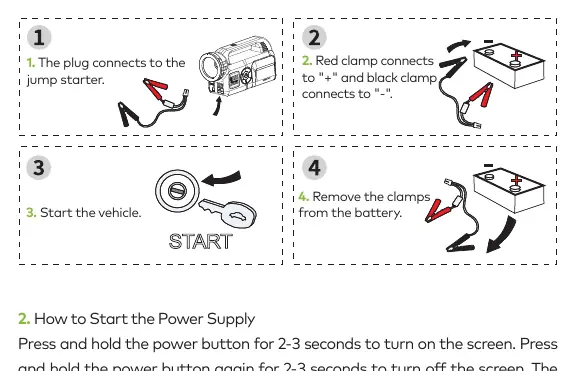
- Connect the jumper cables to the jump starter socket, ensuring the plug is fully inserted.
- Attach the red clamp to the positive (+) terminal and the black clamp to the negative (-) terminal of the car battery.
- Ensure clamps are clean and making good contact.
- Slide the jump starter ON/OFF switch to the ON position.
- Start the vehicle.
- Remove the clamps from the battery terminals within 30 seconds of starting the car.
Air Pump Operation
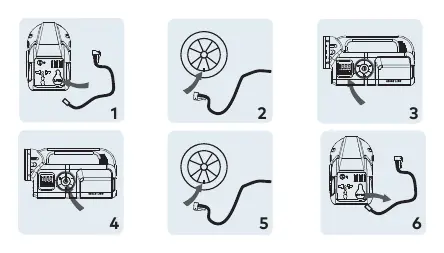
- Remove the built-in air duct from the back of the device.
- Connect the tire end nozzle to the tire valve.
- Press and hold the switch button for 2-3 seconds to turn on the device.
- Click the mode button to select the appropriate mode (car, motorcycle, bicycle, basketball, or custom).
- Adjust pressure using the plus or minus buttons.
- Press the air pump start button to begin inflation.
- Once finished, pull the air pipe out of the tire nozzle and retract the hose.
Power Supply and Inverter
To use the power supply, press and hold the power button for 2-3 seconds to turn on the screen. The device will automatically shut off after 40 seconds of inactivity. To use the AC output, press the AC power button to activate the socket function, then click to turn on the output.
Lighting
Click the light button to turn on the auxiliary light. Click again to cycle through constant modes. Warning flash and SOS modes are also available. Press and hold for 1 second to turn off the lights.
Safety Precautions
- Suitable for regular car tires only; do not use on large heavy vehicles like trucks or vans.
- The air outlet generates high temperatures during inflation; avoid burns.
- Never connect the two battery clamps together.
- Keep the product away from flammable materials like sofas or curtains.
- Do not disassemble the unit.
- Charge the product at least every three months if not in regular use.
Troubleshooting
If the device turns off automatically after startup, it may be due to an aging car battery; try running the car for 3 minutes to charge the battery. If the battery is not charging, verify the charger connection and cable. If the car fails to start, ensure clamps are clean and securely connected, or hold the start button for 10 seconds if the car is in a protected state.
Contact Information
For support, contact Green Lion via email at [email protected] or visit their website at https://www.greenlion.net/.
Official resources from the manual
Manufacturer information
Green Lion
Practical help
Common problems
Device turns off automatically after startup
Usually caused by an aging car battery. Run the car for 3 minutes to charge the battery, or replace the car battery.
Battery is not charging
Check if the display shows 'IN' or flashes '%'. Verify the charger connection and ensure the cable is undamaged.
Cannot charge phone
Ensure the power supply is turned on and has at least 10% power. Check that the charging cable is securely connected.
Cannot start the car
Ensure clamps are clean and securely connected. If the car is in a protected state, press and hold the start button for 10 seconds.
Before use
- Ensure the jump starter has at least 80% charge.
- Check that battery clamps are clean and free of rust.
- Verify the jump starter is in the OFF position before connecting.
- Ensure the plug is fully inserted into the jump starter socket.
- Keep the product away from flammable materials.
Specs in practice
- Battery Capacity
- 24000mAh 88.8Wh - Total energy storage capacity.
- Pump Pressure
- 150-0 PSI - Maximum air inflation pressure.
- Charging Time
- 4-5 hours for a full recharge.
Images and diagrams
- Product Sections: Identifies the LED lights, USB ports, AC output, air pump port, and control buttons.
- Jump Start Sequence: Shows connection of red clamp to positive (+) and black clamp to negative (-) terminals.
- Air Pump Operation: Illustrates connecting the air duct and nozzle to the tire.
Model compatibility
- Suitable for gasoline engines up to 8.0L and diesel engines up to 6.0L.
- Not suitable for large heavy vehicles like trucks, vans, or container trucks.

Manual page author
Emily Carter
User documentation editor
Prepares concise manual descriptions and highlights the most useful setup, operation, and maintenance information for readers.