Home Appliances / Small Kitchen Appliances
Tzumi PocketJuice e-start 20,000mAh Jump Starter
Quick guide for the Tzumi PocketJuice e-start 20,000mAh jump starter. Learn how to jump-start your vehicle, charge the power bank, use the flashlight, and maintain the battery safely.
Table of contents
Quick Start Guide
The Tzumi PocketJuice e-start is a portable power bank designed for emergency vehicle jump-starting and charging mobile devices. Before first use, ensure the unit is fully charged.
Product Overview
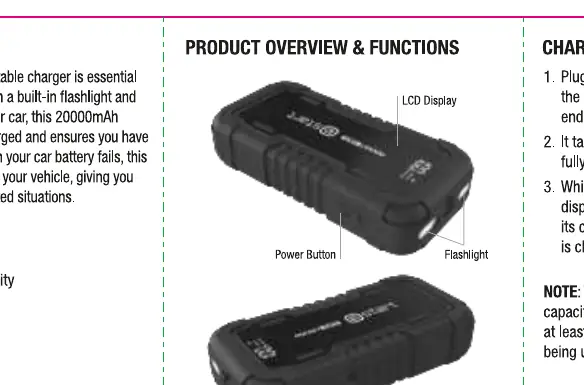
The device features an LCD display, a flashlight, a jump starter port, and USB ports for charging external devices. The LCD display indicates the current battery percentage.
Charging the Power Bank
- Connect the included charging cable to the USB-C port on the power bank.
- Plug the other end into a USB power source.
- The LCD display will show the charging progress.
- Charge the unit at least once every 3 months to preserve battery health.
Charging Mobile Devices
- Connect your device's charging cable to one of the USB ports on the power bank.
- Plug the other end into your device.
- Charging will start automatically.
Using the Flashlight
- Press and hold the Power Button for 4 seconds to turn the flashlight on.
- Press the Power Button again to activate SOS mode.
- Press the Power Button again to activate Strobe mode.
- Press the Power Button a fourth time to turn the flashlight off.
How to Jump Start a Vehicle
- Connect the jumper cable to the Jump Starter's output socket.
- Attach the red battery clamp to the positive (+) terminal of the vehicle's battery.
- Attach the black battery clamp to the negative (-) terminal.
- Ensure the jumper cables are connected to the correct battery terminals.
- Turn the vehicle to the ACC position (do not start the vehicle yet).
- Wait until the smart cables show a solid green light.
- Start the vehicle.
- If the vehicle does not start, allow the power bank to cool down for 1-2 minutes before attempting again.
- Once the vehicle starts, immediately disconnect the cables and remove the power bank.
Care and Maintenance
- Store in a cool, dry place.
- Inspect clamps before use to ensure they are clean and free of corrosion.
- Charge the unit at least once every three months.
Safety Information
- Do not disassemble, pierce, or crush the unit.
- Keep away from heat sources, liquids, and flammable objects.
- If the battery appears swollen, leaking, or emits an odor, discontinue use immediately.
- This product is not a toy; keep away from children.
Manufacturer information
Tzumi
Practical help
Common problems
Smart cables do not show a solid green light
Ensure the car is in the ACC position, check that battery clamps are securely connected to the correct terminals, and verify the power bank has sufficient charge.
Vehicle does not start
Allow the power bank to cool down for 1-2 minutes before attempting to start the vehicle again.
Before use
- Charge the power bank fully before the first use.
- Inspect jumper cables for damage or corrosion.
- Ensure the vehicle is turned to the ACC position.
- Verify that the battery clamps are connected to the correct terminals (Red to +, Black to -).
Specs in practice
- Battery Capacity
- 20,000mAh, providing power for multiple charges and jump-start attempts.
- Peak Current
- 1000A, the maximum current the device can deliver for jump-starting.
- Charging Time
- Up to 10 hours to reach full capacity.
Images and diagrams
- The device includes a dedicated Jump Starter output socket, USB-C input for charging the unit, and USB ports for outputting power to mobile devices.
Model compatibility
- Designed for 12V vehicle systems.

Manual page author
Michael Turner
Technical manual editor
Reviews PDF manuals for structure, safety notes, and practical product details so readers can find the right information quickly.