Home / Garage Door Openers
Installation and Programming Guide for Chamberlain Logic Board 041DJ003MC
A comprehensive guide for replacing the Chamberlain 041DJ003MC logic board. Includes step-by-step instructions for board installation, door profile adjustment, travel limit programming, safety system testing, and remote control...
Table of contents
Manual images
Click an image to enlargeQuick Guide from the Manual
This document provides instructions for replacing the logic board on your Chamberlain garage door opener. Important: Before beginning, disconnect all electric and battery power. You will need the new myQ serial number found on the replacement label to connect your opener to the network. Always wear protective gloves and eye protection when working near the battery compartment.
Logic Board Replacement
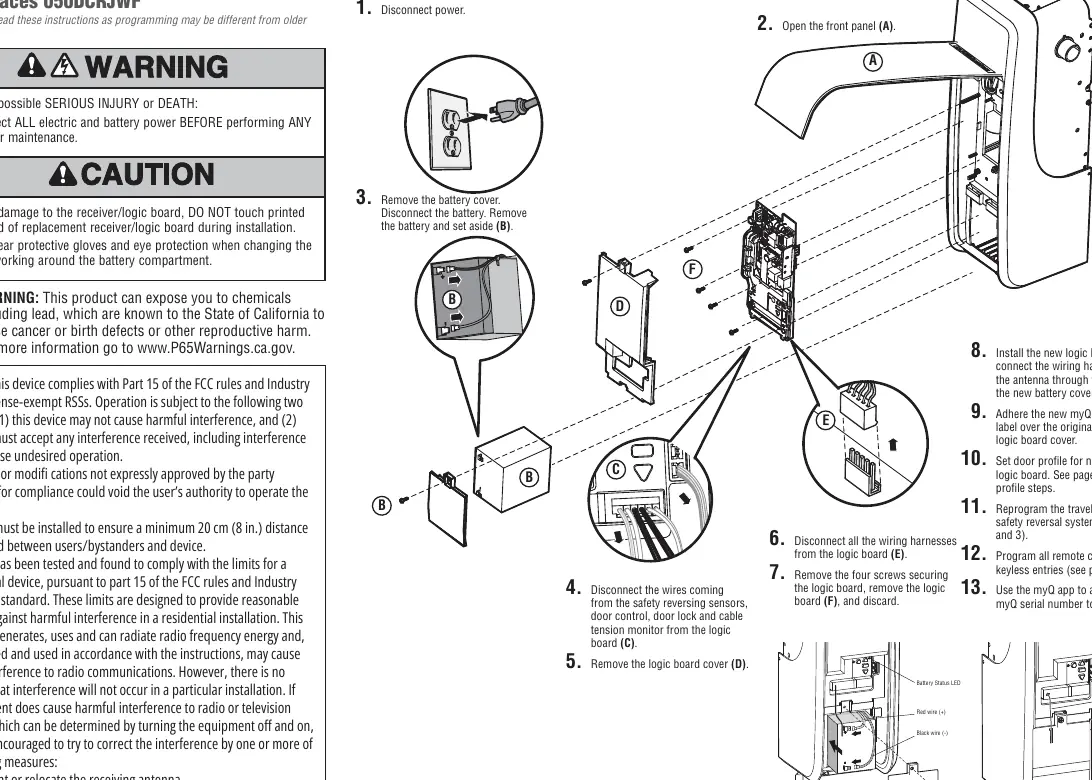
- Disconnect power and open the front panel.
- Remove the battery cover and disconnect the battery.
- Disconnect all wires from the logic board (safety reversing sensors, door control, door lock, and cable tension monitor).
- Remove the logic board cover and disconnect all wiring harnesses.
- Remove the four screws securing the logic board and discard the old board.
- Install the new logic board and connect the wiring harnesses. Route the antenna through the channel in the new battery cover.
- Adhere the new myQ serial number label over the original label on the logic board cover.
Door Profile Adjustment
You must set the door profile based on your garage door type and drum size to ensure proper operation.
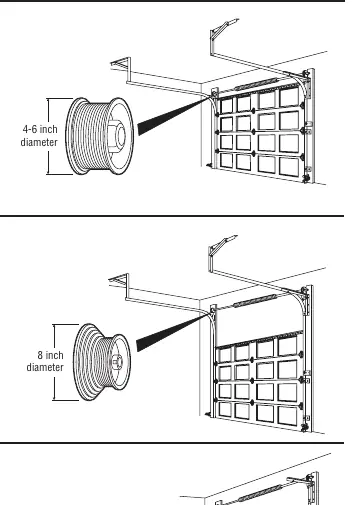
- Door Profile 1: Standard to Heavy Weight Door with 4" drum (Recommended).
- Door Profile 2: Light Weight Door with 4" drum.
- Door Profile 3: Heavy Weight Door with 6" drum.
- Door Profile 4: Light Weight Door with 6" drum.
- Door Profile 5: High Lift or Vertical Lift Door (Tapered drum).
To set the profile: Press and hold the black button for one second until the UP and DOWN buttons turn solid. Use the UP and DOWN buttons to change the setting; the Learn LED will blink to indicate the selected profile. Press the black button to save.
Programming Travel Limits
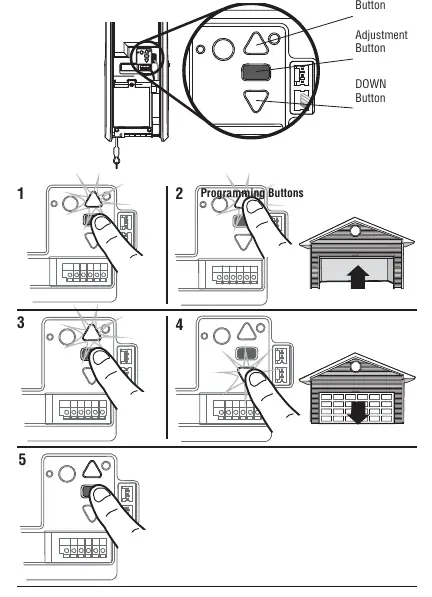
- Press and hold the Adjustment Button until the UP button flashes or a beep is heard.
- Press and hold the UP button until the door reaches the desired UP position.
- Press and release the Adjustment Button; the opener lights will flash twice.
- Press and hold the DOWN button until the door reaches the desired DOWN position.
- Press and release the Adjustment Button; the opener lights will flash twice.
Automatic Force Setup
Once travel limits are set, the opener will automatically enter a force-sensing operation. The door will open and close automatically. The opener will beep three times to confirm successful completion. If you hear one long beep, the setup failed; restart from the Travel Limit programming step.
Safety Testing
Safety Reversal System: Place a 1-1/2 inch (3.8 cm) board or 2x4 laid flat on the floor under the door. Close the door using the remote. The door must reverse upon contact. If it stops but does not reverse, repeat the travel programming.
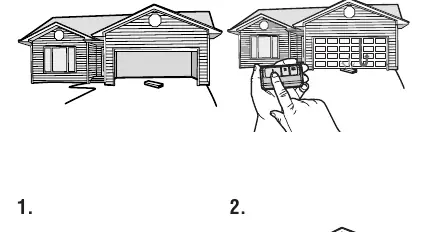
Protector System: Open the door and place an obstruction in its path. Attempt to close the door with the remote. The door should not move more than an inch.
Programming Remote Controls
Up to 40 Security+ 2.0 remote controls can be programmed. To program using the learn button:
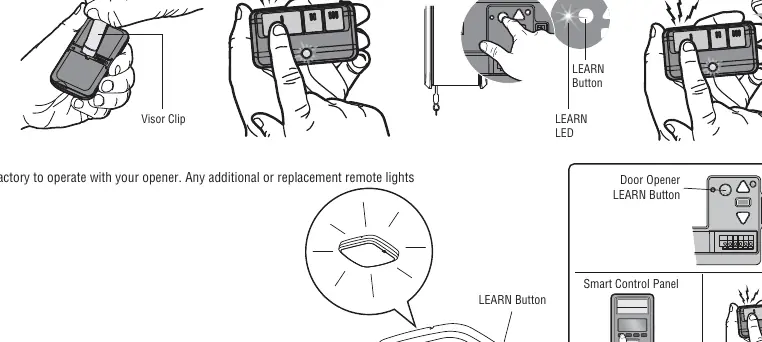
- Press and hold the program button on the remote until the LED turns on.
- Press and release the remote button you wish to use.
- Press and release the Learn button on the garage door opener.
- Press the remote button again until the opener light flashes or two clicks are heard.
Manufacturer information
Chamberlain
Practical help
Common problems
Door does not reverse during safety test
Repeat the 'Program the Travel' procedure and perform the Safety Reversal test again.
Programming timed out
If the garage door opener lights flash 5 times, the programming timed out. Restart the 'Program the Travel' process.
Automatic Force Setup failed
If you hear one long beep after the door attempts to move, the setup failed. Restart from step 1 of 'Program the Travel'.
Before use
- Disconnect all electric and battery power before service.
- Wear protective gloves and eye protection.
- Measure drum diameter to identify the correct door profile.
- Ensure the short antenna is not pinched by the battery door.
- Have the new myQ serial number ready.
Specs in practice
- Door Profile 1
- Standard to Heavy Weight Door with 4" drum.
- Door Profile 2
- Light Weight Door with 4" drum.
- Door Profile 3
- Heavy Weight Door with 6" drum.
- Door Profile 4
- Light Weight Door with 6" drum.
- Door Profile 5
- High Lift or Vertical Lift Door.
Images and diagrams
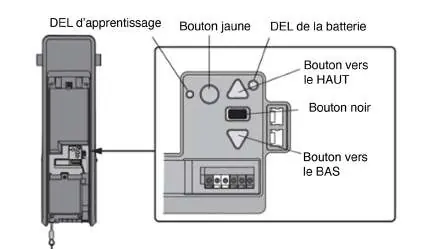
- The logic board diagram shows the location of the Learn LED, Yellow Button, Battery LED, UP/DOWN buttons, and Black button.
- The drum diameter diagrams help identify the correct door profile based on the drum size (4-6 inch or 8 inch).
Model compatibility
- Compatible with Security+ 2.0 remote controls.
- Older LiftMaster remote controls are NOT compatible.
- Requires myQ app for network connectivity.

Manual page author
Michael Turner
Technical manual editor
Reviews PDF manuals for structure, safety notes, and practical product details so readers can find the right information quickly.