Power / Car Chargers
User Manual for Choetech Wall Charger PD 20W
Quick guide for the Choetech Wall Charger PD 20W (Model Q5004). Learn how to use, technical specifications, and safety precautions for your device.
PDF source: polski · summary: English
Quick answers from the manual
Quick answer
- To use the Choetech Wall Charger PD 20W, plug it into a wall outlet, connect a compatible USB-C cable, and attach your device. p. 2
Key actions
- Plug the charger into a wall outlet. p. 2
- Connect a compatible USB-C cable to the charger and your device. p. 2
Problems and fixes
Device not charging properly
Use original or certified cables for best performance.
p. 2Show 3 more answers Show less
Maintenance and reset
- Regularly clean the device and inspect for physical changes. If damage is detected, stop use. p. 3
Technical specifications
| Parameter | Value | Meaning | Pages |
|---|---|---|---|
| Input | 100-240V 50/60Hz 0.5A (Max) | Power input requirements | p. 2 |
| Output | DC 5.0V 3.0A / 9.0V 2.22A / 12.0V 1.67A | Power output capabilities | p. 2 |
Where to find it in the PDF
- Usage and Specs p. 2
- Environmental and Compliance p. 3
Table of contents
Quick guide from the manual
This document provides essential instructions for operating the Choetech Wall Charger PD 20W (Model Q5004). The device is designed for charging mobile devices via a USB-C connection. Ensure you use original or certified cables for optimal performance.
Usage instructions
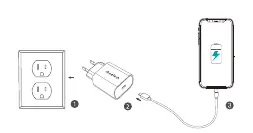
- Plug the charger into a compatible wall outlet.
- Connect a compatible USB-C cable to the charger.
- Connect the other end of the cable to your phone, tablet, or other USB-C device to begin charging.
Technical specifications
- Input: AC 100-240V 50/60Hz 0.5A (Max)
- Output: DC 5.0V 3.0A, 9.0V 2.22A, or 12.0V 1.67A (Max)
- Total Output: 20.0W (Max)
Safety and maintenance
To ensure safety and longevity of the device, follow these guidelines:
- Use only original or certified cables for fast charging.
- Do not expose the charger to rain or excessive moisture.
- Avoid using or storing the charger in extreme temperatures.
- Do not drop, strike, or disassemble the charger.
- Perform regular maintenance by keeping the device clean. If you notice any physical changes or damage, discontinue use and seek service.
Environmental protection
This device contains electronic components and must not be disposed of with household waste. It is subject to selective collection and recycling in accordance with EU directives. Please dispose of the product at designated collection points to prevent negative environmental and health impacts.
Practical help
Common problems
Device not charging or charging slowly
Ensure you are using an original or certified USB-C cable. Check that the charger is securely plugged into the wall outlet.
Physical damage or abnormal appearance
If the charger shows signs of damage, stop using it immediately and perform maintenance or contact a service point.
Before use
- Verify the wall outlet provides 100-240V AC power.
- Ensure you have a compatible USB-C cable.
- Inspect the charger for any physical damage before plugging it in.
Show more Show less
Specs in practice
- Total Output
- The maximum power capacity of the charger, which is 20W.
Images and diagrams
- The diagram illustrates the three-step connection process: plugging the charger into the wall, connecting the USB-C cable, and connecting the device.
Model compatibility
- Compatible with devices requiring USB-C charging.
- Supports fast charging protocols (PD) up to 20W.

Manual page author
David Miller
Documentation analyst