Power / Wireless Chargers
User Manual for Choetech 2-in-1 Magnetic Wireless Charging Stand
Get the most out of your Choetech 2-in-1 Magnetic Wireless Charging Stand with this comprehensive user guide. Learn about setup, charging modes, safety precautions, and troubleshooting.
Quick answers from the manual
Quick answer
- The Choetech 2-in-1 Magnetic Wireless Charging Stand supports 15W fast charging for phones and 3W for earphones. It requires a PD 20W or higher adapter for full-load charging. p. 4, 5
Key actions
- Connect the charger to a suitable adapter. p. 5
- Place device on the charging area. p. 5
First start
- Connect the device to a power adapter and ensure the blue indicator light is on. p. 5
Problems and fixes
Green indicator flashes
Remove metal or magnetic objects from the charger.
p. 5Technical specifications
| Parameter | Value | Meaning | Pages |
|---|---|---|---|
| Input | 9V/2.0A or 12V/3.0A | Power input requirements | p. 5 |
Where to find it in the PDF
- Product Description p. 4
- Parameters and Operation p. 5
Table of contents
Quick Guide
The Choetech 2-in-1 Magnetic Wireless Charging Stand is designed to charge your iPhone 12/13 series and compatible earphones simultaneously. To ensure optimal performance, connect the stand to a power adapter (PD 20W or above is recommended for full-load charging) and place your devices in the designated charging areas.
Product Description
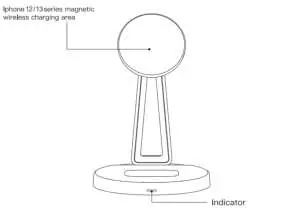
The charging stand features a magnetic wireless charging area at the top for phones and a wireless charging area at the base for earphones. The magnetic position can be rotated by 30 degrees to adjust the viewing angle. An indicator light at the base provides status updates: blue for standby/charging, red for desktop charging, and a flashing green light for Foreign Object Detection (FOD).
Product Features
- Compatible with iPhone 12/13 series magnetic wireless charging and Qi standard devices.
- Supports 15W fast wireless charging for phones and 3W for earphones.
- Multistage magnetic combination for a stable phone hold.
- Adjustable magnetic charging position (30-degree rotation).
- FOD (Foreign Object Detection) safety feature.
Operation Steps
- Connect the product to a suitable power adapter. The blue indicator light will remain on.
- Place your device in the correct charging area.
- If using multiple devices, ensure the adapter has sufficient power (PD 20W or above recommended).
- If the phone does not charge, adjust its position slightly to find the optimal charging spot.
- Indicator Status: Blue light indicates charging in the magnetic position; red light indicates charging in the desktop position.
- FOD Detection: If metal or magnetic objects are detected on the charger, the green indicator will flash.
Technical Specifications
- Input: 9V/2.0A or 12V/3.0A
- Top Output (Magnetic): 5W / 7.5W / 10W / 15W
- Bottom Output: 5W / 7.5W / 10W / 15W
- Headphone Output: 3W (Max)
Safety Precautions
- Recommended operating temperature: -10°C to 45°C.
- Do not disassemble the charger.
- Keep the charger away from water and other liquids.
- Do not place metal or magnetic items (coins, bank cards, keys) on the charging surface.
- Avoid full-load operation to maintain charging efficiency.
Warranty Information
Products purchased within the Alza.cz sales network are covered by a 2-year warranty. For service or repairs, contact the seller directly and provide the original proof of purchase. The warranty does not cover damage caused by misuse, natural disasters, unauthorized modifications, or normal wear and tear.
Official resources from the manual
Practical help
Common problems
Device not charging properly
Move the phone slightly to find the best charging position.
Green indicator flashing
Remove metal or magnetic objects from the charging area (FOD detection).
Fast charging not working or unstable
Ensure you are using a suitable adapter, preferably PD 20W or above.
Before use
- Check that the adapter is connected.
- Ensure no metal or magnetic objects are on the charging surface.
- Verify the ambient temperature is between -10°C and 45°C.
Specs in practice
- Bottom Output
- Wireless charging for earphones (5W/7.5W/10W/15W).
- Headphone Output
- Dedicated 3W wireless charging.
Images and diagrams
- The top area is for iPhone 12/13 series magnetic charging.
- The bottom area is for phone/earphone wireless charging.
- The rotation axis allows for angle adjustment.
- The indicator light shows charging status.
Model compatibility
- Compatible with iPhone 12/13 series magnetic charging.
- Supports Qi standard mobile phone wireless charging.
- Supports earphone wireless charging.

Manual page author
Michael Turner
Technical manual editor
Reviews PDF manuals for structure, safety notes, and practical product details so readers can find the right information quickly.