Power / Wireless Chargers
User Manual for Choetech MagLeap Duo 2-in-1 Magnetic Wireless Charging Stand
Quick guide for the Choetech MagLeap Duo 2-in-1 Magnetic Wireless Charging Stand. Learn how to set up, use, understand LED indicators, and troubleshoot charging issues.
Quick answers from the manual
Quick answer
- The Choetech MagLeap Duo 2-in-1 is a magnetic wireless charging stand. Connect it to a power adapter, attach your iPhone 12 to the top magnetic pad, and place your AirPods on the bottom charging pad. p. 3
Key actions
- Connect to power adapter p. 3
- Place devices for charging p. 3
Problems and fixes
Foreign object detected
Remove the object to continue charging.
p. 4Where to find it in the PDF
- How to Use p. 3
- LED Indicators p. 4
- Warranty p. 6
Table of contents
Manual images
Click an image to enlargeQuick guide from the manual
The Choetech MagLeap Duo 2-in-1 is a magnetic wireless charging stand designed to charge an iPhone 12 (or newer) and AirPods simultaneously. It requires a separate Quick Charger adapter and cable for fast wireless charging features.
How to use
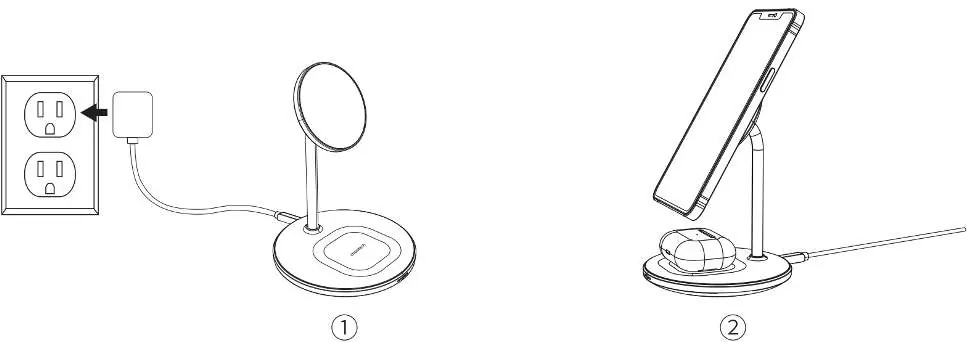
- Connect the charging stand to a power adapter.
- Attach your iPhone 12 to the top magnetic pad.
- Place your AirPods on the bottom charging pad. Note that the bottom pad is intended for AirPods only.
LED indicator status
- Power on: Both indicators flash 3 times quickly and then turn off.
- Standby mode: Both indicators remain off.
- Charging 1 or 2 devices: Both indicators are on simultaneously.
- Foreign object detected: Both indicators flash. If one device is charging and the other is paused due to a foreign object, one light will be on and the other will flash. Remove the object to resume charging.
Safety and warnings
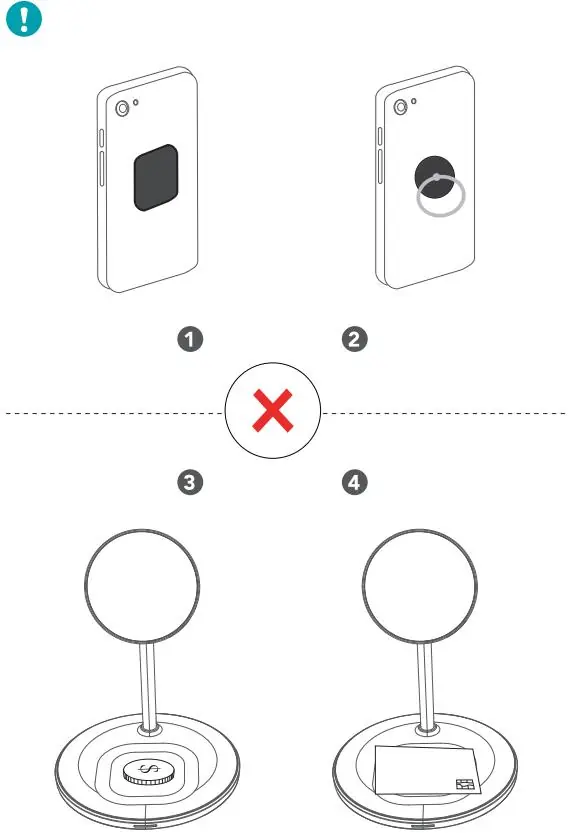
- Do not disassemble the device.
- Compatibility: Ensure your device is Qi-compatible or has a Qi receiver kit. Your phone should be MagSafe compatible or equipped with a magnetic plate/case.
- Interference: Keep magnetic chip cards (ID cards, credit cards) and medical devices (pacemakers, defibrillators, hearing aids) at least 20 cm away from the product, and more than 30 cm during wireless charging.
- Environment: Do not use or store the charger in hot or humid environments to avoid circuit damage.
Warranty and disposal
The product is covered by a 2-year warranty when purchased through the Alza.cz sales network. For service, contact the seller with proof of purchase. Dispose of the product according to WEEE regulations; do not treat it as normal household waste.
Official resources from the manual
Practical help
Common problems
Charging is paused
A foreign object has been detected. Remove the object from the charging area to continue.
Slow charging
Ensure you are using a Quick Charger adapter and cable. The power adapter is sold separately.
Before use
- Ensure your device is Qi-compatible or has a Qi receiver kit.
- Verify your phone is MagSafe compatible or has a magnetic case.
- Use a Quick Charger adapter (not included).
- Keep the device away from hot or humid environments.
Images and diagrams
- Diagram 1: Connecting the stand to a wall power adapter.
- Diagram 2: Correct placement of iPhone on the top pad and AirPods on the bottom pad.
- Diagram 3-4: Warning against placing metal objects or cards on the charging surface.
Model compatibility
- Top pad: MagSafe compatible phones (e.g., iPhone 12).
- Bottom pad: AirPods only.
- Requires Qi-compatible device or receiver.

Manual page author
David Miller
Documentation analyst
Organizes user manual content into clear summaries, with attention to model details, product context, and everyday usability.