Automotive / Portable Coolers
User Manual for Compass Dual Compressor Cooling Box T50
Quick guide for the Compass Dual Compressor Cooling Box T50. Learn how to operate the dual-zone cooling, set battery protection, troubleshoot error codes, and maintain your portable fridge.
Table of contents
Manual images
Click an image to enlargeQuick guide from the manual
The Compass Dual Compressor Cooling Box T50 is a portable refrigerator designed for use in vehicles (12/24V DC) or at home (230V AC). It features dual cooling zones, intelligent battery protection, and a wide electronic temperature control range. For optimal performance, ensure the unit is placed on a flat surface with adequate ventilation (200mm at the back, 100mm on the sides).
Components
The cooling box consists of the following main parts:
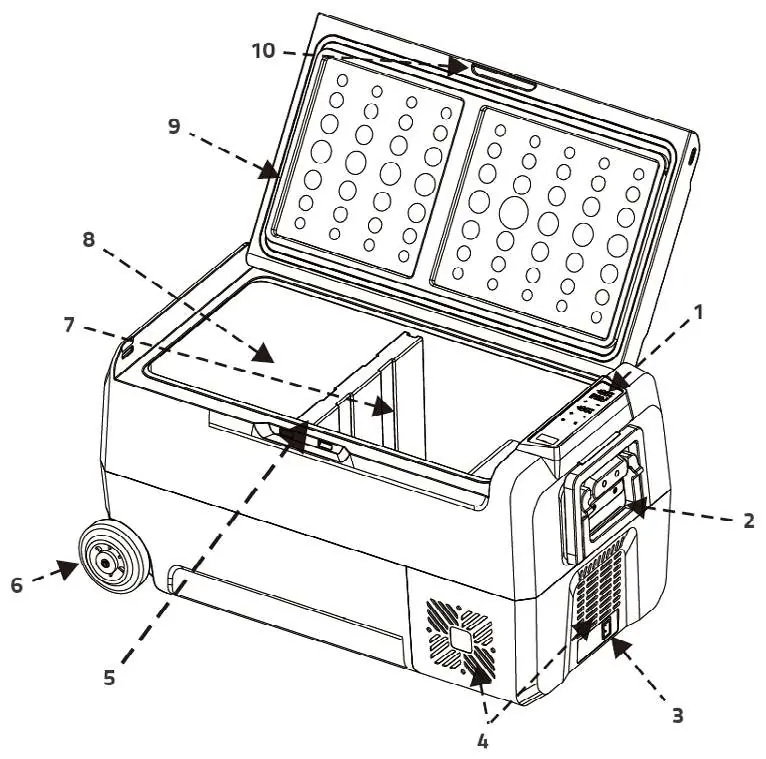
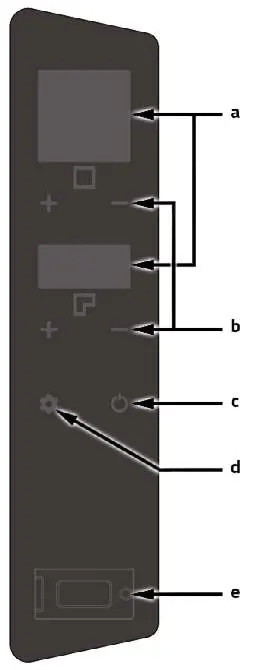
- Control panel: Used for temperature settings, power, and mode selection.
- Power connection: Located on the side for DC/AC input.
- Ventilation: Essential for compressor cooling; keep clear of obstructions.
- Detachable middle plate: Required for separate temperature control of the two zones.
- USB port: Available on the control panel for charging devices.
Operation Settings
To operate the cooling box:
- Power: Connect to the power source and press the Power switch.
- Cooling Mode: Press the Set button to toggle between ECO and MAX modes (default is MAX).
- Temperature Control: Use the + and - buttons to set desired temperatures (-20°C to 10°C). Note that separate control is only possible if the middle plate is installed. The temperature difference between zones must not exceed 20°C, and the lower temperature should always be set for the right zone.
- Turning off a zone: Simultaneously press + and - for a few seconds. The display will show (--). Repeat to turn back on.
Battery Protection
The unit features a 3-level battery protection system to prevent excessive battery drain in vehicles:
- H (High): Recommended for car use.
- M (Medium) / L (Low): Recommended when using a backup battery.
- Settings: Press the SET button for about 3 seconds, then click SET to choose the desired protection level.
Food Storage and Defrosting
For best results, cool hot food before placing it in the fridge. Use fresh-keeping bags and leave space for air circulation. If frost accumulates in the freezer, unplug the unit and allow it to thaw naturally. Do not use sharp metal tools to remove ice, as this may damage the interior.
Cleaning and Maintenance
Always unplug the unit before cleaning. Use a soft cloth dampened with warm water and a neutral detergent for the interior and exterior. Wipe dry with a clean cloth. Do not use corrosive cleansers, bleach, or abrasive materials. If storing for a long period, clean the unit and leave the doors slightly open to prevent odors.
Troubleshooting
If the device is not running, check the power supply, fuse, and ensure the zone is not turned off. If error codes appear:
- F1: Active battery protection; set a lower protection level.
- F2: Ventilation system overload; turn off, wait 30 minutes, and restart.
- F3: Compressor frequent start protection; turn off, wait 30 minutes, and restart.
- F4: Compressor overload; turn off, wait 30 minutes, and restart.
- F5: Compressor high temperature; ensure good ventilation, wait 30 minutes, and restart.
- F6: Control unit fault; restart the unit.
- F7/F8: Temperature sensor fault; restart the unit.
Practical help
Common problems
Device not running
Check if the unit is on, verify the power supply (try another outlet/vehicle), check the fuse, and ensure the cooling zone is not turned off (display shows --).
Low cooling performance
Ensure at least 100mm of space around the unit for ventilation, check if the lid is sealed properly, and ensure the ambient temperature is not too high.
Error F1
Battery protection is active. Set a lower protection level or check the battery charge status.
Error F2, F3, F4, F5
System overload or overheating. Turn off the device, wait 30 minutes, and restart.
Before use
- Ensure the unit is placed on a flat surface.
- Verify the voltage is within the correct range for the socket and cable.
- Ensure proper ventilation (200mm at the back, 100mm on the sides).
- Clean the interior with a soft cloth and neutral detergent before first use.
- Keep the unit away from heat sources and direct sunlight.
Specs in practice
- Inner volume
- 50 L total (24 L + 26 L).
- Power supply
- Supports 12/24V DC or 230V AC.
- Cooling range
- 20°C to -20°C.
- Protection class
- Class III.
Images and diagrams
- The components diagram identifies the control panel, power connection, ventilation, and internal cooling zones.
- The control panel diagram shows the display screens, settings buttons, power switch, and USB port.
Model compatibility
- Separate temperature control is only available if the middle plate is installed.
- The temperature difference between the left and right cooling zones must not exceed 20°C.
- Lower temperatures should always be set for the right cooling zone.

Manual page author
Emily Carter
User documentation editor
Prepares concise manual descriptions and highlights the most useful setup, operation, and maintenance information for readers.