Home Appliances / Ovens
Cosori 10-Tray Stainless Steel Dehydrator User Manual
Comprehensive user guide for the Cosori 10-Tray Stainless Steel Dehydrator, covering setup, operation, safety instructions, maintenance, and troubleshooting.
Table of contents
Product Overview
The Cosori 10-Tray Stainless Steel Dehydrator is designed to efficiently preserve food by circulating warm air horizontally. This process helps maintain nutritional value and flavor, making it an ideal solution for drying fruits, vegetables, meats, and even flowers. The unit features a durable stainless steel construction and includes 10 trays, a fruit roll sheet, and a mesh screen to accommodate various food types.
Safety Precautions
Always prioritize safety when using the dehydrator. Do not touch hot surfaces; use the handles provided. Keep the unit away from flammable materials, curtains, or tablecloths. Ensure the device is placed on a flat, stable, and heat-resistant surface. Never immerse the cord, plug, or housing in water. The dehydrator is intended for household use only and should not be operated outdoors or on a stove. Always unplug the unit when not in use and allow it to cool completely before cleaning or moving.
Getting Started
Before the first use, remove all packaging materials and clean the trays and accessories with a moistened cloth. Place the dehydrator on a solid, level surface and run it at any temperature for 30 minutes without food to eliminate any manufacturing odors. This is a normal part of the initial setup process.
Operation
To operate, plug the dehydrator into a grounded electrical outlet. Place food on the trays, ensuring they are not overloaded to allow proper airflow. Close the door and press the START/STOP button to wake the unit. Use the TEMP/TIME button to adjust settings as needed. The dehydrator offers 10 preset functions for different food types, including apple, banana, meat, and yogurt. Once the cycle is complete, the unit will beep and enter standby mode. You can also use the Keep Warm function to maintain a temperature of 95°F for up to 24 hours after the dehydration cycle finishes.
Care and Maintenance
Proper maintenance ensures the longevity of your appliance. Unplug the unit and allow it to cool before cleaning. Soak trays in warm, soapy water to remove food residue and use a soft brush if necessary. The housing should be wiped down with a damp cloth. Do not use abrasive chemicals or metal scouring pads, as these can damage the stainless steel finish. Note that the trays are not dishwasher-safe.
Manufacturer information
COSORI
Practical help
Common problems
The dehydrator will not turn on or the fan is not working.
Unplug the dehydrator and plug it in again.
E1, E2, or E3 appears on the display.
The dehydrator may be damaged or malfunctioning. Contact Customer Support.
Foods are dried unevenly.
Cut foods evenly to ensure they all finish drying at the same time and avoid overlapping food on the trays.
Before use
- Remove all packaging materials.
- Clean trays and accessories with a moist cloth.
- Place on a flat, heat-resistant surface.
- Ensure adequate ventilation around the unit.
- Run the unit empty for 30 minutes to remove odors.
Specs in practice
- Temperature Range
- Adjustable from 95°F to 165°F (35°C–74°C).
Images and diagrams
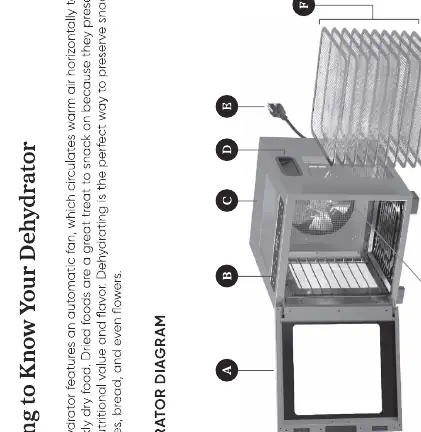
- B: Control Panel
- E: Power Cord
Model compatibility
- Use only with 120V, 60Hz electrical systems in North America.
- Do not use with 220-240V outlets.

Manual page author
Michael Turner
Technical manual editor
Reviews PDF manuals for structure, safety notes, and practical product details so readers can find the right information quickly.