Home Appliances / Small Kitchen Appliances
Cuisinart 12-CUP PerfecTemp Programmable Thermal Coffeemaker User Guide
Quick reference guide for the Cuisinart 12-CUP PerfecTemp coffeemaker, covering initial setup, water filter preparation, brewing instructions, and programming features like Auto On and ready tones.
Table of contents
Quick guide from the manual
This document serves as a quick reference for the Cuisinart 12-CUP PerfecTemp Thermal Coffeemaker. It covers essential setup, daily operation, and programming features. Before using the machine for the first time, it is mandatory to perform a rinse cycle using only water by following the setup steps.
Setup and Use
Follow these steps to prepare your coffeemaker for use:
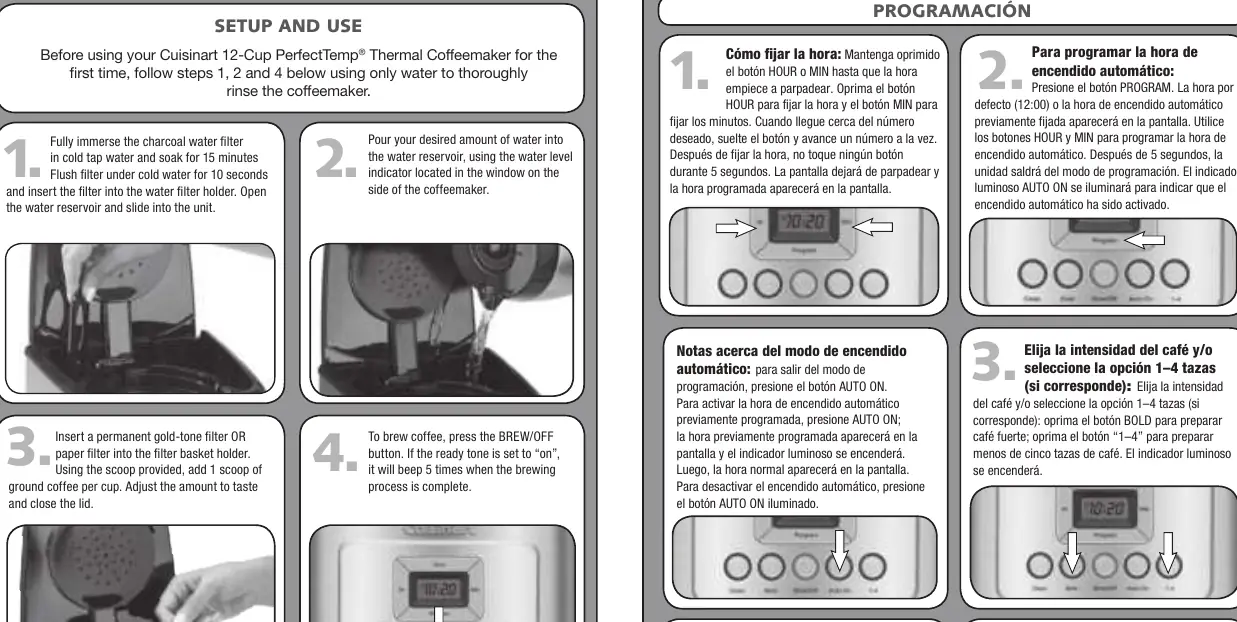
- Water Filter Preparation: Fully immerse the charcoal water filter in cold tap water for 15 minutes. Rinse it under cold running water for 10 seconds, then insert it into the water filter holder inside the reservoir.
- Water Reservoir: Pour the desired amount of water into the reservoir using the level indicator on the side of the unit.
- Filter and Coffee: Insert a permanent gold-tone filter or a paper filter into the basket. Add 1 scoop of ground coffee per cup (adjust to taste) and close the lid.
- Brewing: Press the BREW/OFF button to start the brewing process.
Programming
The coffeemaker includes several programmable features:
- Setting the Time: Hold the HOUR or MIN button until the clock flashes. Use the buttons to select the desired time. Stop pressing buttons for 5 seconds to save the setting.
- Auto On: Press the PROGRAM button, set the desired start time using the HOUR and MIN buttons. The Auto On indicator will light up when activated. To deactivate, press the illuminated Auto On button.
- Coffee Strength and 1-4 Cup Setting: Use the BOLD button for stronger coffee or the 1-4 button when brewing smaller batches (less than 5 cups).
- Ready Tone: The machine beeps 5 times when brewing is complete. Press the TONE button to toggle this alert on or off. An icon on the display indicates when the tone is disabled.
Manufacturer information
Cuisinart
Practical help
Common problems
Auto On is not activating
Ensure the Auto On indicator light is illuminated. If not, press the Auto On button to activate the previously programmed time.
Ready tone is not sounding
Check the display for the tone icon. If the icon is visible, the tone is disabled; press the TONE button to re-enable it.
Before use
- Soak charcoal water filter in cold water for 15 minutes
- Rinse charcoal filter under cold running water for 10 seconds
- Perform an initial rinse of the internal system using only water
- Ensure the water reservoir is filled to the desired level
Specs in practice
- 1-4 Cup Setting
- Optimizes the brewing process for smaller batches (less than 5 cups) to ensure proper extraction.
- Bold Setting
- Adjusts the brewing cycle to produce a stronger coffee flavor.
Images and diagrams
- The control panel features buttons for HOUR, MIN, PROG, AUTO ON, BOLD, 1-4, TONE, and BREW/OFF.
- The water level indicator is located on the side window of the coffeemaker.
Model compatibility
- Compatible with permanent gold-tone filters or standard paper filters.

Manual page author
Michael Turner
Technical manual editor
Reviews PDF manuals for structure, safety notes, and practical product details so readers can find the right information quickly.