Home Appliances / Small Kitchen Appliances
Cuisinart 12-CUP Automatic Grind & Brew Coffeemaker User Guide
Quick start guide for the Cuisinart 12-CUP coffeemaker. Includes setup, programming, brewing with whole or pre-ground beans, cleaning, and maintenance instructions.
Table of contents
Quick guide from the manual
This guide covers the operation of the Cuisinart 12-CUP Automatic Grind & Brew Coffeemaker. Key operations include setting the clock, programming auto-start times, and brewing coffee using either whole beans (with the built-in grinder) or pre-ground coffee. Always ensure the water reservoir is filled correctly and the filter basket is properly seated before starting a brew cycle.
Getting to know your coffeemaker
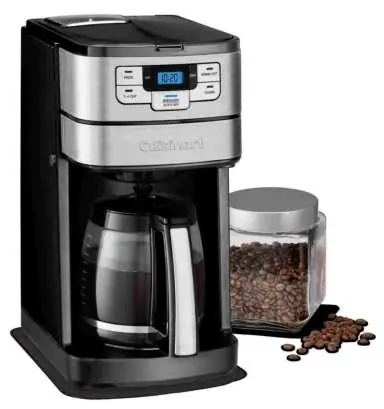
The unit features a built-in grinder, a water reservoir with a charcoal filter, a filter basket, and a 12-cup glass carafe. The control panel allows for clock setting, programming auto-on/off times, selecting a 1-4 cup brew mode for smaller batches, and activating the cleaning cycle.
Programming your coffeemaker
- Setting the clock: When plugged in, the display flashes. Use the Hour and Minute buttons to set the current time.
- Setting auto-on: Press the Program button to set the desired start time.
- Setting auto-off: Press and hold the Auto Off button until the display flashes, then use the Hour and Minute buttons to set the automatic shut-off time (0 to 4 hours).
Brewing coffee
Using whole beans:
- Insert the prepared charcoal water filter.
- Fill the water reservoir to the desired cup level.
- Add the required quantity of beans to the grinder basket (1 level scoop per cup; max 14 scoops).
- Insert a #4 paper filter or the Cuisinart permanent gold-tone filter into the basket.
- Close the reservoir lid and filter door securely.
- Press the Brew/Off button to start.
Using pre-ground coffee:
- Follow steps 1 and 2 above.
- Add ground coffee to the filter basket (1 level scoop per cup; max 16 scoops).
- Press the Grind Off button before starting the brew cycle.
Cleaning and maintenance
Always unplug the unit before cleaning. The carafe, lid, and filter basket are dishwasher safe (top rack). Wipe the area under the grinder with a damp cloth; do not allow water to enter the grinder motor. Perform decalcification when the Clean LED indicator lights up by running a mixture of 1/3 white vinegar and 2/3 water through a brew cycle, followed by a cycle with fresh water.
Safety
Never open the filter basket during the brewing cycle. The unit features a safety interlock system that prevents operation if the lid is open or the grinder cover is missing. Do not use the carafe on a stove top or in a microwave.
Manufacturer information
Cuisinart
Practical help
Common problems
Coffee is too weak or too strong
Adjust the amount of coffee grounds or whole beans used. Follow the recommended proportions in the manual.
Filter basket overflowing
Ensure you are not using too much coffee (max 14 scoops for whole beans, 16 for ground), not using multiple paper filters, or not using the gold-tone filter and paper filter simultaneously.
Grinder not working
Ensure the grinder basket lid is properly in place and the reservoir lid is closed securely.
Unit beeping continuously
The safety interlock system is triggered. Ensure the reservoir lid and grinder cover are properly closed.
Before use
- Flush the system by running a brew cycle with water only (no coffee).
- Prepare and insert the charcoal water filter.
- Ensure the unit is plugged into a 120V outlet.
- Check that the filter basket is clean and properly seated.
- Verify the grinder basket lid is locked in place.
Specs in practice
- 1-4 Cup Setting
- Optimizes extraction, flavor, and temperature when brewing smaller batches.
Images and diagrams
- The control panel features buttons for Program, Hour, Minute, Grind Off, Clean, and Brew/Off.
- The reservoir cover flips back for easy filling.
- The grinder basket lid has recesses on each side for easy removal.
Model compatibility
- Use only #4 basket paper filters or the included Cuisinart permanent gold-tone filter.
- Designed for use with 120-volt outlets only.
- The glass carafe is designed for this coffeemaker only and must not be used on a range top.

Manual page author
David Miller
Documentation analyst
Organizes user manual content into clear summaries, with attention to model details, product context, and everyday usability.